Why OfficeIMO.Excel?
OfficeIMO.Excel lets you build and consume modern .xlsx workbooks, BIFF8 .xls files, and binary Open XML .xlsb workbooks entirely in managed code. Generate dashboards, data exports, financial models, bulk reports, or archive-modernization pipelines without COM or Microsoft Excel.
XLS and XLSB use first-party readers and writers with explicit preservation and loss diagnostics. Supported content projects into the normal workbook model. Before a cross-generation save, an application can inspect whether formulas, charts, drawings, macros, or other workbook features remain native, become an approximation or visual fallback, are retained for recovery, or must be blocked.
Features
- Worksheets & cell values — strings, numbers, dates, booleans, and shared strings with documented type conversion rules
- Tables with AutoFilter — structured tables with column headers, totals row, and built-in filter controls
- Named ranges & formulas — workbook and sheet-scoped names, cell formulas, and calculated columns
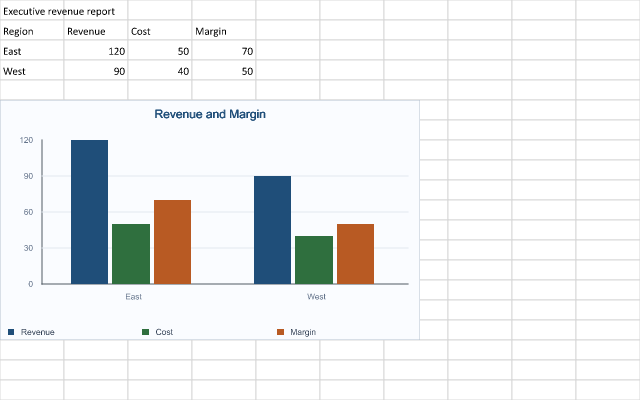
- Charts — column, pie, doughnut, scatter, and bubble charts with series data, axis labels, and legends
- Conditional formatting — color scales, data bars, icon sets, and rule-based highlight formatting
- Validation — list, whole number, decimal, date, time, text length, and custom formula validators
- Pivot tables & sparklines — summarize large data sets and embed inline sparklines in cells
- Parallel execution — bulk read/write operations optimized for multi-core workloads
- Images & hyperlinks — embed images in cells and attach hyperlinks to cells or shapes
- AutoFit columns — automatically size columns to fit content width
- Headers, footers & print setup — page headers, footers, margins, orientation, and print area
- XLS and XLSB workflows — load, inspect, edit, save, and convert legacy and binary workbooks through the normal document lifecycle
- Compatibility policies — choose native-only, editable, visual, best-effort, or source-preserving conversion behavior
Quick start
using System.Collections.Generic;
using DocumentFormat.OpenXml.Spreadsheet;
using OfficeIMO.Excel;

using var workbook = ExcelDocument.Create("Sales.xlsx");
var sheet = workbook.AddWorksheet("Q4 Sales");

// Set headers
sheet.Cells["A1"].Value = "Product";
sheet.Cells["B1"].Value = "Units";
sheet.Cells["C1"].Value = "Revenue";

// Add data rows
string[] products = { "Widget A", "Widget B", "Widget C", "Widget D" };
int[] units = { 1200, 850, 2100, 430 };
decimal[] revenue = { 24000m, 17000m, 63000m, 12900m };

for (int i = 0; i < products.Length; i++)
{
    int row = i + 2;
    sheet.Cells[$"A{row}"].Value = products[i];
    sheet.Cells[$"B{row}"].Value = units[i];
    sheet.Cells[$"C{row}"].Value = revenue[i];
    sheet.Cells[$"C{row}"].NumberFormat = "$#,##0";
}

// Create a styled table with a totals row
int totalsRow = products.Length + 2;
sheet.AddTable(
    $"A1:C{totalsRow}",
    hasHeader: true,
    name: "SalesTable",
    style: TableStyle.TableStyleMedium9);
sheet.SetTableTotalsByName(
    "SalesTable",
    new Dictionary<string, ExcelTableTotalsFunction>
    {
        ["Revenue"] = ExcelTableTotalsFunction.Sum
    });

// AutoFit for a clean layout
sheet.AutoFitColumns();

workbook.Save();
Convert XLS, XLSX, and XLSB
using OfficeIMO.Excel;

using ExcelDocument legacy = ExcelDocument.Load("finance.xls");
legacy.Save("finance-modernized.xlsx");

ExcelDocument.Convert("finance.xls", "finance.xlsx");
ExcelDocument.Convert("finance.xlsx", "finance.xls");
ExcelDocument.Convert("model.xlsb", "model.xlsx");
The destination extension selects the writer. XLS bytes are never disguised as XLSX, and XLSB output is written through its own binary workbook path. Use conversion analysis when your service needs a no-loss gate.
Compatibility
| Target Framework | Supported |
|---|---|
| .NET 10.0 | Yes |
| .NET 8.0 | Yes |
| .NET Standard 2.0 | Yes |
| .NET Framework 4.7.2 | Yes |
OfficeIMO.Excel runs on Windows, Linux, and macOS. It creates and edits modern workbooks and supports first-party XLS/XLSB import, native writing for the documented subsets, and bidirectional conversion. The format compatibility dashboard summarizes the current evidence without pretending every workbook feature has identical representation across generations.
Related guides
| Guide | Description |
|---|---|
| Excel documentation | Start with workbook concepts, lifecycle, and execution model. |
| Worksheets guide | Create sheets, write values, and work with formulas. |
| Tables and ranges | Add structured tables, validation, and conditional formatting. |
| XLS, XLSX, and XLSB compatibility | Check formats, conversion directions, tracked behaviors, and fidelity states. |
| PSWriteOffice Excel cmdlets | Generate workbooks from PowerShell automation. |
Related packages
| Package | Description |
|---|---|
| OfficeIMO.Excel.Pdf | Export Excel workbooks and selected worksheets to PDF |
| OfficeIMO.Excel.GoogleSheets | Translate Excel workbooks to and from Google Sheets |