Why OfficeIMO.Visio?
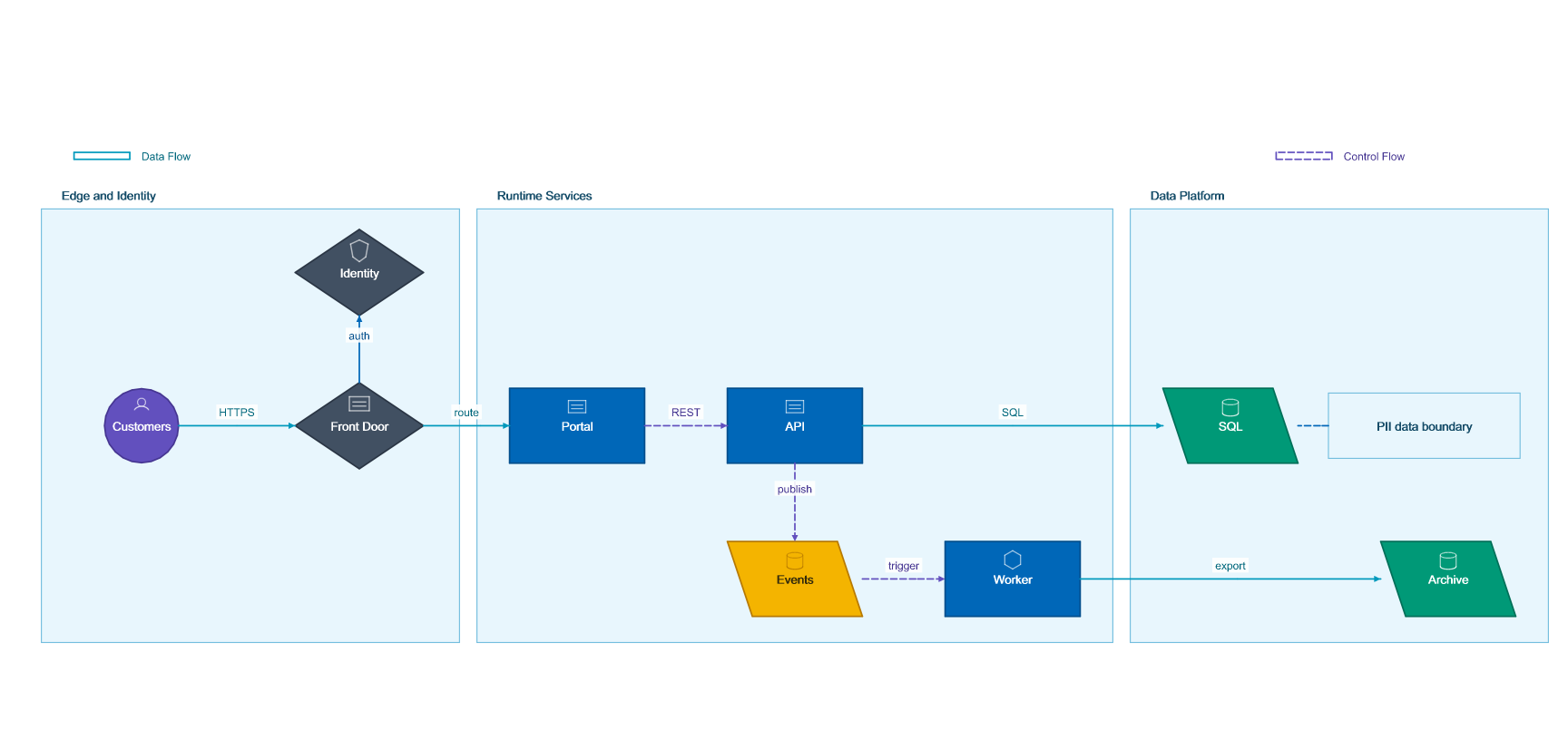
OfficeIMO.Visio lets you generate and modify .vsdx diagrams from pure .NET code. Build network topologies, org charts, flowcharts, timelines, swimlanes, dependency graphs, and architecture diagrams without requiring Visio on the machine. Builder APIs keep common diagrams concise, while lower-level pages, shapes, connectors, masters, and stencil catalogs remain available when you need precision.
Features
- Create, load, and save VSDX files — round-trip the Visio Open XML format
- Diagram builders — create flowcharts, architecture diagrams, networks, dependencies, swimlanes, org charts, timelines, sequences, and generic graphs
- Stencils and catalogs — use generated catalogs, installed Visio stencils, or external
.vssx and .vstx packs while retaining caller-supplied license, attribution, and unsupported-master state - Connectors with metadata — connect shapes with labels, hyperlinks, Shape Data, waypoints, and routing hints
- Fluent and low-level APIs — chain common diagrams or edit individual pages, shapes, connectors, and masters
- Headless image export — render SVG, PNG, JPEG, TIFF, and WebP previews without Microsoft Visio
- Validation — inspect generated and loaded diagrams for package, model, overlap, routing, and connector-label issues
Diagram types you can automate
| Diagram type | Typical source data | Outcome |
|---|
| Infrastructure topology | Inventory exports, deployment metadata, cloud resources | Repeatable architecture diagrams that stay in sync with real systems |
| Process and approval flows | Workflow definitions, queue stages, or policy steps | Clear step-by-step diagrams for operations and compliance teams |
| Org and service maps | HR systems, ownership registries, service catalogs | Diagrams that show teams, responsibilities, and platform boundaries |
| Release and runbook visuals | CI pipelines, deployment targets, or support procedures | Supporting diagrams that travel with Word reports and PowerPoint decks |
Where Visio fits in the suite
| Pair it with | Use the combination for |
|---|
| OfficeIMO.Word | Architecture reports, runbooks, and handoff documents that include generated diagrams. |
| OfficeIMO.PowerPoint | Stakeholder decks where the same topology or workflow data becomes presentation material. |
| OfficeIMO.CSV | Inventory-driven diagrams where nodes, owners, environments, or dependencies start in flat files. |
| OfficeIMO.Reader | Indexing generated diagram metadata alongside related documents for search or review workflows. |
Quick start
using OfficeIMO.Visio;
using OfficeIMO.Visio.Diagrams;

VisioDocument.Create("Architecture.vsdx")
    .ArchitectureDiagram("System Overview", diagram => diagram
        .Title()
        .Legend()
        .Theme(VisioStyleTheme.Technical())
        .Region("vnet", "Virtual Network", 1, 0, 3, 2)
        .Actor("users", "Users", 0, 1)
        .Gateway("gateway", "Gateway", 1, 1)
        .Service("api", "API", 2, 1)
        .Database("database", "Database", 3, 1)
        .DataFlow("users", "gateway", "HTTPS")
        .ControlFlow("gateway", "api", "route")
        .DataFlow("api", "database", "SQL"))
    .Save();
Repeatable modeling flow
- Start from the system, process, or ownership data you already have instead of hand-placing every shape.
- Map each entity to a stable shape type, label, and color so regenerated diagrams stay easy to compare.
- Use connectors to represent traffic, dependency, or approval flow, then reserve shape text for the labels people need to scan quickly.
- Generate the
.vsdx file as part of a report build, architecture export, or operational handoff package. - Pair the diagram with OfficeIMO.Word or OfficeIMO.PowerPoint when the same workflow also needs narrative or presentation output.
Compatibility
| Target Framework | Supported |
|---|
| .NET 10.0 | Yes |
| .NET 8.0 | Yes |
| .NET Standard 2.0 | Yes |
| .NET Framework 4.7.2 | Yes |
OfficeIMO.Visio runs on Windows, Linux, and macOS. Generated files open in Microsoft Visio and other VSDX-compatible viewers.
| Guide | Description |
|---|
| Visio documentation | Choose a creation, editing, stencil, validation, or image-export workflow. |
| Diagram builders | Generate architecture, network, flow, sequence, timeline, and graph diagrams. |
| Editing and validation | Update loaded VSDX files and validate the result. |
| Stencils and catalogs | Work with generated, installed, and external stencil packs. |
| Image export | Render SVG, PNG, JPEG, TIFF, and WebP previews. |
| Visio API reference | Browse diagram, shape, connector, and fluent builder types. |
| Getting Started | Set up the package and validate your first generated diagram. |
| OfficeIMO.Word | Pair diagrams with generated reports, architecture notes, or implementation docs. |
| OfficeIMO.PowerPoint | Turn the same topology or process data into stakeholder-ready slide decks. |
| Downloads | Install the Visio package and compare it with the rest of the OfficeIMO family. |