Excel · C# walkthrough
Asset depreciation schedule
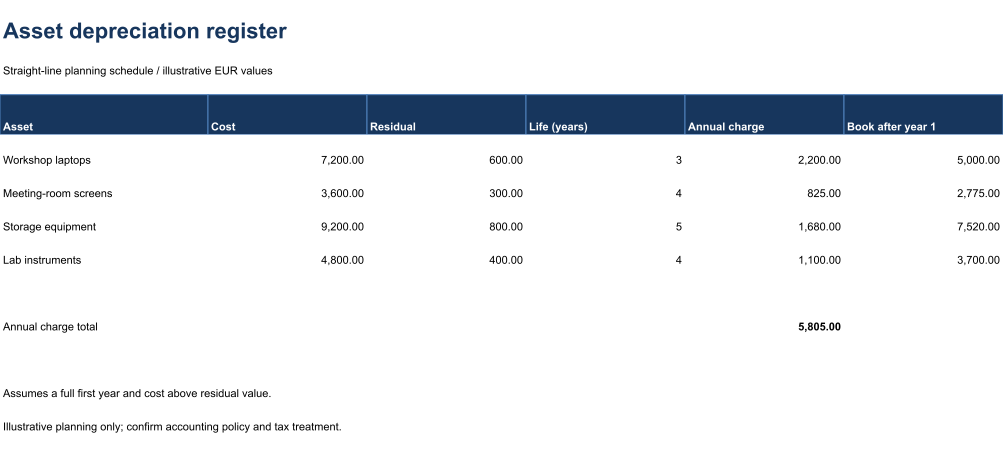
Review the arithmetic behind a simple depreciation plan in an editable workbook.
Opens the generated download in a local browser tool. The C# example below creates the document.
- Start with
- Asset cost, residual value and useful life
- Generate
- XLSX
How it works
Describe the assets
Enter cost, residual value and useful life separately.
Calculate the schedule
Use visible formulas for the annual charge and year-one carrying amount.
Review the total
Calculate a summary and constrain useful-life inputs.
The C# source
The example below shows the document API and layout used for this report. Follow the Excel guide for package setup in your own project.
using OfficeIMO.Drawing;
using OfficeIMO.Excel;

namespace OfficeIMO.Examples.Showcase.Workflows {
    /// <summary>Creates an editable asset depreciation register with visible calculations and a native range preview.</summary>
    internal static class AssetDepreciation {
        internal static void Create(string folder) {
            using var document = ExcelDocument.Create(Path.Combine(folder, "example.xlsx"));
            var sheet = document.AddWorksheet("Assets");
            sheet.SetColumnWidth(1, 29);
            for (int column = 2; column <= 6; column++) sheet.SetColumnWidth(column, 22);
            sheet.MergeRange("A1:F1"); sheet.Cell(1, 1, "Asset depreciation register");
            sheet.CellFontSize(1, 1, 22); sheet.CellBold(1, 1, true); sheet.CellFontColor(1, 1, "17365D");
            sheet.MergeRange("A2:F2"); sheet.Cell(2, 1, "Straight-line planning schedule / illustrative EUR values");
            string[] headers = { "Asset", "Cost", "Residual", "Life (years)", "Annual charge", "Book after year 1" };
            for (int column = 1; column <= 6; column++) sheet.Cell(4, column, headers[column - 1]);
            string[] assets = { "Workshop laptops", "Meeting-room screens", "Storage equipment", "Lab instruments" };
            double[] costs = { 7200, 3600, 9200, 4800 }, residuals = { 600, 300, 800, 400 };
            int[] years = { 3, 4, 5, 4 };
            for (int index = 0; index < assets.Length; index++) {
                int row = index + 5;
                sheet.Cell(row, 1, assets[index]); sheet.Cell(row, 2, costs[index]); sheet.Cell(row, 3, residuals[index]); sheet.Cell(row, 4, years[index]);
                sheet.CellFormula(row, 5, $"(B{row}-C{row})/D{row}");
                sheet.CellFormula(row, 6, $"B{row}-E{row}");
                foreach (int column in new[] { 2, 3, 5, 6 }) sheet.FormatCell(row, column, "#,##0.00");
            }
            sheet.AddTable("A4:F8", true, "AssetSchedule", ExcelTableStyle.TableStyleMedium2);
            sheet.ValidationWholeNumber("D5:D8", ExcelDataValidationOperator.Between, 1, 50);
            sheet.Cell(10, 1, "Annual charge total"); sheet.CellFormula(10, 5, "SUM(E5:E8)"); sheet.FormatCell(10, 5, "#,##0.00"); sheet.CellBold(10, 5, true);
            sheet.MergeRange("A12:F12"); sheet.Cell(12, 1, "Assumes a full first year and cost above residual value.");
            sheet.MergeRange("A13:F13"); sheet.Cell(13, 1, "Illustrative planning only; confirm accounting policy and tax treatment.");
            sheet.SetGridlinesVisible(false);
            for (int row = 1; row <= 16; row++) {
                sheet.SetRowHeight(row, row == 1 ? 34 : row == 3 ? 12 : 25);
                for (int column = 1; column <= 6; column++) {
                    sheet.CellFontName(row, column, "Carlito");
                    if (row > 1) sheet.CellFontSize(row, column, 11);
                }
            }
            sheet.SetRowHeight(4, 30);
            for (int column = 1; column <= 6; column++) {
                sheet.CellFontColor(4, column, "FFFFFF");
                sheet.CellBold(4, column, true);
                sheet.CellBackground(4, column, "17365D");
            }
            document.Calculate();
            document.InspectFormulas().EnsureAllSupported().EnsureAllHaveCachedResults().EnsureNoDependencyIssues();
            sheet.Range("A1:F14").ExportImage(OfficeImageExportFormat.Png, new ExcelImageExportOptions { ShowGridlines = false })
                .Save(Path.Combine(folder, "preview.png"), OfficeImageExportFileConflictPolicy.Replace);
            document.Save();
        }
    }
}
API used in this example
Use this in your project
Confirm accounting policy separately. The sample assumes a full first year and cost above residual value.
The Excel guide explains package setup and related document APIs.
Documents and scope
What the preview shows
The C# source generates the downloadable file. The runner validates the workbook and supported formulas, cached results and dependencies. The PNG is a native range export.
What to keep in mind
Confirm accounting policy separately. The sample assumes a full first year and cost above residual value.