Excel · C# walkthrough
Budget scenario comparison
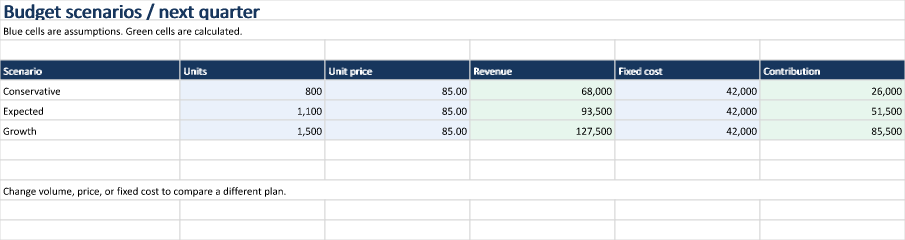
Compare conservative, expected, and growth plans in one worksheet. The example distinguishes editable assumptions from calculated contribution and keeps the formulas inside the workbook.
Opens the generated download in a local browser tool. The C# example below creates the document.
- Start with
- Volume, unit price, and fixed-cost assumptions
- Generate
- XLSX
How it works
Lay out the assumptions
Write volume, unit price, and fixed cost as numeric cells. Use number formats to control display without turning numbers into strings.
Calculate contribution
Calculate revenue from volume and price, then contribution from revenue and fixed cost. Call Calculate before rendering so both steps have cached values.
Make the inputs visible
Use blue fills for assumptions and green for results. Export the range before Save closes the workbook package.
The C# source
The example below shows the document API and layout used for this report. Follow the Excel guide for package setup in your own project.
using System.IO;
using OfficeIMO.Drawing;
using OfficeIMO.Excel;

namespace OfficeIMO.Examples.Showcase.Workflows;

/// <summary>Compares three budget scenarios using calculated cells and editable assumptions.</summary>
internal static class BudgetScenarios {
    internal static void Create(string folder) {
        using ExcelDocument document = ExcelDocument.Create(Path.Combine(folder, "example.xlsx"));
        ExcelSheet sheet = document.AddSheet("Scenarios");
        sheet.Range("A1:F1").Merge();
        sheet.Cell(1, 1).SetValue("Budget scenarios / next quarter");
        sheet.Cell(1, 1).SetFontSize(global::OfficeIMO.OfficeLength.Points(20));
        sheet.Cell(1, 1).SetBold(true);
        sheet.Cell(1, 1).SetFontColor("17365D");
        sheet.Range("A2:F2").Merge();
        sheet.Cell(2, 1).SetValue("Blue cells are assumptions. Green cells are calculated.");

        string[] headings = { "Scenario", "Units", "Unit price", "Revenue", "Fixed cost", "Contribution" };
        for (int column = 0; column < headings.Length; column++) {
            sheet.Cell(4, column + 1).SetValue(headings[column]);
            sheet.Cell(4, column + 1).SetFillColor("17365D");
            sheet.Cell(4, column + 1).SetFontColor("FFFFFF");
            sheet.Cell(4, column + 1).SetBold(true);
            sheet.SetColumnWidth(column + 1, ExcelColumnWidth.Characters(column == 0 ? 25 : 20));
        }
        string[] labels = { "Conservative", "Expected", "Growth" };
        for (int index = 0; index < labels.Length; index++) {
            int row = index + 5;
            sheet.Cell(row, 1).SetValue(labels[index]);
            sheet.Cell(row, 2).SetValue(new[] { 800, 1100, 1500 }[index]).SetNumberFormat("#,##0");
            sheet.Cell(row, 3).SetValue(85).SetNumberFormat("#,##0.00");
            sheet.Cell(row, 4).SetFormula($"B{row}*C{row}");
            sheet.Cell(row, 5).SetValue(42000).SetNumberFormat("#,##0");
            sheet.Cell(row, 6).SetFormula($"D{row}-E{row}");
            sheet.Cell(row, 4).SetNumberFormat("#,##0");
            sheet.Cell(row, 6).SetNumberFormat("#,##0");
            foreach (int column in new[] { 2, 3, 5 }) sheet.Cell(row, column).SetFillColor("EAF1FB");
            foreach (int column in new[] { 4, 6 }) sheet.Cell(row, column).SetFillColor("E7F6ED");
        }
        sheet.Range("A10:F10").Merge();
        sheet.Cell(10, 1).SetValue("Change volume, price, or fixed cost to compare a different plan.");
        document.Calculate();
        sheet.Range("A1:F12").ExportImage(OfficeImageExportFormat.Png)
            .Save(Path.Combine(folder, "preview.png"), OfficeImageExportFileConflictPolicy.Replace);
        document.Save();
    }
}
API used in this example
Use this in your project
Add scenarios as rows or introduce more cost drivers as columns. For the supplied data, the calculated contributions are 26,000, 51,500, and 85,500.
The Excel guide explains package setup and related document APIs.
Documents and scope
What the preview shows
The linked C# example generates this file. The runner reopens and validates the XLSX. The image is a native rendering of the specified worksheet range.
What to keep in mind
Contribution here is units multiplied by price minus fixed cost. Variable costs, tax, and cash timing are outside this small model. The calculation is split into cells supported by the native formula engine; more complex expressions may need a spreadsheet application.