Excel · C# walkthrough
Rolling cash-flow forecast
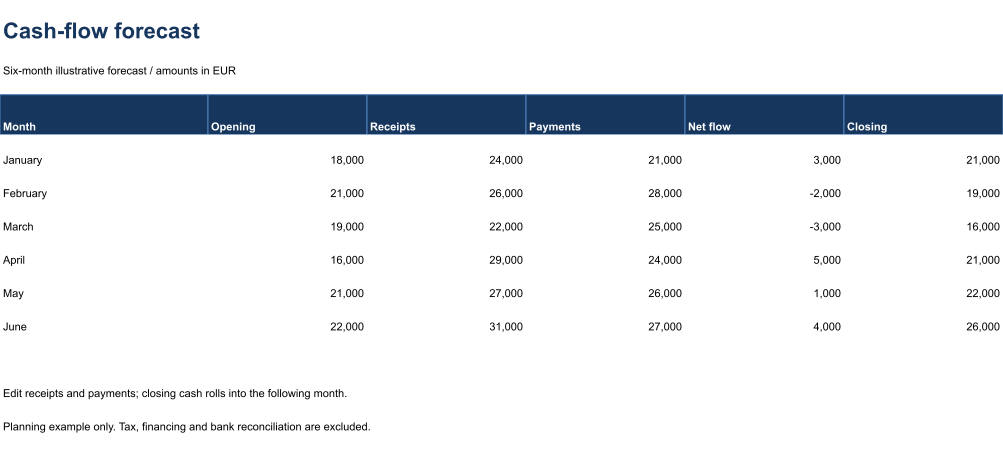
See how monthly receipts and payments affect the cash available in the next period.
Opens the generated download in a local browser tool. The C# example below creates the document.
- Start with
- Opening cash, receipts and payments
- Generate
- XLSX
How it works
Enter cash assumptions
Keep editable receipts and payments visible.
Roll balances forward
Link each opening balance to the previous closing balance.
Inspect calculations
Calculate cached values and validate formula support before exporting a range preview.
The C# source
The example below shows the document API and layout used for this report. Follow the Excel guide for package setup in your own project.
using OfficeIMO.Drawing;
using OfficeIMO.Excel;

namespace OfficeIMO.Examples.Showcase.Workflows {
    /// <summary>Creates an editable cash-flow forecast with visible calculations and a native range preview.</summary>
    internal static class CashFlowForecast {
        internal static void Create(string folder) {
            using var document = ExcelDocument.Create(Path.Combine(folder, "example.xlsx"));
            var sheet = document.AddWorksheet("Cash flow");
            sheet.SetColumnWidth(1, 29);
            for (int column = 2; column <= 6; column++) sheet.SetColumnWidth(column, 22);
            sheet.MergeRange("A1:F1"); sheet.Cell(1, 1, "Cash-flow forecast");
            sheet.CellFontSize(1, 1, 22); sheet.CellBold(1, 1, true); sheet.CellFontColor(1, 1, "17365D");
            sheet.MergeRange("A2:F2"); sheet.Cell(2, 1, "Six-month illustrative forecast / amounts in EUR");
            string[] headers = { "Month", "Opening", "Receipts", "Payments", "Net flow", "Closing" };
            for (int column = 1; column <= 6; column++) sheet.Cell(4, column, headers[column - 1]);
            double[] receipts = { 24000, 26000, 22000, 29000, 27000, 31000 };
            double[] payments = { 21000, 28000, 25000, 24000, 26000, 27000 };
            for (int index = 0; index < 6; index++) {
                int row = index + 5;
                sheet.Cell(row, 1, new[] { "January", "February", "March", "April", "May", "June" }[index]);
                if (index == 0) sheet.Cell(row, 2, 18000); else sheet.CellFormula(row, 2, $"F{row - 1}");
                sheet.Cell(row, 3, receipts[index]); sheet.Cell(row, 4, payments[index]);
                sheet.CellFormula(row, 5, $"C{row}-D{row}");
                sheet.CellFormula(row, 6, $"B{row}+E{row}");
                for (int column = 2; column <= 6; column++) sheet.FormatCell(row, column, "#,##0");
            }
            sheet.AddTable("A4:F10", true, "CashForecast", ExcelTableStyle.TableStyleMedium2);
            sheet.ValidationWholeNumber("C5:D10", ExcelDataValidationOperator.Between, 0, 1000000);
            sheet.MergeRange("A12:F12"); sheet.Cell(12, 1, "Edit receipts and payments; closing cash rolls into the following month.");
            sheet.MergeRange("A13:F13"); sheet.Cell(13, 1, "Planning example only. Tax, financing and bank reconciliation are excluded.");
            sheet.SetGridlinesVisible(false);
            for (int row = 1; row <= 16; row++) {
                sheet.SetRowHeight(row, row == 1 ? 34 : row == 3 ? 12 : 25);
                for (int column = 1; column <= 6; column++) {
                    sheet.CellFontName(row, column, "Carlito");
                    if (row > 1) sheet.CellFontSize(row, column, 11);
                }
            }
            sheet.SetRowHeight(4, 30);
            for (int column = 1; column <= 6; column++) {
                sheet.CellFontColor(4, column, "FFFFFF");
                sheet.CellBold(4, column, true);
                sheet.CellBackground(4, column, "17365D");
            }
            document.Calculate();
            document.InspectFormulas().EnsureAllSupported().EnsureAllHaveCachedResults().EnsureNoDependencyIssues();
            sheet.Range("A1:F14").ExportImage(OfficeImageExportFormat.Png, new ExcelImageExportOptions { ShowGridlines = false })
                .Save(Path.Combine(folder, "preview.png"), OfficeImageExportFileConflictPolicy.Replace);
            document.Save();
        }
    }
}
API used in this example
Use this in your project
Use actual forecast assumptions and reconcile separately; this sample excludes tax and financing.
The Excel guide explains package setup and related document APIs.
Documents and scope
What the preview shows
The C# source generates the downloadable file. The runner validates the workbook and supported formulas, cached results and dependencies. The PNG is a native range export.
What to keep in mind
Use actual forecast assumptions and reconcile separately; this sample excludes tax and financing.