Excel · C# walkthrough
A structured expense register
Export expenses as data people can filter and total. The example keeps dates and amounts typed, constrains category and status entry with lists, and freezes the heading area.
Opens the generated download in a local browser tool. The C# example below creates the document.
- Start with
- Expense dates, categories, amounts, and review status
- Generate
- XLSX
How it works
Preserve data types
Write DateTime and numeric values directly. Apply date and decimal formats for a readable display.
Add entry guidance
Declare validation lists for category and status, then wrap the populated area in an Excel table.
Calculate the total
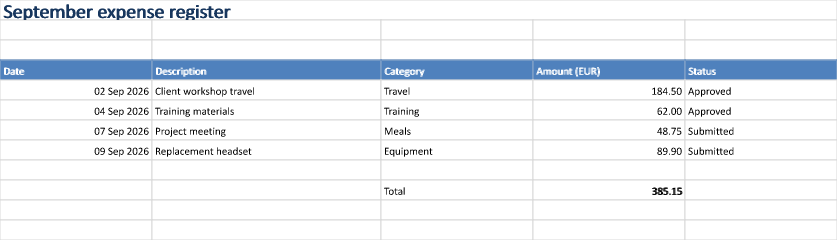
Use SUM over the amount cells, evaluate the workbook, and render the register. The four sample expenses total 385.15 EUR.
The C# source
The example below shows the document API and layout used for this report. Follow the Excel guide for package setup in your own project.
using System;
using System.IO;
using OfficeIMO.Drawing;
using OfficeIMO.Excel;

namespace OfficeIMO.Examples.Showcase.Workflows;

/// <summary>Builds an expense register with real date cells, currency formats, and list validation.</summary>
internal static class ExpenseRegister {
    internal static void Create(string folder) {
        using ExcelDocument document = ExcelDocument.Create(Path.Combine(folder, "example.xlsx"));
        ExcelSheet sheet = document.AddSheet("Expenses");
        sheet.Range("A1:E1").Merge();
        sheet.Cell(1, 1).SetValue("September expense register");
        sheet.Cell(1, 1).SetFontSize(global::OfficeIMO.OfficeLength.Points(20));
        sheet.Cell(1, 1).SetBold(true);
        sheet.Cell(1, 1).SetFontColor("17365D");
        string[] headers = { "Date", "Description", "Category", "Amount (EUR)", "Status" };
        for (int column = 0; column < headers.Length; column++) {
            sheet.Cell(4, column + 1).SetValue(headers[column]);
            sheet.SetColumnWidth(column + 1, ExcelColumnWidth.Characters(column == 1 ? 32 : 21));
        }
        var expenses = new[] {
            (Day: 2, Description: "Client workshop travel", Category: "Travel", Amount: 184.50),
            (Day: 4, Description: "Training materials", Category: "Training", Amount: 62.00),
            (Day: 7, Description: "Project meeting", Category: "Meals", Amount: 48.75),
            (Day: 9, Description: "Replacement headset", Category: "Equipment", Amount: 89.90)
        };
        for (int index = 0; index < expenses.Length; index++) {
            int row = index + 5;
            var expense = expenses[index];
            sheet.Cell(row, 1).SetValue(new DateTime(2026, 9, expense.Day)).SetNumberFormat("dd mmm yyyy");
            sheet.Cell(row, 2).SetValue(expense.Description);
            sheet.Cell(row, 3).SetValue(expense.Category);
            sheet.Cell(row, 4).SetValue(expense.Amount).SetNumberFormat("#,##0.00");
            sheet.Cell(row, 5).SetValue(index < 2 ? "Approved" : "Submitted");
        }
        sheet.AddTable("A4:E8", true, "Expenses", ExcelTableStyle.TableStyleMedium2);
        sheet.Range("C5:C8").Validation().List(new[] { "Travel", "Training", "Meals", "Equipment" });
        sheet.Range("E5:E8").Validation().List(new[] { "Submitted", "Approved", "Returned" });
        sheet.Cell(10, 3).SetValue("Total");
        sheet.Cell(10, 4).SetFormula("SUM(D5:D8)");
        sheet.Cell(10, 4).SetNumberFormat("#,##0.00");
        sheet.Cell(10, 4).SetBold(true);
        sheet.View.Freeze(topRows: 4);
        document.Calculate();
        sheet.Range("A1:E12").ExportImage(OfficeImageExportFormat.Png)
            .Save(Path.Combine(folder, "preview.png"), OfficeImageExportFileConflictPolicy.Replace);
        document.Save();
    }
}
API used in this example
Use this in your project
Extend the table and validation ranges when you add rows. Use your own categories and keep the currency explicit in the column heading.
The Excel guide explains package setup and related document APIs.
Documents and scope
What the preview shows
The linked C# example generates this file. The runner reopens and validates the XLSX. The image is a native rendering of the specified worksheet range.
What to keep in mind
Dropdown validation guides entry in a spreadsheet application. It is not a security boundary or an expense approval service.