Excel · C# walkthrough
Inventory replenishment plan
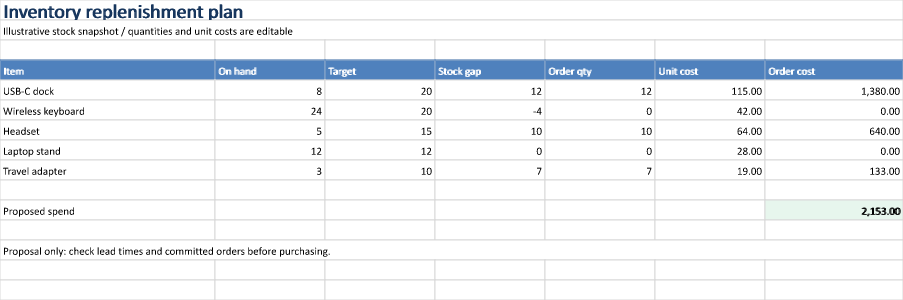
Turn a stock snapshot into a reviewable replenishment proposal. Input values and calculated results remain visible beside each item.
Opens the generated download in a local browser tool. The C# example below creates the document.
- Start with
- On-hand quantities, target stock and unit costs
- Generate
- XLSX
How it works
Load the stock snapshot
Populate item names, current quantities, target levels and unit costs in a styled table.
Calculate a proposal
Keep the stock gap, proposed order quantity and extended cost in separate formula cells so reviewers can trace the calculation.
Validate and preview
Constrain quantity inputs, calculate cached values and render the worksheet range before reopening the workbook for formula inspection.
The C# source
The example below shows the document API and layout used for this report. Follow the Excel guide for package setup in your own project.
using OfficeIMO.Drawing;
using OfficeIMO.Excel;

namespace OfficeIMO.Examples.Showcase.Workflows;

/// <summary>Calculates a replenishment proposal from on-hand stock, targets and unit costs.</summary>
internal static class InventoryReorder {
    internal static void Create(string folder) {
        using ExcelDocument document = ExcelDocument.Create(Path.Combine(folder, "example.xlsx"));
        var sheet = document.AddSheet("Reorder");
        // Widths sized to the content so the whole plan prints on one page.
        sheet.SetColumnWidth(1, ExcelColumnWidth.Characters(20));
        for (int column = 2; column <= 6; column++) sheet.SetColumnWidth(column, ExcelColumnWidth.Characters(10));
        sheet.SetColumnWidth(7, ExcelColumnWidth.Characters(13));
        sheet.Range("A1:G1").Merge();
        sheet.Cell(1, 1).SetValue("Inventory replenishment plan");
        sheet.Cell(1, 1).SetFontSize(global::OfficeIMO.OfficeLength.Points(20)); sheet.Cell(1, 1).SetBold(true); sheet.Cell(1, 1).SetFontColor("17365D");
        sheet.Range("A2:G2").Merge(); sheet.Cell(2, 1).SetValue("Illustrative stock snapshot / quantities and unit costs are editable");
        string[] headers = { "Item", "On hand", "Target", "Stock gap", "Order qty", "Unit cost", "Order cost" };
        for (int column = 1; column <= 7; column++) sheet.Cell(4, column).SetValue(headers[column - 1]);
        string[] items = { "USB-C dock", "Wireless keyboard", "Headset", "Laptop stand", "Travel adapter" };
        int[] onHand = { 8, 24, 5, 12, 3 }, targets = { 20, 20, 15, 12, 10 };
        double[] costs = { 115, 42, 64, 28, 19 };
        for (int index = 0; index < items.Length; index++) {
            int row = index + 5;
            sheet.Cell(row, 1).SetValue(items[index]); sheet.Cell(row, 2).SetValue(onHand[index]); sheet.Cell(row, 3).SetValue(targets[index]);
            sheet.Cell(row, 4).SetFormula($"C{row}-B{row}");
            sheet.Cell(row, 5).SetFormula($"IF(D{row}>0,D{row},0)");
            sheet.Cell(row, 6).SetValue(costs[index]).SetNumberFormat("#,##0.00");
            sheet.Cell(row, 7).SetFormula($"E{row}*F{row}"); sheet.Cell(row, 7).SetNumberFormat("#,##0.00");
        }
        sheet.AddTable("A4:G9", hasHeader: true, name: "Stock", style: ExcelTableStyle.TableStyleMedium2);
        sheet.Range("B5:C9").Validation().WholeNumber(ExcelDataValidationOperator.Between, 0, 10000);
        sheet.Cell(11, 1).SetValue("Proposed spend"); sheet.Cell(11, 7).SetFormula("SUM(G5:G9)"); sheet.Cell(11, 7).SetNumberFormat("#,##0.00");
        sheet.Cell(11, 7).SetBold(true); sheet.Cell(11, 7).SetFillColor("E7F6ED");
        sheet.Range("A13:G13").Merge(); sheet.Cell(13, 1).SetValue("Proposal only: check lead times and committed orders before purchasing.");
        document.Calculate();
        sheet.Range("A1:G15").ExportImage(OfficeImageExportFormat.Png).Save(Path.Combine(folder, "preview.png"), OfficeImageExportFileConflictPolicy.Replace);
        document.Save();
    }
}
API used in this example
Use this in your project
Add lead times, committed orders and minimum order quantities when your purchasing rules require them. Review the proposal before placing orders.
The Excel guide explains package setup and related document APIs.
Documents and scope
What the preview shows
The linked C# example generates this file. The runner reopens and validates the XLSX and checks supported formulas, cached results and dependencies. The PNG is a native worksheet-range export.
What to keep in mind
The calculation is a target-stock proposal using synthetic data. It does not submit purchases or account for delivery schedules.