Excel · C# walkthrough
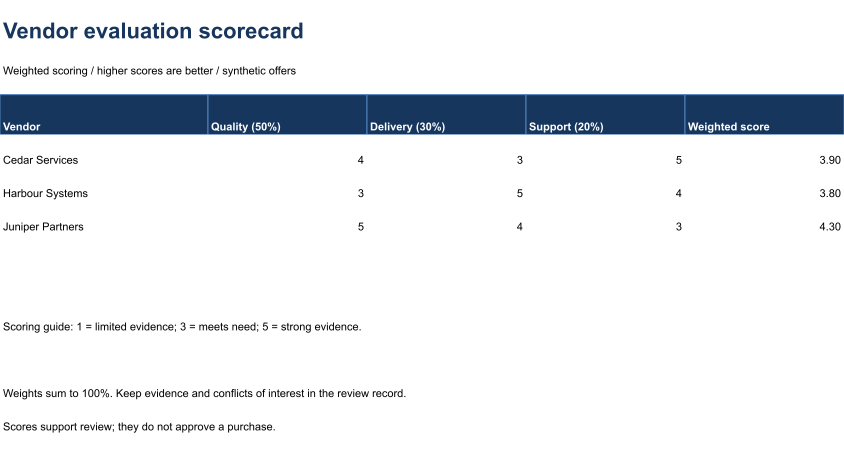
Weighted vendor scorecard
Support a procurement discussion with a traceable scoring model.
Opens the generated download in a local browser tool. The C# example below creates the document.
- Start with
- Criterion scores and agreed weights
- Generate
- XLSX
How it works
Define the criteria
Use the same rating scale for every vendor.
Apply the weights
Calculate quality at 50%, delivery at 30% and support at 20%.
Keep review authority
Treat the result as discussion evidence rather than purchase approval.
The C# source
The example below shows the document API and layout used for this report. Follow the Excel guide for package setup in your own project.
using OfficeIMO.Drawing;
using OfficeIMO.Excel;

namespace OfficeIMO.Examples.Showcase.Workflows {
    /// <summary>Creates an editable vendor evaluation scorecard with visible calculations and a native range preview.</summary>
    internal static class VendorComparison {
        internal static void Create(string folder) {
            using var document = ExcelDocument.Create(Path.Combine(folder, "example.xlsx"));
            var sheet = document.AddWorksheet("Evaluation");
            sheet.SetColumnWidth(1, 29);
            for (int column = 2; column <= 5; column++) sheet.SetColumnWidth(column, 22);
            sheet.MergeRange("A1:E1"); sheet.Cell(1, 1, "Vendor evaluation scorecard");
            sheet.CellFontSize(1, 1, 22); sheet.CellBold(1, 1, true); sheet.CellFontColor(1, 1, "17365D");
            sheet.MergeRange("A2:E2"); sheet.Cell(2, 1, "Weighted scoring / higher scores are better / synthetic offers");
            string[] headers = { "Vendor", "Quality (50%)", "Delivery (30%)", "Support (20%)", "Weighted score" };
            for (int column = 1; column <= 5; column++) sheet.Cell(4, column, headers[column - 1]);
            string[] vendors = { "Cedar Services", "Harbour Systems", "Juniper Partners" };
            int[,] scores = { { 4, 3, 5 }, { 3, 5, 4 }, { 5, 4, 3 } };
            for (int index = 0; index < vendors.Length; index++) {
                int row = index + 5; sheet.Cell(row, 1, vendors[index]);
                for (int column = 2; column <= 4; column++) sheet.Cell(row, column, scores[index, column - 2]);
                sheet.CellFormula(row, 5, $"B{row}*0.5+C{row}*0.3+D{row}*0.2"); sheet.FormatCell(row, 5, "0.00");
            }
            sheet.AddTable("A4:E7", true, "VendorScores", ExcelTableStyle.TableStyleMedium2);
            sheet.ValidationWholeNumber("B5:D7", ExcelDataValidationOperator.Between, 1, 5);
            sheet.MergeRange("A10:E10"); sheet.Cell(10, 1, "Scoring guide: 1 = limited evidence; 3 = meets need; 5 = strong evidence.");
            sheet.MergeRange("A12:E12"); sheet.Cell(12, 1, "Weights sum to 100%. Keep evidence and conflicts of interest in the review record.");
            sheet.MergeRange("A13:E13"); sheet.Cell(13, 1, "Scores support review; they do not approve a purchase.");
            sheet.SetGridlinesVisible(false);
            for (int row = 1; row <= 16; row++) {
                sheet.SetRowHeight(row, row == 1 ? 34 : row == 3 ? 12 : 25);
                for (int column = 1; column <= 5; column++) {
                    sheet.CellFontName(row, column, "Carlito");
                    if (row > 1) sheet.CellFontSize(row, column, 11);
                }
            }
            sheet.SetRowHeight(4, 30);
            for (int column = 1; column <= 5; column++) {
                sheet.CellFontColor(4, column, "FFFFFF");
                sheet.CellBold(4, column, true);
                sheet.CellBackground(4, column, "17365D");
            }
            document.Calculate();
            document.InspectFormulas().EnsureAllSupported().EnsureAllHaveCachedResults().EnsureNoDependencyIssues();
            sheet.Range("A1:E14").ExportImage(OfficeImageExportFormat.Png, new ExcelImageExportOptions { ShowGridlines = false })
                .Save(Path.Combine(folder, "preview.png"), OfficeImageExportFileConflictPolicy.Replace);
            document.Save();
        }
    }
}
API used in this example
Use this in your project
Agree criteria and weights before scoring, retain the supporting evidence and review conflicts of interest.
The Excel guide explains package setup and related document APIs.
Documents and scope
What the preview shows
The C# source generates the downloadable file. The runner validates the workbook and supported formulas, cached results and dependencies. The PNG is a native range export.
What to keep in mind
Agree criteria and weights before scoring, retain the supporting evidence and review conflicts of interest.