Excel · C# walkthrough
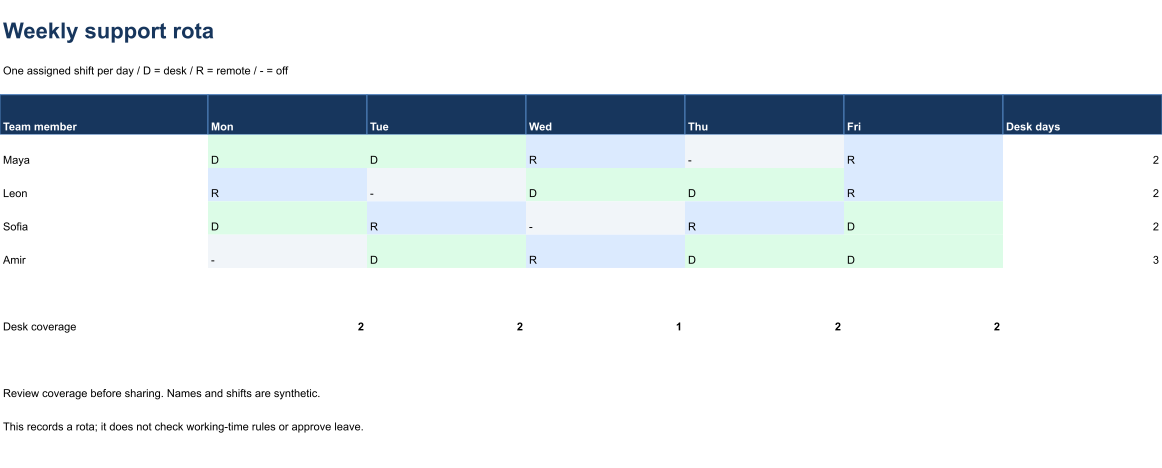
Weekly support rota and coverage
Spot coverage gaps while keeping the underlying assignments editable.
Opens the generated download in a local browser tool. The C# example below creates the document.
- Start with
- Team members and daily shift codes
- Generate
- XLSX
How it works
Record assignments
Use D, R and a dash consistently for desk, remote and off.
Calculate coverage
Count desk assignments per person and per day.
Review before sharing
Keep the legend and scope limits beside the table.
The C# source
The example below shows the document API and layout used for this report. Follow the Excel guide for package setup in your own project.
using OfficeIMO.Drawing;
using OfficeIMO.Excel;

namespace OfficeIMO.Examples.Showcase.Workflows {
    /// <summary>Creates an editable weekly support rota with visible calculations and a native range preview.</summary>
    internal static class WorkforceRota {
        internal static void Create(string folder) {
            using var document = ExcelDocument.Create(Path.Combine(folder, "example.xlsx"));
            var sheet = document.AddWorksheet("Rota");
            sheet.SetColumnWidth(1, 29);
            for (int column = 2; column <= 7; column++) sheet.SetColumnWidth(column, 22);
            sheet.MergeRange("A1:G1"); sheet.Cell(1, 1, "Weekly support rota");
            sheet.CellFontSize(1, 1, 22); sheet.CellBold(1, 1, true); sheet.CellFontColor(1, 1, "17365D");
            sheet.MergeRange("A2:G2"); sheet.Cell(2, 1, "One assigned shift per day / D = desk / R = remote / - = off");
            string[] headers = { "Team member", "Mon", "Tue", "Wed", "Thu", "Fri", "Desk days" };
            for (int column = 1; column <= 7; column++) sheet.Cell(4, column, headers[column - 1]);
            string[] names = { "Maya", "Leon", "Sofia", "Amir" };
            string[][] shifts = { new[] { "D", "D", "R", "-", "R" }, new[] { "R", "-", "D", "D", "R" }, new[] { "D", "R", "-", "R", "D" }, new[] { "-", "D", "R", "D", "D" } };
            for (int index = 0; index < names.Length; index++) {
                int row = index + 5; sheet.Cell(row, 1, names[index]);
                for (int column = 2; column <= 6; column++) {
                    string shift = shifts[index][column - 2]; sheet.Cell(row, column, shift);
                }
                sheet.CellFormula(row, 7, $"COUNTIF(B{row}:F{row},\"D\")");
            }
            sheet.AddTable("A4:G8", true, "SupportRota", ExcelTableStyle.TableStyleMedium2);
            // Rules follow edited shifts in Excel and in the native range preview.
            sheet.Range("B5:F8").Validation.List(new[] { "D", "R", "-" }, allowBlank: false);
            sheet.Range("B5:F8").ConditionalFormatting.ContainsText("D", "DCFCE7");
            sheet.Range("B5:F8").ConditionalFormatting.ContainsText("R", "DBEAFE");
            sheet.Range("B5:F8").ConditionalFormatting.ContainsText("-", "F1F5F9");
            sheet.Cell(10, 1, "Desk coverage");
            for (int column = 2; column <= 6; column++) {
                string letter = ((char)('A' + column - 1)).ToString();
                sheet.CellFormula(10, column, $"COUNTIF({letter}5:{letter}8,\"D\")"); sheet.CellBold(10, column, true);
            }
            sheet.MergeRange("A12:G12"); sheet.Cell(12, 1, "Review coverage before sharing. Names and shifts are synthetic.");
            sheet.MergeRange("A13:G13"); sheet.Cell(13, 1, "This records a rota; it does not check working-time rules or approve leave.");
            sheet.SetGridlinesVisible(false);
            for (int row = 1; row <= 16; row++) {
                sheet.SetRowHeight(row, row == 1 ? 34 : row == 3 ? 12 : 25);
                for (int column = 1; column <= 7; column++) {
                    sheet.CellFontName(row, column, "Carlito");
                    if (row > 1) sheet.CellFontSize(row, column, 11);
                }
            }
            sheet.SetRowHeight(4, 30);
            for (int column = 1; column <= 7; column++) {
                sheet.CellFontColor(4, column, "FFFFFF");
                sheet.CellBold(4, column, true);
                sheet.CellBackground(4, column, "17365D");
            }
            document.Calculate();
            document.InspectFormulas().EnsureAllSupported().EnsureAllHaveCachedResults().EnsureNoDependencyIssues();
            sheet.Range("A1:G14").ExportImage(OfficeImageExportFormat.Png, new ExcelImageExportOptions { ShowGridlines = false })
                .Save(Path.Combine(folder, "preview.png"), OfficeImageExportFileConflictPolicy.Replace);
            document.Save();
        }
    }
}
API used in this example
Use this in your project
Use your actual shift codes and staffing rules; this example does not validate working-time or leave policies.
The Excel guide explains package setup and related document APIs.
Documents and scope
What the preview shows
The C# source generates the downloadable file. The runner validates the workbook and supported formulas, cached results and dependencies. The PNG is a native range export.
What to keep in mind
Use your actual shift codes and staffing rules; this example does not validate working-time or leave policies.