HTML · C# walkthrough
Personalized course certificate
Produce a consistent learning record from structured values while keeping the HTML available for editing and inspection.
Opens the generated download in a local browser tool. The C# example below creates the document.
- Start with
- Learner name, course title and completion details
- Generate
- HTML + PDF
How it works
Bind the personal details
Encode the learner name and course title before inserting them into HTML.
Design the printable document
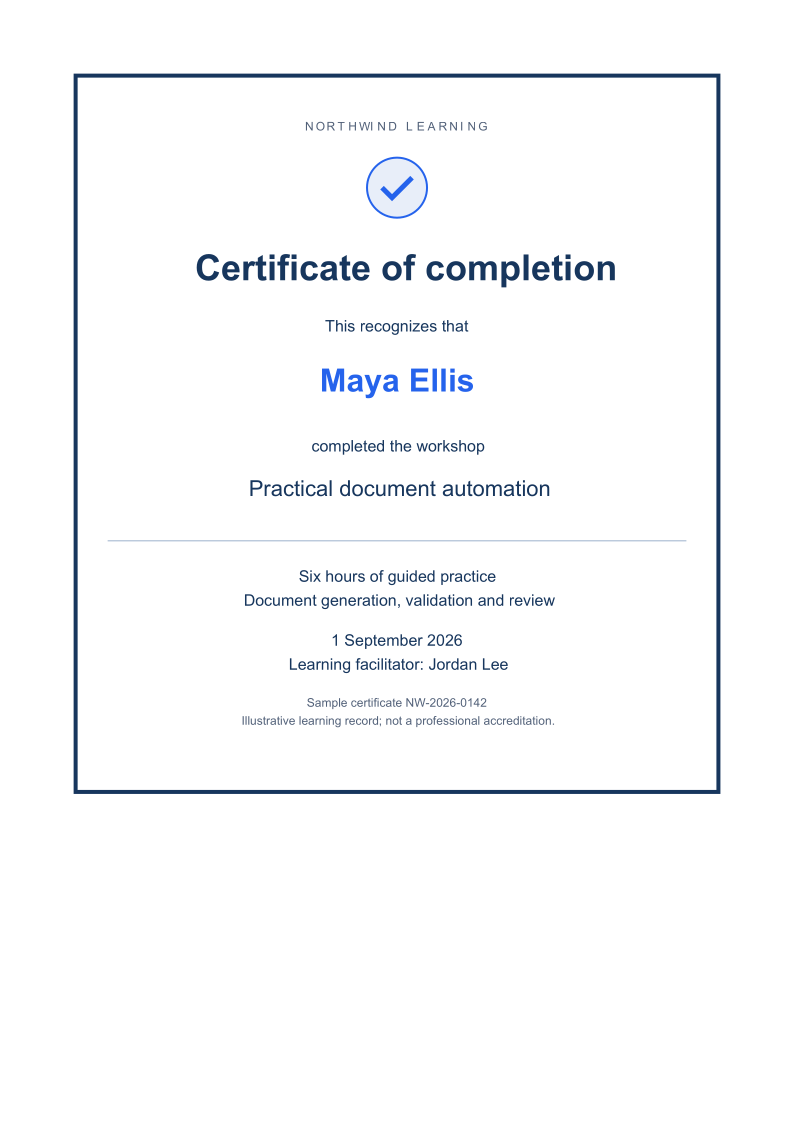
Use a bordered layout, clear type hierarchy, an inline SVG mark and explicit page margins.
Export through the HTML owner
Parse the HTML with HtmlConversionDocument and require a successful PDF save.
The C# source
The example below shows the document API and layout used for this report. Follow the HTML guide for package setup in your own project.
using System.Net;
using OfficeIMO.Drawing;
using OfficeIMO.Html;
using OfficeIMO.Html.Pdf;

namespace OfficeIMO.Examples.Showcase.Workflows;

/// <summary>Generates a personalized HTML completion certificate and a PDF review copy.</summary>
internal static class CourseCertificate {
    internal static void Create(string folder) {
        string learner = "Maya Ellis";
        string course = "Practical document automation";
        string html = $$"""
            <!doctype html><html lang="en"><head><meta charset="utf-8"><title>Course completion</title>
            <style>
            @page { size:A4; margin:20mm }
            body { font:16px/1.5 Arial,sans-serif;color:#17365d;background:white }
            main { border:4px solid #17365d;padding:42px 28px;text-align:center }
            .eyebrow { font-size:12px;letter-spacing:3px;color:#526179 }
            h1 { font-size:36px;margin:30px 0 12px } h2 { font-size:32px;color:#2563eb;margin:24px 0 }
            .rule { border-top:1px solid #9db2cc;margin:28px 0 }
            .small { font-size:12px;color:#526179 } .course { font-size:22px }
            </style></head><body><main>
            <p class="eyebrow">NORTHWIND LEARNING</p>
            <svg width="72" height="72" viewBox="0 0 72 72"><circle cx="36" cy="36" r="30" fill="#e8eef8" stroke="#2563eb" stroke-width="2"/><path d="M21 36 L31 46 L51 26" fill="none" stroke="#2563eb" stroke-width="5"/></svg>
            <h1>Certificate of completion</h1><p>This recognizes that</p>
            <h2>{{WebUtility.HtmlEncode(learner)}}</h2>
            <p>completed the workshop</p><p class="course">{{WebUtility.HtmlEncode(course)}}</p>
            <div class="rule"></div><p>Six hours of guided practice<br>Document generation, validation and review</p>
            <p>1 September 2026<br>Learning facilitator: Jordan Lee</p>
            <p class="small">Sample certificate NW-2026-0142<br>Illustrative learning record; not a professional accreditation.</p>
            </main></body></html>
            """;
        File.WriteAllText(Path.Combine(folder, "example.html"), html);
        HtmlConversionDocument.Parse(html).SaveAsPdf(Path.Combine(folder, "preview.pdf"),
            new HtmlPdfExportOptions { PageSize = OfficePageSizes.A4, Margins = HtmlRenderMargins.All(24D) });
    }
}
API used in this example
Use this in your project
Replace the course, learner and issue details with your records. Use an actual verification process if the certificate needs to prove completion.
The HTML guide explains package setup and related document APIs.
Documents and scope
What the preview shows
The linked C# example generates this file. The HTML document is exported through OfficeIMO.Html to PDF with a required successful save. Each PDF page is rendered for review.
What to keep in mind
This is an illustrative completion record, not professional accreditation or a digitally signed certificate. The preview is rendered from the PDF.