HTML · C# walkthrough
Service review with explicit target misses
Create a concise review that distinguishes performance facts from the follow-up decision.
Opens the generated download in a local browser tool. The C# example below creates the document.
- Start with
- Measured values, targets, units and comparison direction
- Generate
- HTML + PDF
How it works
Model each measure
Store the actual value, target, unit and whether higher or lower values are better.
Calculate the status
Evaluate each target using its direction and render a clear Met or Below target label.
Explain the follow-up
Include the missed measure, concrete actions and measurement definitions before exporting to PDF.
The C# source
The example below shows the document API and layout used for this report. Follow the HTML guide for package setup in your own project.
using System.Globalization;
using System.Net;
using OfficeIMO.Drawing;
using OfficeIMO.Html;
using OfficeIMO.Html.Pdf;

namespace OfficeIMO.Examples.Showcase.Workflows;

/// <summary>Builds an HTML service review from measured and target values, including explicit misses.</summary>
internal static class ServiceLevelReport {
    internal static void Create(string folder) {
        var measures = new[] {
            new Measure("Availability", 99.94m, 99.90m, "%", true),
            new Measure("First response", 3.2m, 4m, "hours", false),
            new Measure("Resolution within target", 88m, 90m, "%", true)
        };
        string rows = string.Join("", measures.Select(measure => {
            bool met = measure.HigherIsBetter ? measure.Actual >= measure.Target : measure.Actual <= measure.Target;
            return $"<tr><td>{WebUtility.HtmlEncode(measure.Name)}</td><td>{measure.Actual.ToString("0.##", CultureInfo.InvariantCulture)} {measure.Unit}</td><td>{measure.Target.ToString("0.##", CultureInfo.InvariantCulture)} {measure.Unit}</td><td class='{(met ? "met" : "miss")}'>{(met ? "Met" : "Below target")}</td></tr>";
        }));
        string html = $$"""
            <!doctype html><html lang="en"><head><meta charset="utf-8"><title>Monthly service review</title>
            <style>
            @page { size:A4; margin:18mm }
            body { font:14px/1.5 Arial,sans-serif;color:#24324a }
            header { background:#17365d;color:white;padding:24px } h1 { font-size:30px;margin:6px 0 }
            h2 { font-size:20px;color:#17365d;margin-top:26px } .label { font-size:11px;letter-spacing:2px }
            table { width:100%;border-collapse:collapse;margin:18px 0 } th { text-align:left;background:#e8eef8 }
            th,td { padding:12px 8px;border-bottom:1px solid #cbd5e1 }
            .met { color:#176b3a } .miss { color:#9a3412;font-weight:bold }
            .note { background:#fff7ed;border-left:4px solid #c76a20;padding:15px }
            footer { border-top:1px solid #cbd5e1;margin-top:28px;padding-top:12px;color:#526179;font-size:11px }
            </style></head><body>
            <header><p class="label">NORTHWIND / SERVICE OPERATIONS</p><h1>Monthly service review</h1><p>August 2026 / request portal / illustrative measurements</p></header>
            <h2>Performance against agreed targets</h2>
            <table><thead><tr><th>Measure</th><th>Actual</th><th>Target</th><th>Result</th></tr></thead><tbody>{{rows}}</tbody></table>
            <div class="note"><strong>Attention required</strong><p>Resolution within target missed the agreed threshold. Review the oldest waiting requests and assign an owner to each next action.</p></div>
            <h2>Follow-up actions</h2><ol><li>Separate customer waiting time from internal queue time.</li><li>Review the ten oldest requests with the service owner.</li><li>Recheck the measure after two weeks of targeted follow-up.</li></ol>
            <h2>Measurement notes</h2><p>Availability uses the agreed service window. First response is the median elapsed time. Resolution reports the share completed within the agreed target. Replace these definitions with the actual service contract.</p>
            <footer>Prepared from synthetic data. A generated report records a measurement; it does not independently verify the source system.</footer>
            </body></html>
            """;
        File.WriteAllText(Path.Combine(folder, "example.html"), html);
        HtmlConversionDocument.Parse(html).SaveAsPdf(Path.Combine(folder, "preview.pdf"),
            new HtmlPdfExportOptions { PageSize = OfficePageSizes.A4, Margins = HtmlRenderMargins.All(24D) });
    }

    private sealed record Measure(string Name, decimal Actual, decimal Target, string Unit, bool HigherIsBetter);
}
API used in this example
Use this in your project
Connect the measures to your reporting source and replace the example definitions with the service contract. Keep human-readable status text alongside color.
The HTML guide explains package setup and related document APIs.
Documents and scope
What the preview shows
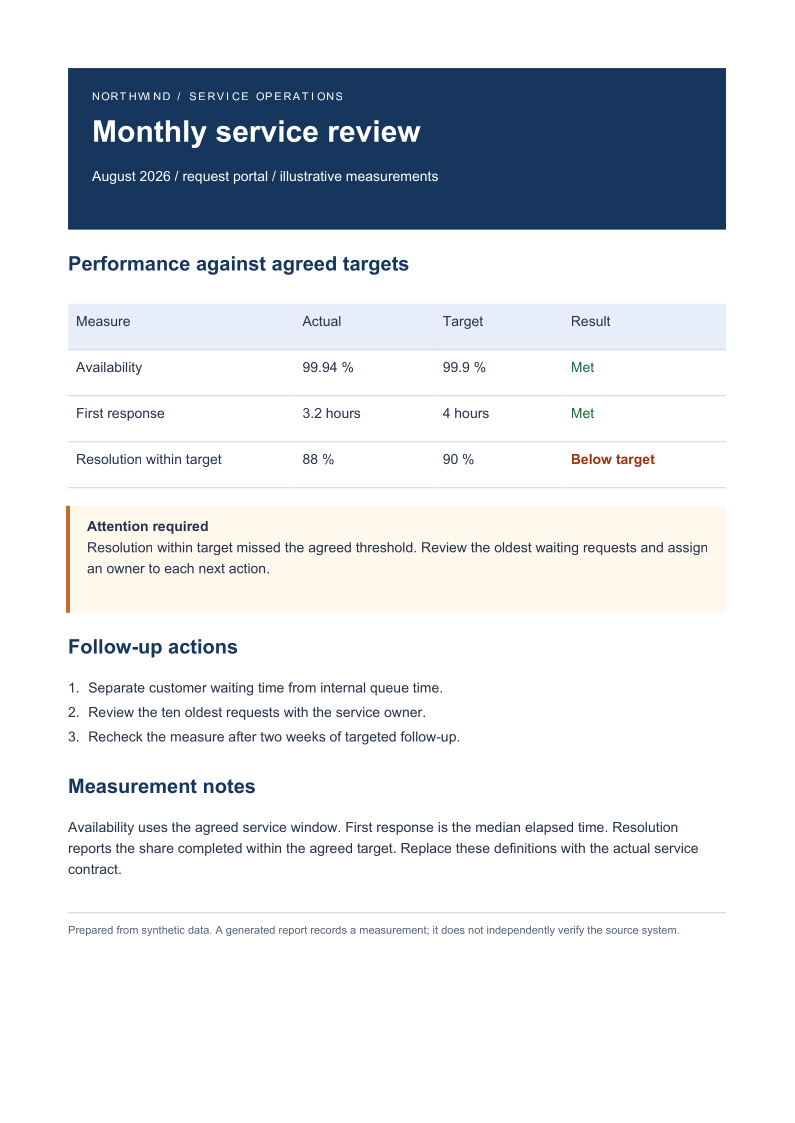
The linked C# example generates this file. The HTML document is exported through OfficeIMO.Html to PDF with a required successful save. Each PDF page is rendered for review.
What to keep in mind
The values are synthetic. The report evaluates supplied numbers; it does not independently collect or verify service telemetry.