Markdown · C# walkthrough
An architecture decision record
Create a decision record that works naturally in version control. The example preserves the context, chosen approach, alternatives, and consequences in portable Markdown.
Opens the generated download in a local browser tool. The C# example below creates the document.
- Start with
- An architectural choice and the reasons behind it
- Generate
- MD + PDF
How it works
Record identity and status
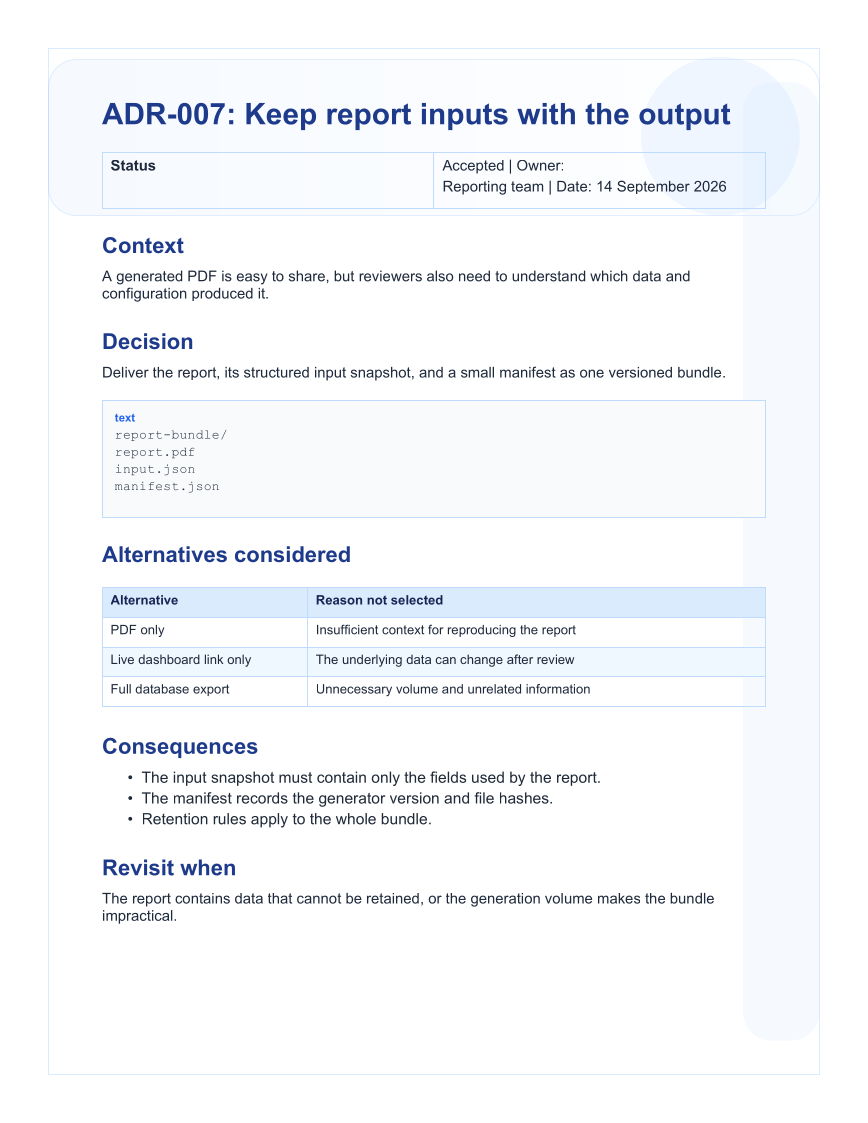
Give the decision an identifier, owner, date, and status before explaining the context.
Show the selected shape
Use a fenced text block for the proposed report-bundle structure.
Preserve the reasoning
Add an alternatives table, consequence list, and a condition for revisiting the decision.
The C# source
The example below shows the document API and layout used for this report. Follow the Markdown guide for package setup in your own project.
using System.IO;
using OfficeIMO.Markdown;

namespace OfficeIMO.Examples.Showcase.Workflows;

/// <summary>Builds a repository-friendly architecture decision record with context and consequences.</summary>
internal static class MarkdownDecisionRecord {
    internal static void Create(string folder) {
        MarkdownDocument document = MarkdownDocument.Create()
            .H1("ADR-007: Keep report inputs with the output")
            .P("Status: Accepted | Owner: Reporting team | Date: 14 September 2026")
            .H2("Context")
            .P("A generated PDF is easy to share, but reviewers also need to understand which data and configuration produced it.")
            .H2("Decision")
            .P("Deliver the report, its structured input snapshot, and a small manifest as one versioned bundle.")
            .Code("text", "report-bundle/\n  report.pdf\n  input.json\n  manifest.json")
            .H2("Alternatives considered")
            .Table(table => table.Headers("Alternative", "Reason not selected")
                .Row("PDF only", "Insufficient context for reproducing the report")
                .Row("Live dashboard link only", "The underlying data can change after review")
                .Row("Full database export", "Unnecessary volume and unrelated information"))
            .H2("Consequences")
            .Ul(list => list.Item("The input snapshot must contain only the fields used by the report.")
                .Item("The manifest records the generator version and file hashes.")
                .Item("Retention rules apply to the whole bundle."))
            .H2("Revisit when")
            .P("The report contains data that cannot be retained, or the generation volume makes the bundle impractical.");
        File.WriteAllText(Path.Combine(folder, "example.md"), document.ToMarkdown());
    }
}
API used in this example
Use this in your project
Generate the fixed sections from your decision-record template and supply the content from your review process. Keep the actual reasoning in the record rather than relying only on a status field.
The Markdown guide explains package setup and related document APIs.
Documents and scope
What the preview shows
The linked C# example generates this file. The Markdown builder creates the source file. The runner exports a PDF, which is rendered for the preview.
What to keep in mind
The report-bundle design is illustrative. This example writes the decision record; it does not create or hash a report bundle.