Markdown · C# walkthrough
A portable incident runbook
Keep a runbook usable in a repository and as an offline document. The example combines short steps with a decision table and a copyable incident-update template.
Opens the generated download in a local browser tool. The C# example below creates the document.
- Start with
- Response steps, ownership, and communication guidance
- Generate
- MD + PDF
How it works
Put the precondition first
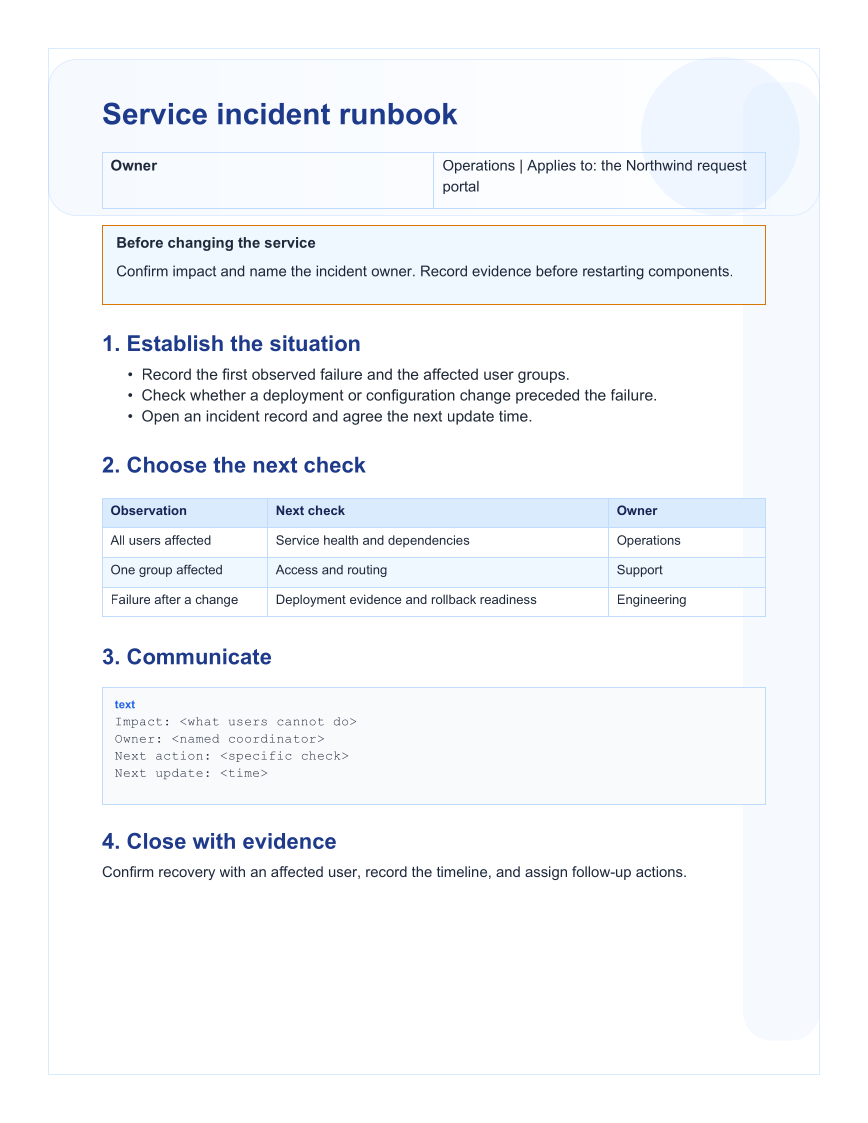
Add a warning callout that asks the responder to establish impact and ownership before making changes.
Describe the next check
Build a table that maps an observation to a concrete check and its owner.
Provide a reusable update format
Add a fenced text block for impact, owner, next action, and next update, then save the Markdown source.
The C# source
The example below shows the document API and layout used for this report. Follow the Markdown guide for package setup in your own project.
using System.IO;
using OfficeIMO.Markdown;

namespace OfficeIMO.Examples.Showcase.Workflows;

/// <summary>Authors a portable incident runbook with structured steps, a decision table, and a warning.</summary>
internal static class IncidentRunbook {
    internal static void Create(string folder) {
        MarkdownDocument document = MarkdownDocument.Create()
            .H1("Service incident runbook")
            .P("Owner: Operations | Applies to: the Northwind request portal")
            .Callout("warning", "Before changing the service",
                "Confirm impact and name the incident owner. Record evidence before restarting components.")
            .H2("1. Establish the situation")
            .Ul(list => list.Item("Record the first observed failure and the affected user groups.")
                .Item("Check whether a deployment or configuration change preceded the failure.")
                .Item("Open an incident record and agree the next update time."))
            .H2("2. Choose the next check")
            .Table(table => table.Headers("Observation", "Next check", "Owner")
                .Row("All users affected", "Service health and dependencies", "Operations")
                .Row("One group affected", "Access and routing", "Support")
                .Row("Failure after a change", "Deployment evidence and rollback readiness", "Engineering"))
            .H2("3. Communicate")
            .Code("text", "Impact: <what users cannot do>\nOwner: <named coordinator>\nNext action: <specific check>\nNext update: <time>")
            .H2("4. Close with evidence")
            .P("Confirm recovery with an affected user, record the timeline, and assign follow-up actions.");
        File.WriteAllText(Path.Combine(folder, "example.md"), document.ToMarkdown());
    }
}
API used in this example
Use this in your project
Replace the fictional service details with reviewed instructions for your environment. Keep the diagnostic steps specific and use the Markdown file as the editable source of truth.
The Markdown guide explains package setup and related document APIs.
Documents and scope
What the preview shows
The linked C# example generates this file. The Markdown builder creates the source file. The runner exports a PDF, which is rendered for the preview.
What to keep in mind
The content is a sample runbook, not a validated response procedure for your service. PDF export is a separate rendering step.