OpenDocument · C# walkthrough
Client appointment letter
Send a concise client letter that remains editable in OpenDocument tools.
- Start with
- Recipient, appointment and preparation details
- Generate
- ODT + PDF
How it works
Set the purpose
Use a clear subject and named recipient.
State the commitment
Label the appointment time zone and the follow-up window.
Style the letter
Use heading spacing and readable body text.
The C# source
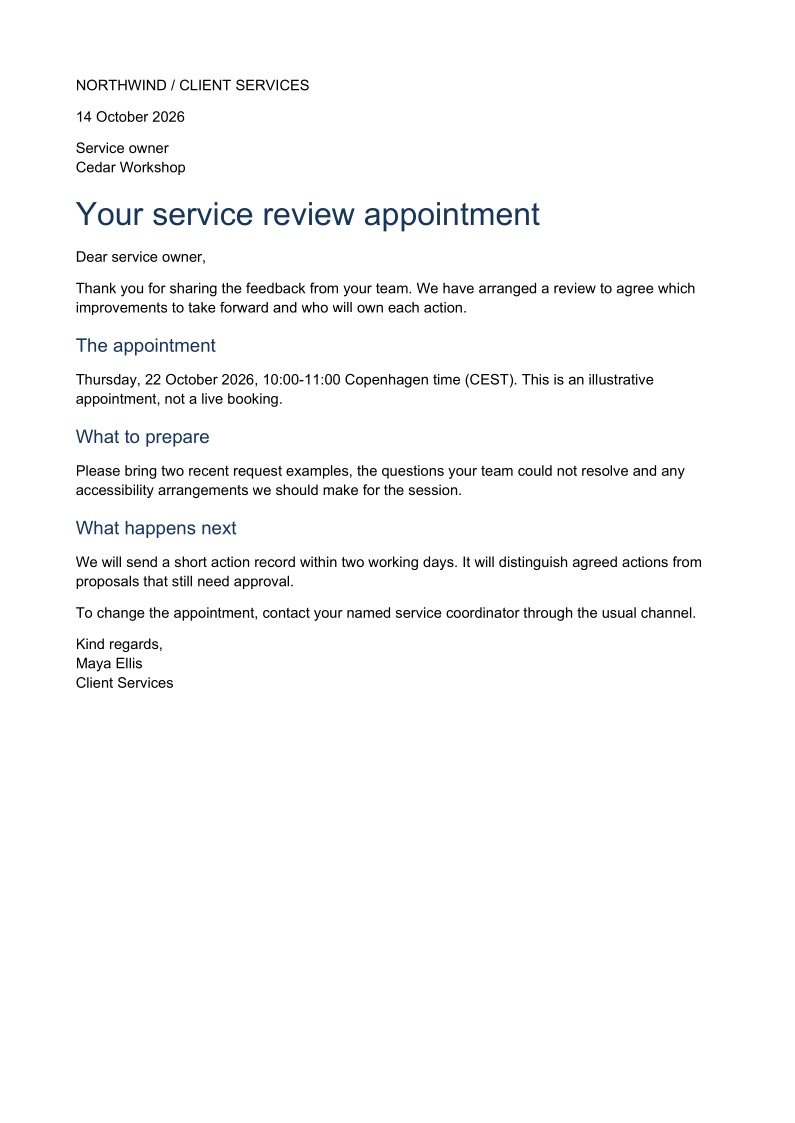
The example below shows the document API and layout used for this report. Follow the OpenDocument guide for package setup in your own project.
using OfficeIMO.OpenDocument;

namespace OfficeIMO.Examples.Showcase.Workflows {
    /// <summary>Authors an editable ODT client letter with an explicit subject, dated commitment and contact route.</summary>
    internal static class ClientLetter {
        internal static void Create(string folder) {
            var document = OdtDocument.Create();
            document.AddParagraph("NORTHWIND / CLIENT SERVICES");
            document.AddParagraph("14 October 2026");
            document.AddParagraph("Service owner\nCedar Workshop");
            document.AddHeading("Your service review appointment", 1);
            document.AddParagraph("Dear service owner,");
            document.AddParagraph("Thank you for sharing the feedback from your team. We have arranged a review to agree which improvements to take forward and who will own each action.");
            document.AddHeading("The appointment", 2);
            document.AddParagraph("Thursday, 22 October 2026, 10:00-11:00 Copenhagen time (CEST). This is an illustrative appointment, not a live booking.");
            document.AddHeading("What to prepare", 2);
            document.AddParagraph("Please bring two recent request examples, the questions your team could not resolve and any accessibility arrangements we should make for the session.");
            document.AddHeading("What happens next", 2);
            document.AddParagraph("We will send a short action record within two working days. It will distinguish agreed actions from proposals that still need approval.");
            document.AddParagraph("To change the appointment, contact your named service coordinator through the usual channel.");
            document.AddParagraph("Kind regards,\nMaya Ellis\nClient Services");
            foreach (var paragraph in document.Paragraphs) {
                paragraph.FontFamily = "Carlito";
                paragraph.FontSize = OdfLength.Parse(paragraph.HeadingLevel == 1 ? "24pt" : paragraph.IsHeading ? "14pt" : "11pt");
                paragraph.SpaceAbove = OdfLength.Parse(paragraph.IsHeading ? "12pt" : "0pt");
                paragraph.SpaceBelow = OdfLength.Parse("9pt");
                if (paragraph.IsHeading) paragraph.Color = OdfColor.Parse("#17365d");
            }
            document.Save(Path.Combine(folder, "example.odt"));
        }
    }
}
API used in this example
Use this in your project
Replace the invented appointment and contact route with confirmed arrangements.
The OpenDocument guide explains package setup and related document APIs.
Documents and scope
What the preview shows
The C# source generates the downloadable file. The runner reopens the editable document, validates Open XML where applicable and exports a PDF. Page previews come from the generated output.
What to keep in mind
Replace the invented appointment and contact route with confirmed arrangements.