OpenDocument · C# walkthrough
Editable OpenDocument proposal
Share a proposal in OpenDocument format while keeping the decision, scope and acceptance conditions easy to find.
- Start with
- Proposed outcome, deliverables and acceptance conditions
- Generate
- ODT + PDF
How it works
Set the hierarchy
Use native ODT headings and apply the title font size and color.
Emphasize the decision
Add styled text spans so the decision label stands out without turning the paragraph into an image.
Make acceptance explicit
Keep each deliverable beside its owner and acceptance condition, then state assumptions, exclusions and the next step.
The C# source
The example below shows the document API and layout used for this report. Follow the OpenDocument guide for package setup in your own project.
using OfficeIMO.OpenDocument;

namespace OfficeIMO.Examples.Showcase.Workflows;

/// <summary>Authors a vendor-neutral proposal with styled text, deliverables and explicit assumptions.</summary>
internal static class OpenProposal {
    internal static void Create(string folder) {
        OdtDocument document = OdtDocument.Create();
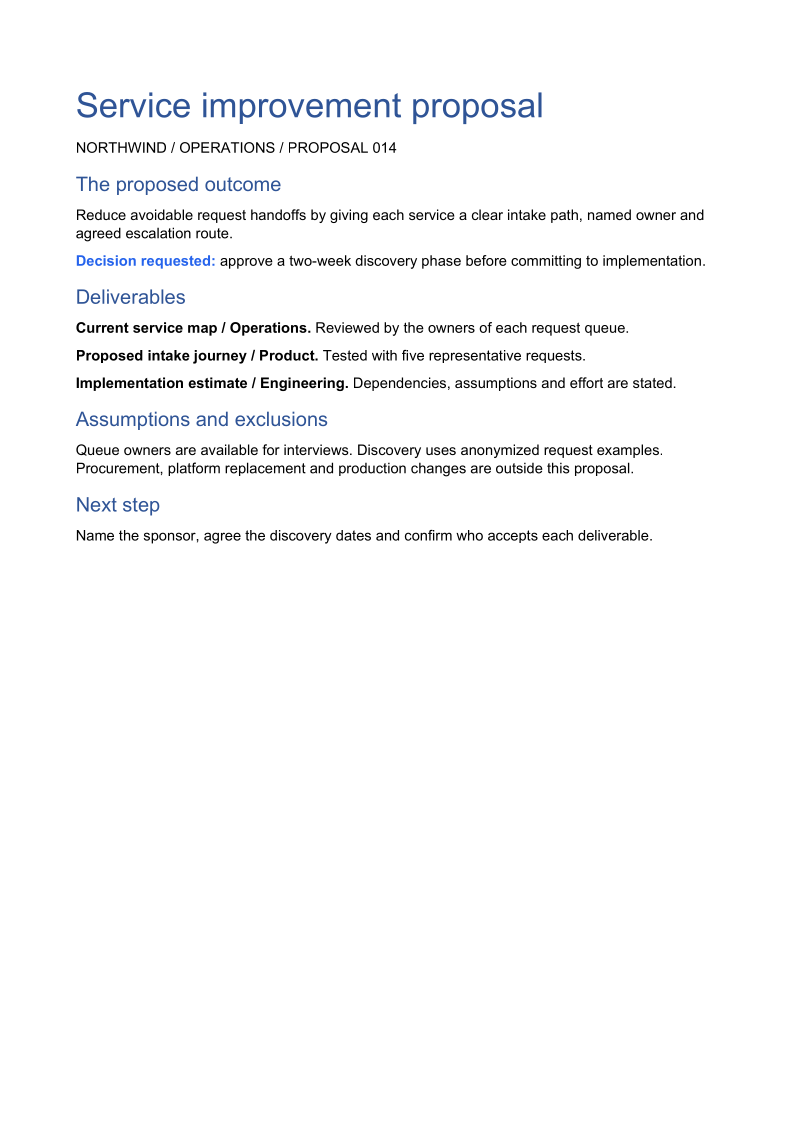
        var title = document.AddHeading("Service improvement proposal", 1);
        title.FontFamily = "Carlito"; title.FontSize = OdfLength.Parse("26pt"); title.Color = OdfColor.Parse("#17365d");
        document.AddParagraph("NORTHWIND / OPERATIONS / PROPOSAL 014");
        document.AddHeading("The proposed outcome", 2);
        document.AddParagraph("Reduce avoidable request handoffs by giving each service a clear intake path, named owner and agreed escalation route.");
        var decision = document.AddParagraph();
        var label = decision.AddSpan("Decision requested: "); label.Bold = true; label.Color = OdfColor.Parse("#2563eb");
        decision.AddSpan("approve a two-week discovery phase before committing to implementation.");
        document.AddHeading("Deliverables", 2);
        Deliverable("Current service map", "Operations", "Reviewed by the owners of each request queue.");
        Deliverable("Proposed intake journey", "Product", "Tested with five representative requests.");
        Deliverable("Implementation estimate", "Engineering", "Dependencies, assumptions and effort are stated.");
        document.AddHeading("Assumptions and exclusions", 2);
        document.AddParagraph("Queue owners are available for interviews. Discovery uses anonymized request examples. Procurement, platform replacement and production changes are outside this proposal.");
        document.AddHeading("Next step", 2);
        document.AddParagraph("Name the sponsor, agree the discovery dates and confirm who accepts each deliverable.");
        foreach (var paragraph in document.Paragraphs) {
            paragraph.FontFamily = "Carlito";
            paragraph.FontSize = OdfLength.Parse(paragraph.HeadingLevel == 1 ? "26pt" : paragraph.IsHeading ? "15pt" : "11pt");
            paragraph.SpaceAbove = OdfLength.Parse(paragraph.IsHeading ? "12pt" : "0pt");
            paragraph.SpaceBelow = OdfLength.Parse("7pt");
            if (paragraph.IsHeading) paragraph.Color = OdfColor.Parse("#17365d");
        }
        document.Save(Path.Combine(folder, "example.odt"));

        void Deliverable(string name, string owner, string acceptance) {
            var paragraph = document.AddParagraph();
            paragraph.AddSpan(name + " / " + owner + ". ").Bold = true;
            paragraph.AddSpan(acceptance);
        }
    }
}
API used in this example
Use this in your project
Replace the scope and deliverables with the actual engagement. Keep acceptance conditions observable and name their owners.
The OpenDocument guide explains package setup and related document APIs.
Documents and scope
What the preview shows
The linked C# example generates this file. The runner reopens the ODT and exports a PDF review copy. Each PDF page is rendered for review.
What to keep in mind
The ODT is reopened and converted by OfficeIMO for review. The preview does not certify identical pagination in every OpenDocument editor.