PDF · C# walkthrough
A branded invoice with embedded CII
Generate a customer-facing invoice and its machine-readable CII representation from one typed model, while keeping branding and presentation settings separate from the business data.
Opens the generated download in a local browser tool. The C# example below creates the document.
- Start with
- Typed invoice parties, line items, tax, payment, branding, and approval details
- Generate
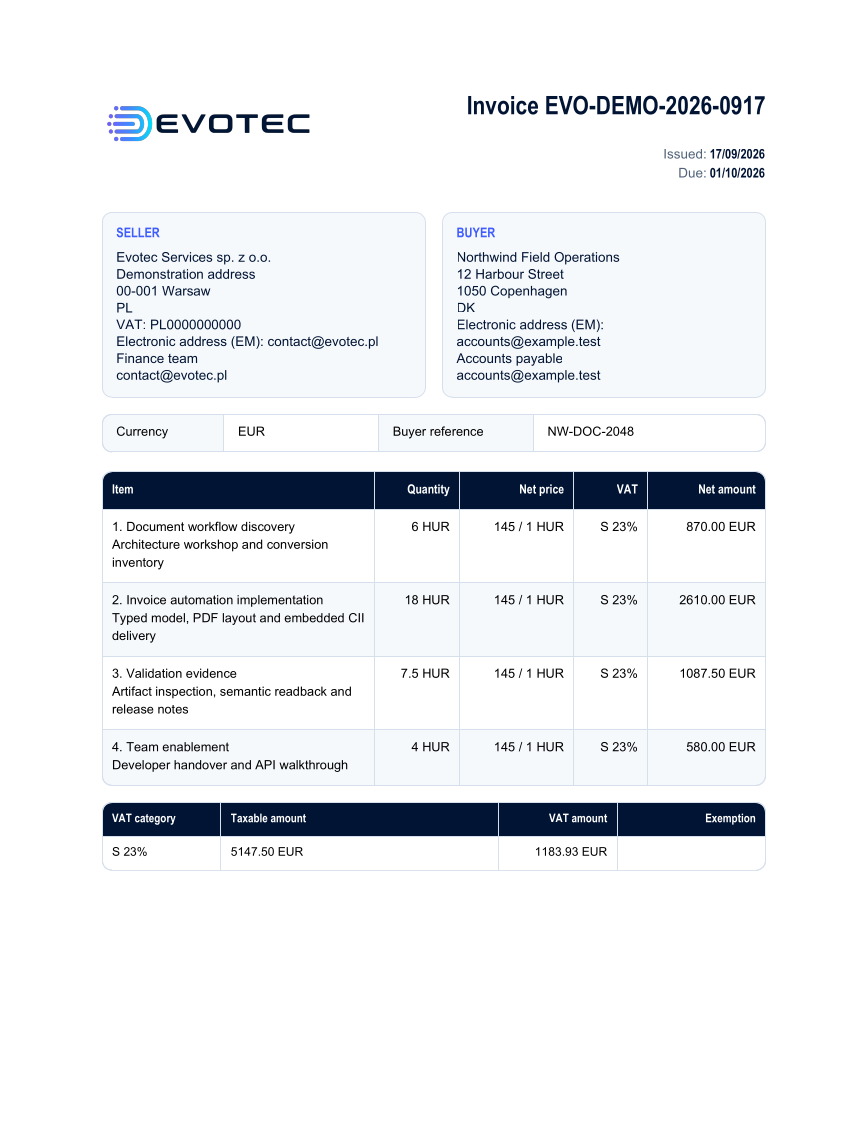
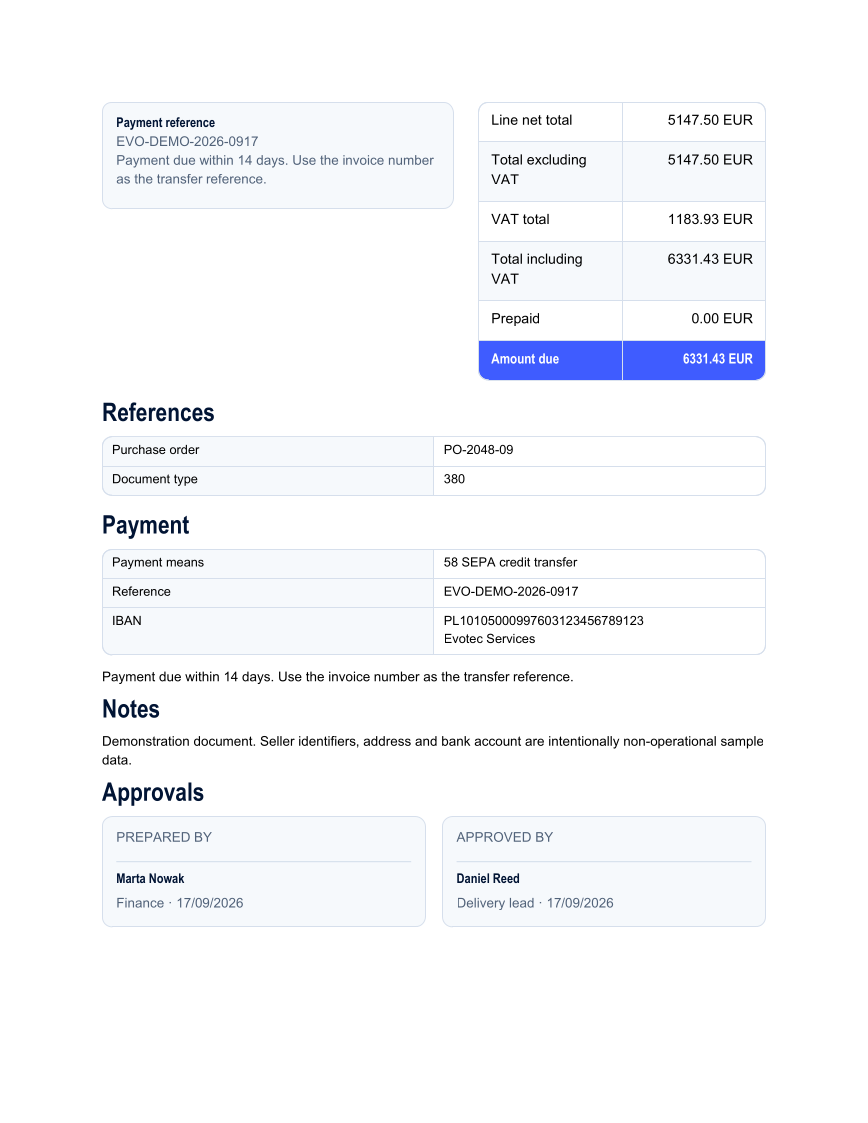
- Two-page PDF with embedded CII XML
How it works
Build the invoice model
Populate typed seller, buyer, line, tax, payment, reference, and note records, then calculate the declared totals from those values.
Apply the presentation
Choose one or more built-in label cultures, select the modern theme, add the governed logo, and add visible prepared-by and approved-by details to the captured layout.
Write both representations
Create one snapshot, write its exact CII XML, and render the PDF with that XML embedded as the alternative invoice representation.
The rest of the document
The C# source
The example below shows the document API and layout used for this report. Follow the PDF guide for package setup in your own project.
using OfficeIMO.Invoicing;
using OfficeIMO.Invoicing.Pdf;
using OfficeIMO.Pdf;

namespace OfficeIMO.Examples.Showcase.Workflows;

/// <summary>Creates a polished PDF invoice and embeds its CII representation from the typed invoice model.</summary>
internal static class BrandedInvoice {
    internal static void Create(string folder) {
        Invoice invoice = CreateInvoice();
        var contract = new InvoiceXmlOptions(
            InvoiceSpecificationRelease.FacturX_1_09_2_Zugferd_2_5_2,
            InvoiceSyntax.Cii,
            InvoiceProfile.En16931);
        var layout = InvoicePdfLayoutOptions.ForCultures("en-GB");
        layout.Theme = InvoicePdfTheme.Modern(global::OfficeIMO.OfficeColor.FromRgb(63, 92, 255));
        layout.LogoBytes = File.ReadAllBytes(Path.Combine(
            AppContext.BaseDirectory,
            "Assets",
            "Brand",
            "Evotec",
            "evotec-logo-horizontal-gradient-2400.png"));
        layout.LogoAlternativeText = "Evotec";
        layout.Approvals.Add(new InvoicePdfApproval("Prepared by", "Marta Nowak", "Finance", invoice.IssueDate));
        layout.Approvals.Add(new InvoicePdfApproval("Approved by", "Daniel Reed", "Delivery lead", invoice.IssueDate));

        PdfInvoiceDocument snapshot = PdfInvoiceDocument.Create(invoice, contract, layout);
        string fonts = Path.Combine(AppContext.BaseDirectory, "Assets", "Fonts");
        var pdfOptions = new PdfCreateOptions {
            DefaultFontSize = global::OfficeIMO.OfficeLength.Points(9.5D),
            TaggedStructureMode = PdfTaggedStructureMode.CatalogMarkers
        }.UseFontFamily(new PdfEmbeddedFontFamily(
            "Carlito",
            File.ReadAllBytes(Path.Combine(fonts, "Carlito-Regular.ttf")),
            File.ReadAllBytes(Path.Combine(fonts, "Carlito-Bold.ttf"))));

        File.WriteAllBytes(Path.Combine(folder, "example.xml"), snapshot.ToXmlBytes());
        File.WriteAllBytes(Path.Combine(folder, "example.pdf"), snapshot.ToPdfBytes(pdfOptions));
    }

    private static Invoice CreateInvoice() {
        var invoice = new Invoice {
            Number = "EVO-DEMO-2026-0917",
            IssueDate = new DateTime(2026, 9, 17),
            DueDate = new DateTime(2026, 10, 1),
            Currency = "EUR",
            BuyerReference = "NW-DOC-2048",
            PurchaseOrderReference = "PO-2048-09",
            PaymentTerms = "Payment due within 14 days. Use the invoice number as the transfer reference.",
            Seller = new InvoiceParty {
                Name = "Evotec Services sp. z o.o.",
                ElectronicAddress = new InvoiceIdentifier("[email protected]", "EM"),
                Address = new InvoiceAddress {
                    Line1 = "Demonstration address",
                    City = "Warsaw",
                    PostCode = "00-001",
                    CountryCode = "PL"
                },
                Contact = new InvoiceContact { Name = "Finance team", Email = "[email protected]" }
            },
            Buyer = new InvoiceParty {
                Name = "Northwind Field Operations",
                ElectronicAddress = new InvoiceIdentifier("[email protected]", "EM"),
                Address = new InvoiceAddress {
                    Line1 = "12 Harbour Street",
                    City = "Copenhagen",
                    PostCode = "1050",
                    CountryCode = "DK"
                },
                Contact = new InvoiceContact { Name = "Accounts payable", Email = "[email protected]" }
            }
        };
        invoice.Seller.TaxRegistrations.Add(new InvoiceTaxRegistration("PL0000000000", InvoiceTaxRegistration.VatScheme));
        invoice.Payments.Add(new InvoicePayment {
            MeansCode = "58",
            MeansText = "SEPA credit transfer",
            Reference = invoice.Number,
            Account = new InvoiceBankAccount { Identifier = "PL10105000997603123456789123", Name = "Evotec Services" }
        });
        AddLine(invoice, "1", "Document workflow discovery", "Architecture workshop and conversion inventory", 6m, 145m);
        AddLine(invoice, "2", "Invoice automation implementation", "Typed model, PDF layout and embedded CII delivery", 18m, 145m);
        AddLine(invoice, "3", "Validation evidence", "Artifact inspection, semantic readback and release notes", 7.5m, 145m);
        AddLine(invoice, "4", "Team enablement", "Developer handover and API walkthrough", 4m, 145m);
        invoice.Notes.Add(new InvoiceNote("Demonstration document. Seller identifiers, address and bank account are intentionally non-operational sample data."));
        InvoiceCalculator.UpdateDeclaredAmounts(invoice);
        return invoice;
    }

    private static void AddLine(Invoice invoice, string id, string name, string description, decimal quantity, decimal unitPrice) =>
        invoice.Lines.Add(new InvoiceLine {
            Id = id,
            Name = name,
            Description = description,
            Quantity = quantity,
            UnitCode = "HUR",
            UnitPrice = unitPrice,
            Tax = new InvoiceTaxCategory { Code = "S", Rate = 23m }
        });
}
API used in this example
InvoiceInvoiceAddressInvoiceContactInvoiceIdentifierInvoicePartyInvoicePdfApprovalInvoiceTaxRegistrationPdfInvoiceDocumentInvoiceBankAccountInvoiceCalculatorInvoiceLineInvoiceNoteInvoicePaymentInvoicePdfLayoutOptionsInvoicePdfThemeInvoiceProfileInvoiceSpecificationReleaseInvoiceSyntaxInvoiceTaxCategoryInvoiceXmlOptionsOfficeColorOfficeLengthPdfCreateOptionsPdfEmbeddedFontFamilyPdfTaggedStructureMode
Use this in your project
Replace the sample seller, bank, colors, logo, and approval records with your own data. Select from the ten built-in label languages or supply a custom language pack. Keep approval blocks as presentation unless your workflow also applies a real PDF digital signature.
The PDF guide explains package setup and related document APIs.
Documents and scope
What the preview shows
The example generates the PDF and XML from one captured invoice. The runner reopens the PDF, checks its visible text, and renders both page previews with Poppler.
What to keep in mind
Seller identifiers, bank details, and the buyer are non-operational sample data. Approval blocks are visible content, not cryptographic signatures. The showcase does not claim Factur-X or PDF/A conformance without external validation of the exact artifact.