PDF · C# walkthrough
A three-column service catalog
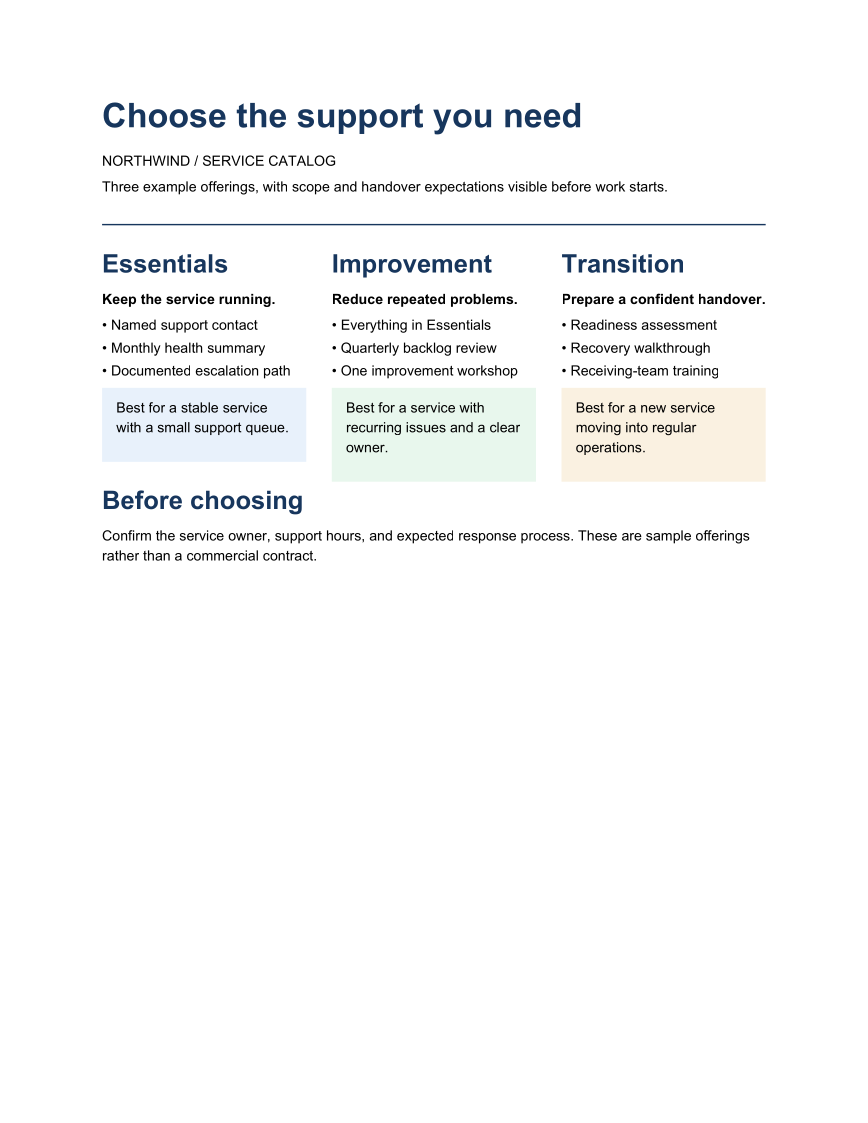
Present three offerings side by side without turning the whole page into a table. Each column contains its own heading, list, and guidance panel.
Opens the generated download in a local browser tool. The C# example below creates the document.
- Start with
- Three service offerings and their intended use
- Generate
How it works
Establish a page hierarchy
Place the main heading and short introduction above the comparison area.
Use relative columns
Create three equal relative columns and set a gutter so each offering has a distinct reading area.
Keep the next decision visible
Finish with the questions a reader should resolve before choosing an offering.
The C# source
The example below shows the document API and layout used for this report. Follow the PDF guide for package setup in your own project.
using System.IO;
using OfficeIMO.Pdf;

namespace OfficeIMO.Examples.Showcase.Workflows;

/// <summary>Uses relative columns to present three service offerings in a single PDF.</summary>
internal static class ServiceCatalog {
    internal static void Create(string folder) {
        OfficeThemePalette palette = OfficeTheme.Default.Palette;
        OfficeColor muted = palette.TextMuted;
        PdfPanelStyle Note(OfficeColor accent) => new PdfPanelStyle {
            Background = palette.Background, BorderColor = accent,
            BorderWidth = OfficeLength.Points(0.75), PaddingX = OfficeLength.Points(10), PaddingY = OfficeLength.Points(8)
        };
        PdfDocument.Create(pdf => pdf.Content(content => {
            content.Title("Choose the support you need");
            content.AddParagraph(p => p.AddText("Northwind \u00B7 Service catalog").SetFontSize(OfficeLength.Points(9)), color: muted);
            content.Subtitle("Three example offerings, with scope and handover expectations visible before work starts.");
            // The offerings and their notes sit in two rows, so the three notes start on one line
            // even when the lists above them differ in length.
            content.Row(row => {
                row.Gap(global::OfficeIMO.OfficeLength.Points(18));
                row.RelativeColumn(column => column
                    .H2("Essentials")
                    .AddParagraph(p => p.AddText("Keep the service running.").SetBold())
                    .AddList(new[] { "Named support contact", "Monthly health summary", "Documented escalation path" }));
                row.RelativeColumn(column => column
                    .H2("Improvement")
                    .AddParagraph(p => p.AddText("Reduce repeated problems.").SetBold())
                    .AddList(new[] { "Everything in Essentials", "Quarterly backlog review", "One improvement workshop" }));
                row.RelativeColumn(column => column
                    .H2("Transition")
                    .AddParagraph(p => p.AddText("Prepare a confident handover.").SetBold())
                    .AddList(new[] { "Readiness assessment", "Recovery walkthrough", "Receiving-team training" }));
            });
            content.Row(row => {
                row.Gap(OfficeLength.Points(18));
                row.RelativeColumn(column => column
                    .AddPanelParagraph(p => p.AddText("Best for a stable service with a small support queue."), Note(palette.Accent1)));
                row.RelativeColumn(column => column
                    .AddPanelParagraph(p => p.AddText("Best for a service with recurring issues and a clear owner."), Note(palette.Accent3)));
                row.RelativeColumn(column => column
                    .AddPanelParagraph(p => p.AddText("Best for a new service moving into regular operations."), Note(palette.Accent2)));
            });
            content.H2("Before choosing");
            content.AddParagraph(p => p.AddText("Confirm the service owner, support hours, and expected response process. These are sample offerings rather than a commercial contract."));
        }), new PdfCreateOptions { DefaultFontSize = OfficeLength.Points(10), PageSetup = { Footer = { Show = true } } })
            .Meta(title: "Northwind service catalog", author: "OfficeIMO")
            .Save(Path.Combine(folder, "example.pdf"));
    }
}
API used in this example
Use this in your project
Use unequal column weights if one offering needs more room. Keep descriptions short and inspect the rendered PDF when a list becomes longer.
The PDF guide explains package setup and related document APIs.
Documents and scope
What the preview shows
The linked C# example generates this file. The page images are rendered from the downloadable PDF with Poppler.
What to keep in mind
The offerings are fictional sample content. The layout demonstrates fixed PDF output rather than a responsive web pricing component.