PDF · C# walkthrough
A decision-focused weekly PDF brief
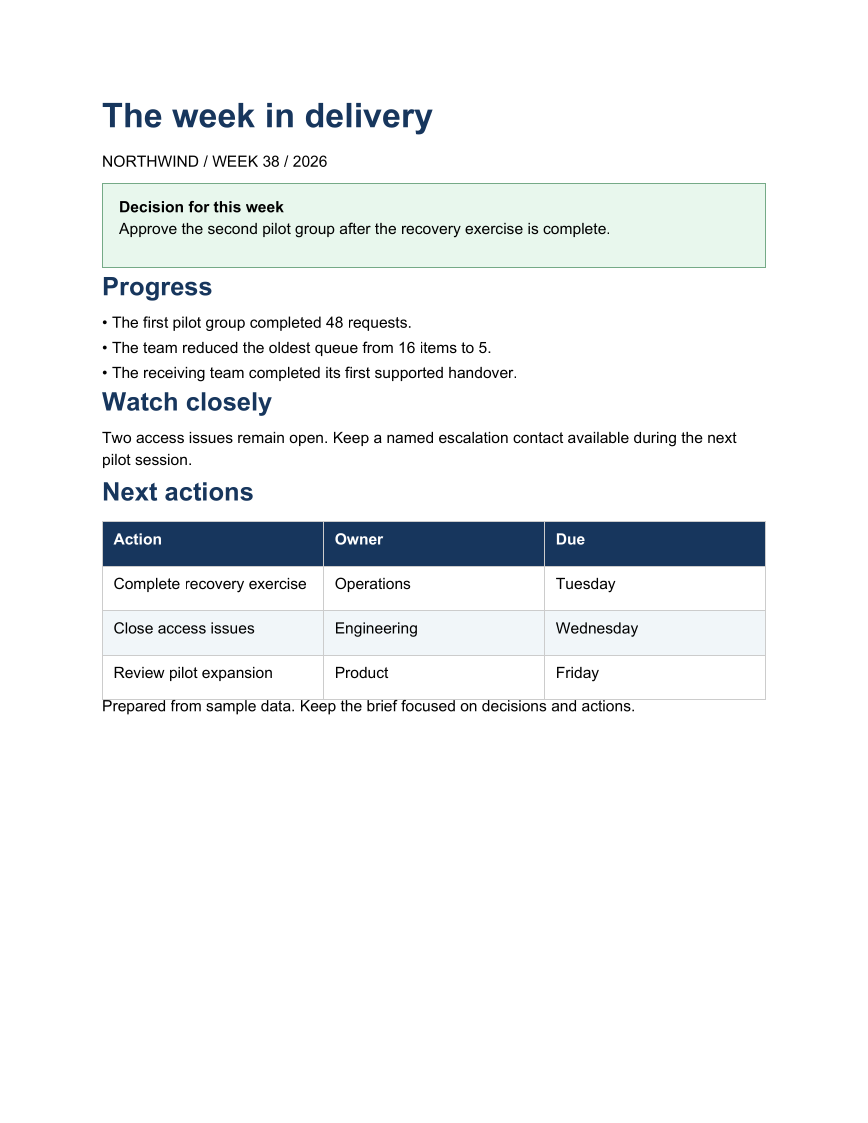
Give reviewers a short report they can act on. A highlighted decision appears first, followed by the progress and risks that explain it and an action table with owners.
Opens the generated download in a local browser tool. The C# example below creates the document.
- Start with
- Weekly progress, risks, and next actions
- Generate
How it works
Lead with the decision
Use a colored paragraph panel to make the requested decision stand out from the narrative.
Keep the supporting detail short
Separate progress bullets from the issue that needs attention.
Close with ownership
Put the next actions, owners, and due dates into a styled table. Add PDF metadata for the exported file.
The C# source
The example below shows the document API and layout used for this report. Follow the PDF guide for package setup in your own project.
using System.IO;
using OfficeIMO.Pdf;

namespace OfficeIMO.Examples.Showcase.Workflows;

/// <summary>Combines a decision panel, concise narrative, and action table in a weekly PDF brief.</summary>
internal static class WeeklyBrief {
    internal static void Create(string folder) {
        OfficeTheme theme = OfficeTheme.Default;
        OfficeColor muted = theme.Palette.TextMuted;
        OfficeColor warning = theme.Palette.Warning;
        string fonts = Path.Combine(AppContext.BaseDirectory, "Assets", "Fonts");
        var options = new PdfCreateOptions { PageSetup = { Footer = { Show = true } } }
            .UseFontFamily(new PdfEmbeddedFontFamily("Carlito",
                File.ReadAllBytes(Path.Combine(fonts, "Carlito-Regular.ttf")),
                File.ReadAllBytes(Path.Combine(fonts, "Carlito-Bold.ttf"))))
            .UsePdfUa(PdfComplianceProfile.PdfUa1);
        PdfDocument.Create(pdf => pdf.Content(content => content
            .Title("The week in delivery")
            .AddParagraph(p => p.AddText("Northwind · Week 38 · 2026").SetFontSize(OfficeLength.Points(theme.TypeScale.Caption.ToPoints())), color: muted)
            .AddPanelParagraph(p => {
                p.AddText("Decision for this week\n").SetBold();
                p.AddText(
                "Approve the second pilot group after the recovery exercise is complete.");
            })
            .H2("Progress")
            .AddList(new[] {
                "The first pilot group completed 48 requests.",
                "The team reduced the oldest queue from 16 items to 5.",
                "The receiving team completed its first supported handover."
            })
            .H2("Watch closely")
            .AddParagraph(p => { p.AddText("At risk: ").SetBold().SetColor(warning); p.AddText("two access issues remain open. Keep a named escalation contact available during the next pilot session."); })
            .H2("Next actions")
            .AddTable(new[] {
                new[] { "Action", "Owner", "Due" },
                new[] { "Complete recovery exercise", "Operations", "Tuesday" },
                new[] { "Close access issues", "Engineering", "Wednesday" },
                new[] { "Review pilot expansion", "Product", "Friday" }
            })
            .AddParagraph(p => p.AddText("Prepared from sample data. Keep the brief focused on decisions and actions.").SetFontSize(OfficeLength.Points(theme.TypeScale.Caption.ToPoints())), color: muted)),
            options)
            .Meta(title: "The week in delivery", author: "OfficeIMO")
            .Save(Path.Combine(folder, "example.pdf"));
    }
}
API used in this example
Use this in your project
Build the progress list and action rows from your reporting data. Retain the decision-first order so the report does not become a list of activity.
The PDF guide explains package setup and related document APIs.
Documents and scope
What the preview shows
The linked C# example generates this file. The page images are rendered from the downloadable PDF with Poppler.
What to keep in mind
The numbers and actions are demonstration data. This example formats a report; it does not collect live service telemetry.