PowerPoint · C# walkthrough
Board decision brief
Make a governance discussion easier to follow without hiding assumptions in a chart.
Opens the generated download in a local browser tool. The C# example below creates the document.
- Start with
- Investment options and approval conditions
- Generate
- PPTX + PDF
How it works
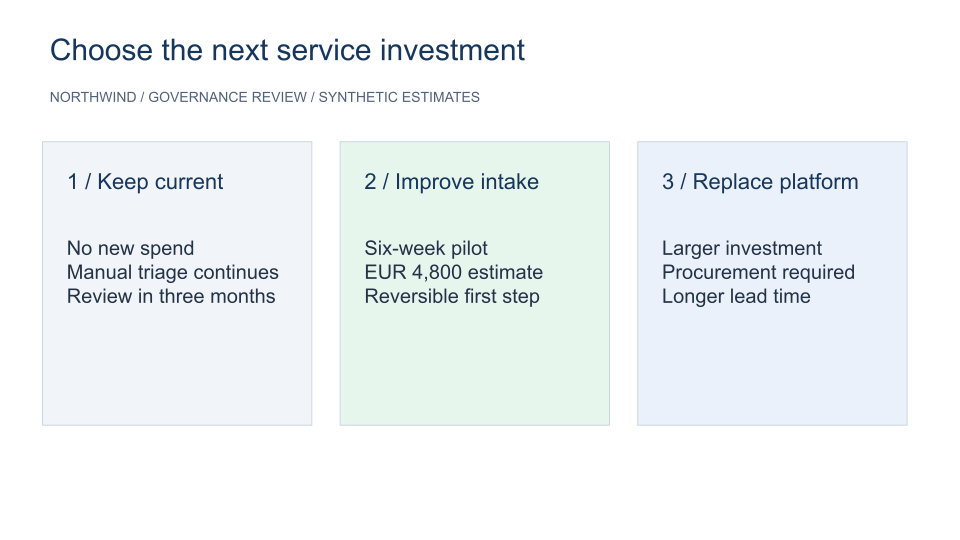
Compare three options
Use equal panels so cost and trade-offs are easy to scan.
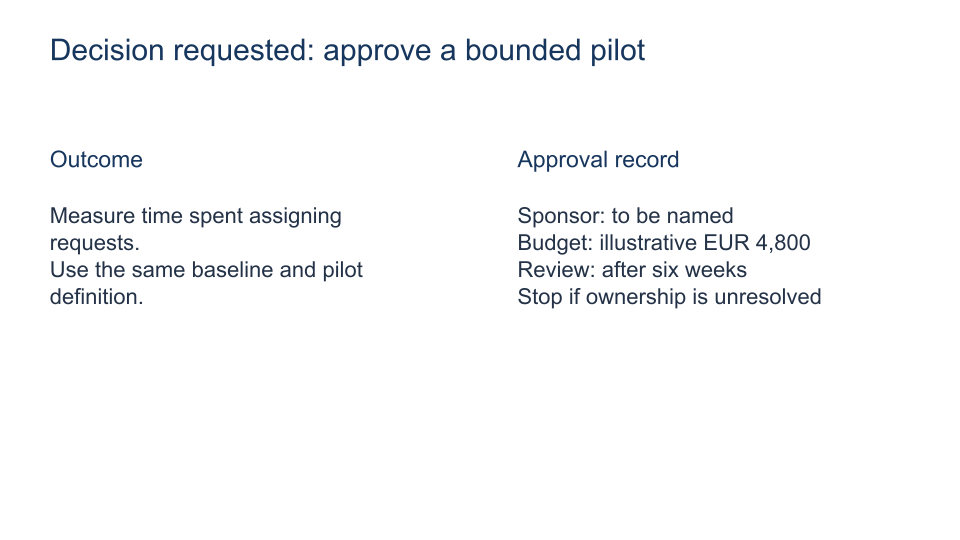
State the request
Separate the recommended pilot from an approved commitment.
Keep the record
Use speaker notes and a visible owner, budget and review window.
The rest of the document
The C# source
The example below shows the document API and layout used for this report. Follow the PowerPoint guide for package setup in your own project.
using OfficeIMO.PowerPoint;

namespace OfficeIMO.Examples.Showcase.Workflows {
    /// <summary>Builds a two-slide decision brief with explicit options, trade-offs and an approval record.</summary>
    internal static class BoardDecision {
        internal static void Create(string folder) {
            using var deck = PowerPointPresentation.Create(Path.Combine(folder, "example.pptx"));
            var options = deck.AddSlide();
            Text(options, "Choose the next service investment", 1.5, 1, 30, 2, 30, "17365D");
            Text(options, "NORTHWIND / GOVERNANCE REVIEW / SYNTHETIC ESTIMATES", 1.5, 3, 30, 1, 14, "526179");
            Card(options, 1.5, "1 / Keep current", "No new spend\nManual triage continues\nReview in three months", "F1F5F9");
            Card(options, 12, "2 / Improve intake", "Six-week pilot\nEUR 4,800 estimate\nReversible first step", "E7F6ED");
            Card(options, 22.5, "3 / Replace platform", "Larger investment\nProcurement required\nLonger lead time", "EAF1FB");
            options.Notes.Text = "Explain the assumptions behind each estimate. The green panel identifies the proposed option, not an approved commitment.";
            var decision = deck.AddSlide();
            Text(decision, "Decision requested: approve a bounded pilot", 1.5, 1, 30, 2.5, 30, "17365D");
            Text(decision, "Outcome", 1.5, 5, 13, 1, 23, "17365D");
            Text(decision, "Measure time spent assigning requests.\nUse the same baseline and pilot definition.", 1.5, 7, 14, 5, 22, "243247");
            Text(decision, "Approval record", 18, 5, 13, 1, 23, "17365D");
            Text(decision, "Sponsor: to be named\nBudget: illustrative EUR 4,800\nReview: after six weeks\nStop if ownership is unresolved", 18, 7, 13, 7, 22, "243247");
            decision.Notes.Text = "Record approval, conditions and the named sponsor in the actual governance record. This deck is a fictional example.";
            deck.Save();
        }
        private static void Card(PowerPointSlide slide, double x, string title, string body, string fill) {
            slide.AddRectangleCm(x, 5, 9.5, 10).Fill(fill).Stroke("CBD5E1", 1);
            Text(slide, title, x + 0.6, 5.8, 8.3, 2, 22, "17365D");
            Text(slide, body, x + 0.6, 8.2, 8.3, 5.5, 20, "243247");
        }
        private static void Text(PowerPointSlide slide, string value, double x, double y, double width, double height, int size, string color) {
            var box = slide.AddTextBoxCm(value, x, y, width, height); box.FontSize = size; box.Color = color;
        }
    }
}
API used in this example
Use this in your project
Use validated amounts and keep approval conditions in the actual governance record.
The PowerPoint guide explains package setup and related document APIs.
Documents and scope
What the preview shows
The C# source generates the downloadable file. The runner reopens the editable document, validates Open XML where applicable and exports a PDF. Page previews come from the generated output.
What to keep in mind
Use validated amounts and keep approval conditions in the actual governance record.