PowerPoint · C# walkthrough
An editable project roadmap deck
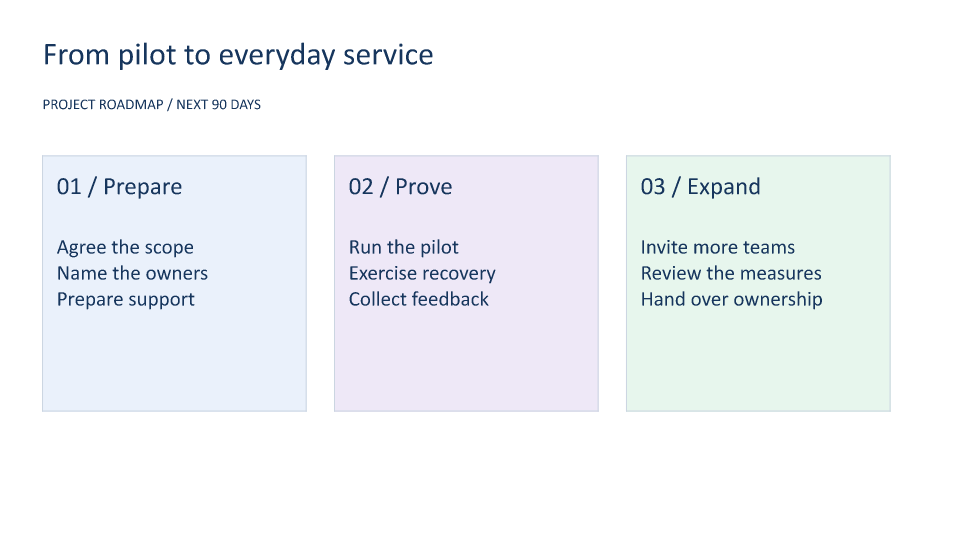
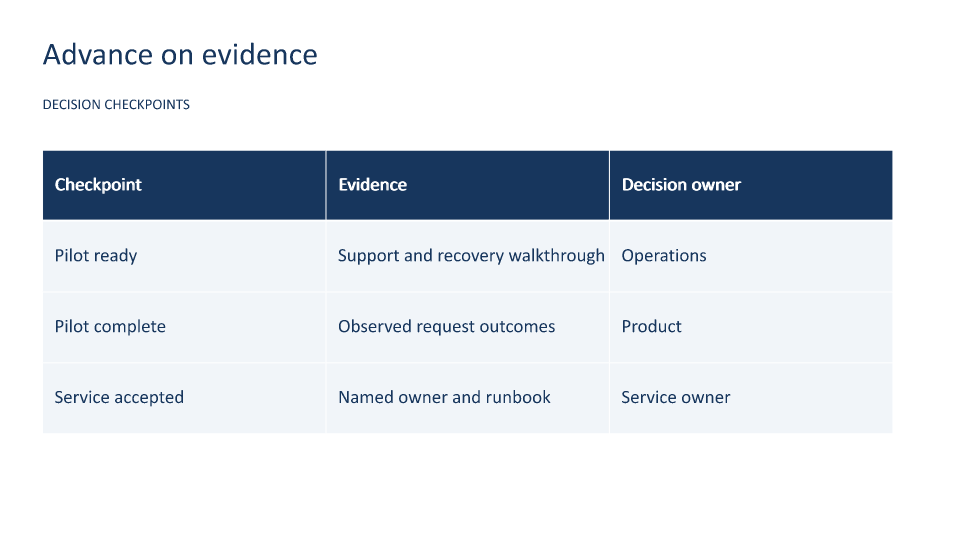
Explain the path from pilot to routine service with a small deck. The first slide shows phases; the second makes the evidence and decision owner for each checkpoint explicit.
Opens the generated download in a local browser tool. The C# example below creates the document.
- Start with
- Project phases, activities, and decision gates
- Generate
- PPTX + PDF
How it works
Build phase cards from data
Use arrays for phase labels, activities, and fills, and position native rectangles and text boxes in three columns.
Add the decision slide
Create a native PowerPoint table for checkpoints, evidence, and owners.
Keep the deck editable
Save the PPTX with shapes, text, and table cells intact. The walkthrough runner also exports the slides to images and PDF.
The rest of the document
The C# source
The example below shows the document API and layout used for this report. Follow the PowerPoint guide for package setup in your own project.
using System.IO;
using OfficeIMO.PowerPoint;

namespace OfficeIMO.Examples.Showcase.Workflows;

/// <summary>Creates an editable roadmap deck with phase cards and a decision table.</summary>
internal static class ProjectRoadmap {
    internal static void Create(string folder) {
        using PowerPointDocument deck = PowerPointDocument.Create(Path.Combine(folder, "example.pptx"));
        PowerPointSlide roadmap = deck.AddSlide();
        Heading(roadmap, "From pilot to everyday service", "PROJECT ROADMAP / NEXT 90 DAYS");
        string[] phases = { "01 / Prepare", "02 / Prove", "03 / Expand" };
        string[] details = { "Agree the scope\nName the owners\nPrepare support", "Run the pilot\nExercise recovery\nCollect feedback", "Invite more teams\nReview the measures\nHand over ownership" };
        string[] colors = { "EAF1FB", "EEE8F7", "E7F6ED" };
        for (int index = 0; index < phases.Length; index++) {
            double x = 1.5 + index * 10.3;
            roadmap.AddRectangle(OfficeIMO.OfficeLength.Centimeters(x), OfficeIMO.OfficeLength.Centimeters(5.5), OfficeIMO.OfficeLength.Centimeters(9.3), OfficeIMO.OfficeLength.Centimeters(9), phases[index]).Fill(colors[index]).Stroke("CBD5E1", global::OfficeIMO.OfficeLength.Points(1));
            Text(roadmap, phases[index], x + 0.5, 6.1, 8.3, 1.4, 25);
            Text(roadmap, details[index], x + 0.5, 8.3, 8.3, 5, 21);
        }

        PowerPointSlide gates = deck.AddSlide();
        Heading(gates, "Advance on evidence", "DECISION CHECKPOINTS");
        PowerPointTable table = gates.AddTable(4,3,global::OfficeIMO.OfficeLength.Centimeters(1.5),global::OfficeIMO.OfficeLength.Centimeters(5.3),global::OfficeIMO.OfficeLength.Centimeters(30),global::OfficeIMO.OfficeLength.Centimeters(10));
        string[,] values = {
            { "Checkpoint", "Evidence", "Decision owner" },
            { "Pilot ready", "Support and recovery walkthrough", "Operations" },
            { "Pilot complete", "Observed request outcomes", "Product" },
            { "Service accepted", "Named owner and runbook", "Service owner" }
        };
        for (int row = 0; row < 4; row++) {
            for (int column = 0; column < 3; column++) {
                var cell = table.GetCell(row, column);
                cell.Text = values[row, column];
                cell.FontSize = global::OfficeIMO.OfficeLength.Points(19);
                cell.Bold = row == 0;
                cell.FillColor = row == 0 ? "17365D" : "F1F5F9";
                cell.Color = OfficeColor.Parse(row == 0 ? "FFFFFF" : "17365D");
                cell.PaddingLeft = global::OfficeIMO.OfficeLength.Points(12);
                cell.VerticalAlignment = PowerPointTextVerticalAlignment.Center;
            }
        }
        deck.Save();

        void Heading(PowerPointSlide slide, string title, string subtitle) {
            Text(slide, title, 1.5, 1.3, 30, 1.8, 32);
            Text(slide, subtitle, 1.5, 3.4, 30, 1, 15);
        }
        void Text(PowerPointSlide slide, string value, double x, double y, double width, double height, int size) {
            var box = slide.AddTextBox(value,global::OfficeIMO.OfficeLength.Centimeters(x),global::OfficeIMO.OfficeLength.Centimeters(y),global::OfficeIMO.OfficeLength.Centimeters(width),global::OfficeIMO.OfficeLength.Centimeters(height));
            box.FontSize = global::OfficeIMO.OfficeLength.Points(size);
            box.Color = OfficeColor.Parse("17365D");
        }
    }
}
API used in this example
Use this in your project
Change the phase data and decision gates to match your delivery plan. Recheck text fit when a phase label or activity list becomes longer.
The PowerPoint guide explains package setup and related document APIs.
Documents and scope
What the preview shows
The linked C# example generates this file. The runner reopens and validates the PPTX, then exports each slide and a PDF review copy.
What to keep in mind
Previews show OfficeIMO's rendering of the generated slides. Fonts and layout can differ in other presentation applications.