PowerPoint · C# walkthrough
Pilot retrospective and experiments
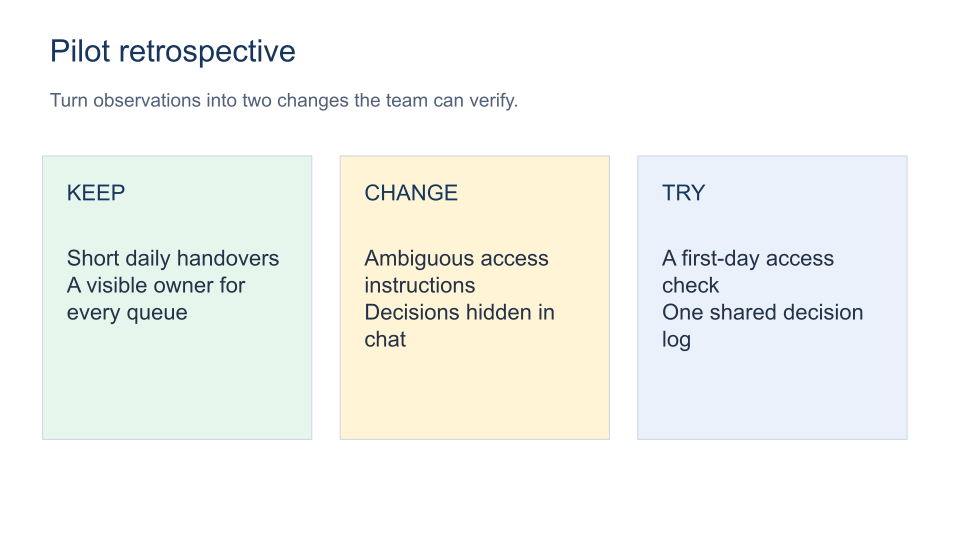
Turn a retrospective conversation into a small number of changes the team can verify.
Opens the generated download in a local browser tool. The C# example below creates the document.
- Start with
- Team observations and proposed experiments
- Generate
- PPTX + PDF
How it works
Group observations
Use three spaced panels for keep, change and try.
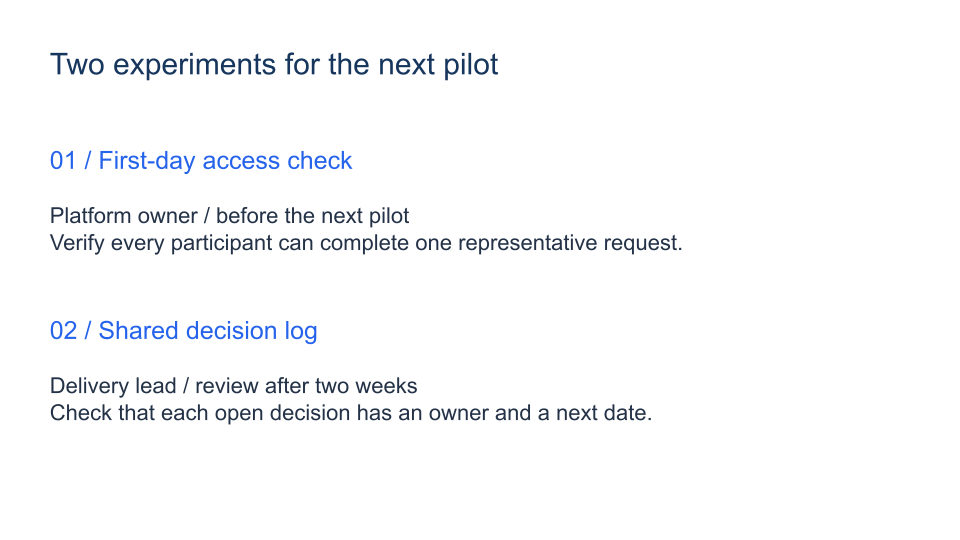
Choose two experiments
Keep the follow-through slide focused.
Verify the result
State what the owner will observe at the review.
The rest of the document
The C# source
The example below shows the document API and layout used for this report. Follow the PowerPoint guide for package setup in your own project.
using OfficeIMO.PowerPoint;

namespace OfficeIMO.Examples.Showcase.Workflows {
    /// <summary>Creates a retrospective board and a follow-through slide with owners and observable checks.</summary>
    internal static class Retrospective {
        internal static void Create(string folder) {
            using var deck = PowerPointPresentation.Create(Path.Combine(folder, "example.pptx"));
            var board = deck.AddSlide();
            Text(board, "Pilot retrospective", 1.5, 1, 30, 2, 31, "17365D");
            Text(board, "Turn observations into two changes the team can verify.", 1.5, 3, 30, 1.5, 19, "526179");
            string[] headings = { "KEEP", "CHANGE", "TRY" }, fills = { "E7F6ED", "FFF4D6", "EAF1FB" };
            string[] notes = { "Short daily handovers\nA visible owner for every queue", "Ambiguous access instructions\nDecisions hidden in chat", "A first-day access check\nOne shared decision log" };
            for (int i = 0; i < 3; i++) {
                double x = 1.5 + i * 10.5;
                board.AddRectangleCm(x, 5.5, 9.5, 10).Fill(fills[i]).Stroke("CBD5E1", 1);
                Text(board, headings[i], x + 0.6, 6.2, 8.3, 1.5, 22, "17365D");
                Text(board, notes[i], x + 0.6, 8.5, 8.3, 6, 22, "243247");
            }
            board.Notes.Text = "These observations are fictional. Ask for specific examples and separate process friction from blame.";
            var follow = deck.AddSlide();
            Text(follow, "Two experiments for the next pilot", 1.5, 1.5, 30, 2, 30, "17365D");
            Text(follow, "01 / First-day access check", 1.5, 5, 30, 1.5, 25, "2563EB");
            Text(follow, "Platform owner / before the next pilot\nVerify every participant can complete one representative request.", 1.5, 7, 29, 3, 22, "243247");
            Text(follow, "02 / Shared decision log", 1.5, 11, 30, 1.5, 25, "2563EB");
            Text(follow, "Delivery lead / review after two weeks\nCheck that each open decision has an owner and a next date.", 1.5, 13, 29, 3, 22, "243247");
            follow.Notes.Text = "Agree the owners and review dates with the team. Do not treat an assigned action as a completed improvement.";
            deck.Save();
        }
        private static void Text(PowerPointSlide slide, string value, double x, double y, double width, double height, int size, string color) {
            var box = slide.AddTextBoxCm(value, x, y, width, height); box.FontSize = size; box.Color = color;
        }
    }
}
API used in this example
Use this in your project
Use specific observations, agree owners and dates, and avoid treating an assigned action as completed work.
The PowerPoint guide explains package setup and related document APIs.
Documents and scope
What the preview shows
The C# source generates the downloadable file. The runner reopens the editable document, validates Open XML where applicable and exports a PDF. Page previews come from the generated output.
What to keep in mind
Use specific observations, agree owners and dates, and avoid treating an assigned action as completed work.