Project · C# walkthrough
Delivery Gantt with progress
Keep delivery dates and progress together in a report that can be shared as an image or opened as a Word document.
Opens the generated download in a local browser tool. The C# example below creates the document.
- Start with
- Task durations, dependencies, and actual duration
- Generate
- XML + PNG + SVG + PDF + DOCX
How it works
Create the task sequence
Define a working calendar, five tasks, their dependencies, and actual/remaining duration for the completed and active work.
Calculate and snapshot the plan
Calculate the schedule, inspect its diagnostics, and create a Gantt snapshot with a fixed status date. Apply the calculated dates explicitly before saving the Project XML.
Export the chart and editable data
Register regular and bold fonts, render a 300-DPI PNG and vector SVG/PDF, then create a Word report with a chart and editable tables.
The C# source
The example below shows the document API and layout used for this report. Follow the Project guide for package setup in your own project.
using OfficeIMO.Drawing;
using OfficeIMO.Project;
using OfficeIMO.Workflows;

namespace OfficeIMO.Examples.Showcase.Workflows;

/// <summary>Creates a calculated delivery plan, a progress Gantt, and an editable Word report.</summary>
internal static class ProjectDeliveryGantt {
    internal static void Create(string folder) {
        using var project = ProjectDocument.Create();
        project.Name = "Service launch / delivery plan";
        project.Calendar = project.Calendars.AddStandardWorkingWeek();
        project.Settings.StartDate = new DateTime(2026, 10, 5, 8, 0, 0);

        var scope = project.Tasks.Add("Agree scope and acceptance");
        var design = project.Tasks.Add("Design the service");
        var build = project.Tasks.Add("Build and integrate");
        var verify = project.Tasks.Add("Verify the release");
        var launch = project.Tasks.Add("Launch milestone");
        scope.Duration = ProjectDuration.WorkingDays(2);
        design.Duration = ProjectDuration.WorkingDays(2);
        build.Duration = ProjectDuration.WorkingDays(4);
        verify.Duration = ProjectDuration.WorkingDays(2);
        launch.Duration = ProjectDuration.WorkingHours(0);
        project.Dependencies.Add(scope, design);
        project.Dependencies.Add(design, build);
        project.Dependencies.Add(build, verify);
        project.Dependencies.Add(verify, launch);
        scope.ActualStart = project.Settings.StartDate;
        scope.ActualDuration = ProjectDuration.WorkingHours(16);
        scope.RemainingDuration = ProjectDuration.WorkingHours(0);
        design.ActualStart = new DateTime(2026, 10, 7, 8, 0, 0);
        design.ActualDuration = ProjectDuration.WorkingHours(8);
        design.RemainingDuration = ProjectDuration.WorkingHours(8);

        var schedule = project.CalculateSchedule(new ProjectScheduleOptions { CalculateAssignments = true });
        schedule.Report.ThrowIfErrors();
        var view = project.CreateView(schedule, new ProjectViewOptions {
            Kind = ProjectViewKind.Gantt, Timescale = ProjectViewTimescale.Day,
            PageWidth = 1200, PageHeight = 675,
            StatusDate = new DateTime(2026, 10, 8),
            Columns = new[] { ProjectViewColumn.Uid, ProjectViewColumn.Name }
        });
        project.ApplySchedule(schedule);
        project.Save(Path.Combine(folder, "example.xml"));

        // The checkout runner copies these bundled, openly licensed font faces.
        string fonts = Path.Combine(AppContext.BaseDirectory, "Assets", "Fonts");
        var faces = new OfficeFontFaceCollection()
            .Add("Arial", File.ReadAllBytes(Path.Combine(fonts, "Carlito-Regular.ttf")))
            .Add("Arial", File.ReadAllBytes(Path.Combine(fonts, "Carlito-Bold.ttf")), OfficeFontStyle.Bold);
        var typography = new OfficeRenderingProfile("delivery-report", faces, OfficeManagedTextShapingProvider.Instance);
        var images = new ProjectImageExportOptions().UseRenderingProfile(typography).UseQuality(OfficeImageExportQuality.Print);
        File.WriteAllBytes(Path.Combine(folder, "preview.png"), ProjectReportWorkflow.ExportImages(view, options: images).Single().Bytes);
        File.WriteAllText(Path.Combine(folder, "preview.svg"), ProjectReportWorkflow.ToSvg(view, typography).Single());
        File.WriteAllBytes(Path.Combine(folder, "preview.pdf"), ProjectReportWorkflow.ToPdf(view, typography: typography));
        using var word = ProjectReportWorkflow.CreateWord(view, new ProjectOfficeReportOptions { Images = images });
        word.Save(Path.Combine(folder, "report.docx"));
    }
}
API used in this example
ProjectDurationProjectReportWorkflowProjectViewColumnOfficeFontFaceCollectionOfficeFontStyleOfficeImageExportQualityOfficeManagedTextShapingProviderOfficeRenderingProfileProjectDocumentProjectImageExportOptionsProjectOfficeReportOptionsProjectScheduleOptionsProjectViewKindProjectViewOptionsProjectViewTimescale
Use this in your project
Replace the task names, working durations, progress values, and status date with your delivery data. The status date is explicit so rerunning the example does not depend on today.
The Project guide explains package setup and related document APIs.
Documents and scope
What the preview shows
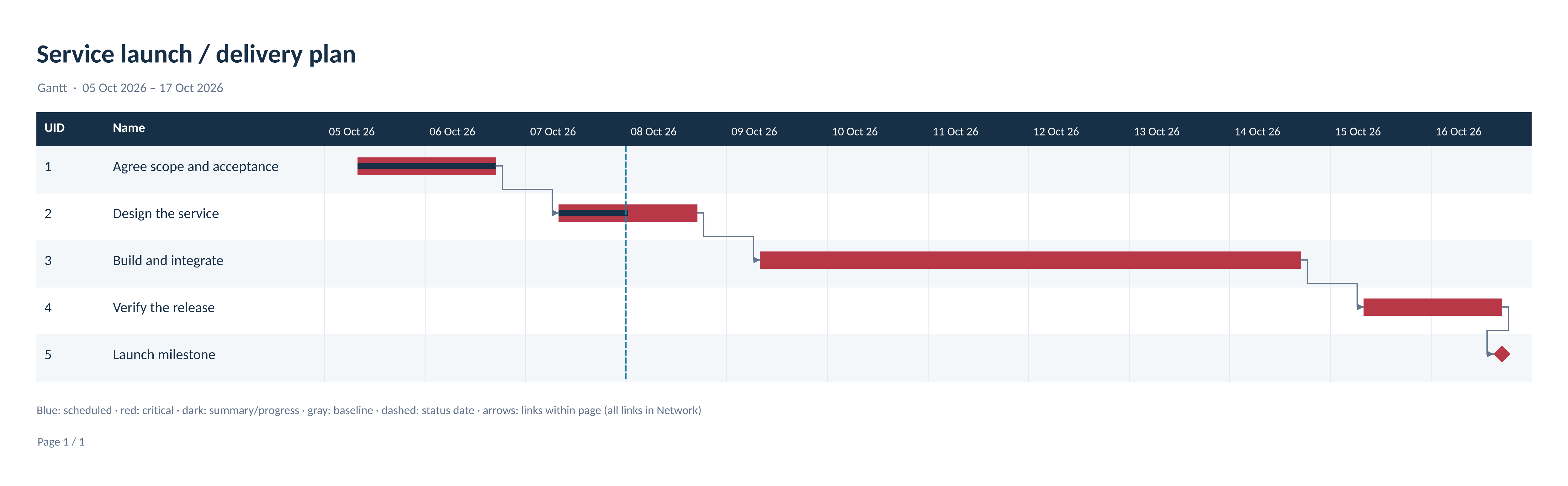
The complete C# example generates these exports. The runner reopens and validates the Project XML and any Office documents, and verifies the PDF page count. The preview is the actual 300-DPI PNG export.
What to keep in mind
Calculated report views do not reconstruct saved native Project view styles. Charts in Word and PowerPoint are images; accompanying data tables remain editable. PNG has a fixed pixel resolution; use SVG for vector zoom.