Excel · PowerShell walkthrough
Budget and forecast review
Give a finance reviewer the detail behind the forecast and a short decision brief from the same data snapshot.
Opens the generated download in a local browser tool. The PowerShell example below creates the document.
- Start with
- Synthetic CSV snapshot
- Generate
- XLSX + DOCX + PDF
How it works
Prepare the input snapshot
Use the synthetic USD sample or provide Department, Owner, Budget, Actual, Forecast and Action columns. Use non-negative USD amounts with a dot decimal separator, at most two decimal places, and no grouping separators, such as 1234.50.
Calculate the review
The workbook calculates totals and forecast variance, retains input validation, and identifies positive variance as overspend. The review derives its figures and owner decisions from the same CSV.
Review the distribution copy
Review the departments with a positive forecast variance and agree an action with each owner. Inspect the PDF before distribution, keep the Word copy for decision notes and use the workbook to trace each total back to its department.
The PowerShell source
Follow the code below to see how the input becomes the report. Change the data and output folder for your own review.
Use PSWriteOffice in your reporting session:
Import-Module PSWriteOffice<#
.SYNOPSIS
Creates an editable forecast workbook and a management review from the same CSV.
.DESCRIPTION
The checked-in CSV is synthetic annual spending in USD. Positive forecast variance means
overspend. Workbook formulas retain the calculation; the Word/PDF review records the same
input snapshot. Regenerate the review after editing the workbook or changing the CSV.
.EXAMPLE
pwsh -NoProfile -File ./BudgetForecastReview.ps1 -InputPath ./BudgetForecast.csv -OutputDirectory ./out
.EXAMPLE
./BudgetForecastReview.ps1 -InputPath ./Finance.csv -AsOfDate 2026-09-30 -OutputDirectory ./out
#>
[CmdletBinding()]
param(
[Parameter(Mandatory)][string] $OutputDirectory,
[string] $InputPath = '',
[datetime] $AsOfDate = '2026-09-30',
[string] $ModuleVersion
)
$ErrorActionPreference = 'Stop'
$usingSampleInput = -not $InputPath
if (-not $InputPath) { $InputPath = Join-Path $PSScriptRoot 'Data/BudgetForecast.csv' }
$inputLabel = if ($usingSampleInput) { 'Synthetic USD sample' } else { 'USD forecast snapshot' }
if ($ModuleVersion) {
Import-Module PSWriteOffice -RequiredVersion $ModuleVersion -ErrorAction Stop
} else {
Import-Module PSWriteOffice -ErrorAction Stop
}
$culture = [Globalization.CultureInfo]::InvariantCulture
$money = [Globalization.CultureInfo]::GetCultureInfo('en-US')
$inputRows = @(Import-Csv -LiteralPath $InputPath -Encoding UTF8)
if (-not $inputRows.Count) { throw 'Provide at least one department in the budget CSV.' }
$rows = @(foreach ($item in $inputRows) {
foreach ($field in 'Department','Owner','Budget','Actual','Forecast','Action') {
if ($field -notin $item.PSObject.Properties.Name -or [string]::IsNullOrWhiteSpace($item.$field)) {
throw "Every budget row needs a value for $field."
}
}
$amounts = @{}
foreach ($field in 'Budget','Actual','Forecast') {
$amountText = ([string]$item.$field).Trim()
if ($amountText -cnotmatch '^[0-9]+(?:\.[0-9]{1,2})?$') {
throw "$field must be non-negative USD with at most two decimal places and no group separators for $($item.Department)."
}
$value = [decimal]::Parse($amountText, [Globalization.NumberStyles]::AllowDecimalPoint, $culture)
$amounts[$field] = $value
}
[pscustomobject]@{ Department=$item.Department; Owner=$item.Owner; Budget=$amounts.Budget; Actual=$amounts.Actual;
Forecast=$amounts.Forecast; Variance=$amounts.Forecast-$amounts.Budget; Action=$item.Action }
})
[decimal]$totalBudget = 0
[decimal]$totalActual = 0
[decimal]$totalForecast = 0
foreach ($item in $rows) { $totalBudget += $item.Budget; $totalActual += $item.Actual; $totalForecast += $item.Forecast }
$variance = $totalForecast - $totalBudget
$exceptions = @($rows | Where-Object Variance -gt 0 | Sort-Object Variance -Descending)
$lastRow = $rows.Count + 1
New-Item -ItemType Directory -Path $OutputDirectory -Force | Out-Null
$xlsx = Join-Path $OutputDirectory 'BudgetForecastReview.xlsx'
$docx = Join-Path $OutputDirectory 'BudgetForecastReview.docx'
$pdf = Join-Path $OutputDirectory 'BudgetForecastReview.pdf'
#region Excerpt:pswriteoffice-budget-review
ExcelNew -Path $xlsx -EvaluateFormulas {
ExcelSheet 'Review' {
ExcelGridlines -Hide
ExcelColumn -ColumnName A -Width 44
ExcelColumn -ColumnName B -Width 24
ExcelCell -Address A1 -Value 'Annual forecast review'
ExcelRow -Row 1 -Bold $true -Height 32
ExcelCell -Address A2 -Value "Snapshot: $($AsOfDate.ToString('yyyy-MM-dd')) | USD"
ExcelCell -Address A3 -Value 'Approved budget'
ExcelCell -Address B3 -Formula "SUM(Detail!C2:C$lastRow)" -NumberFormat '$#,##0.00'
ExcelCell -Address A4 -Value 'Actual spend'
ExcelCell -Address B4 -Formula "SUM(Detail!D2:D$lastRow)" -NumberFormat '$#,##0.00'
ExcelCell -Address A5 -Value 'Year-end forecast'
ExcelCell -Address B5 -Formula "SUM(Detail!E2:E$lastRow)" -NumberFormat '$#,##0.00'
ExcelCell -Address A6 -Value 'Forecast above / below budget'
ExcelCell -Address B6 -Formula 'B5-B3' -NumberFormat '[Red]$#,##0.00;[Green]-$#,##0.00;$0.00'
ExcelRow -Row 6 -Bold $true -BackgroundColor '#EFF6FF' -FirstColumn 1 -LastColumn 2
ExcelCell -Address A8 -Value 'Positive variance is overspend. Review each exception with its owner.'
ExcelRow -Row 8 -WrapText $true -Height 34
ExcelOrientation -Orientation Landscape
ExcelPageSetup -FitToWidth 1 -FitToHeight 0
ExcelPrintArea -Range 'A1:B8'
}
ExcelSheet 'Detail' {
ExcelTable -Data $rows -TableName 'BudgetForecast' -TableStyle TableStyleMedium4
ExcelFreeze -TopRows 1
ExcelColumn -ColumnName A -Width 36
ExcelColumn -ColumnName B -Width 24
foreach ($column in 'C','D','E','F') { ExcelColumn -ColumnName $column -Width 20 }
ExcelColumn -ColumnName G -Width 62
foreach ($header in 'Budget','Actual','Forecast','Variance') { ExcelColumnStyleByHeader -Header $header -NumberFormat '$#,##0.00' }
for ($row = 2; $row -le $lastRow; $row++) {
ExcelCell -Address "F$row" -Formula "E$row-C$row" -NumberFormat '[Red]$#,##0.00;[Green]-$#,##0.00;$0.00'
ExcelRow -Row $row -WrapText $true
}
ExcelValidationDecimal -Range "C2:E$lastRow" -Operator GreaterThanOrEqual -Formula1 0 -AllowBlank:$false -ErrorTitle 'Non-negative USD amount' -ErrorMessage 'Enter zero or a positive amount.'
ExcelOrientation -Orientation Landscape
ExcelPageSetup -FitToWidth 1 -FitToHeight 0
ExcelPrintTitles -FirstRow 1 -LastRow 1
ExcelPrintArea -Range "A1:G$lastRow"
}
}
$reviewRows = $rows | Select-Object Department,
@{Name='Budget (USD)';Expression={$_.Budget.ToString('N2',$money)}},
@{Name='Forecast (USD)';Expression={$_.Forecast.ToString('N2',$money)}},
@{Name='Variance (USD)';Expression={$_.Variance.ToString('+#,##0.00;-#,##0.00;0.00',$money)}}
WordNew -Path $docx {
WordHeader { WordParagraph -Text "FINANCE | $inputLabel | $($AsOfDate.ToString('yyyy-MM-dd'))" }
WordFooter { WordPageNumber -IncludeTotalPages }
WordParagraph { WordParagraphStyle -SpacingAfterPoints 12 -KeepWithNext $true; WordText 'Budget and forecast review' -Bold -FontSize 25 -Color '17365D' }
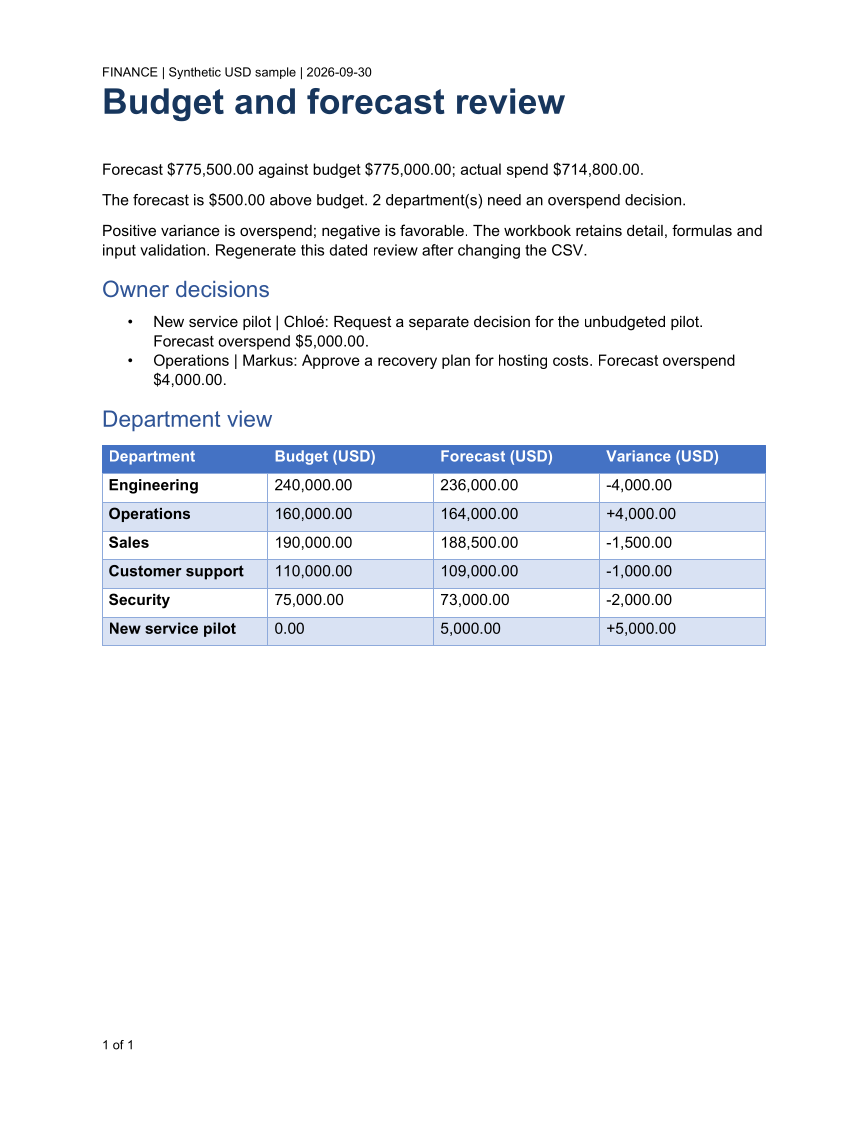
WordParagraph -Text "Forecast $($totalForecast.ToString('C2',$money)) against budget $($totalBudget.ToString('C2',$money)); actual spend $($totalActual.ToString('C2',$money))."
WordParagraph -Text "$(if ($variance -eq 0) {'The forecast matches the approved budget.'} else { "The forecast is $([math]::Abs($variance).ToString('C2',$money)) $(if ($variance -gt 0) {'above'} else {'below'}) budget." }) $($exceptions.Count) department(s) need an overspend decision."
WordParagraph -Text 'Positive variance is overspend; negative is favorable. The workbook retains detail, formulas and input validation. Regenerate this dated review after changing the CSV.'
WordParagraph -Text 'Owner decisions' -Style Heading1 { WordParagraphStyle -KeepWithNext $true -SpacingBeforePoints 12 -SpacingAfterPoints 6 }
WordList -Style Bulleted {
foreach ($item in $exceptions) {
$decision = WordListItem -Text "$($item.Department) | $($item.Owner): $($item.Action). Forecast overspend $($item.Variance.ToString('C2',$money))." -PassThru
WordParagraphStyle -Paragraph $decision -KeepLinesTogether $true
}
if (-not $exceptions.Count) { WordListItem -Text 'No overspend exceptions. Confirm the remaining forecast assumptions with department owners.' }
}
WordParagraph -Text 'Department view' -Style Heading1 { WordParagraphStyle -KeepWithNext $true -SpacingBeforePoints 12 -SpacingAfterPoints 6 }
$table = WordTable -InputObject $reviewRows -Style GridTable4Accent1 -Layout AutoFitToWindow -PassThru
$table.RepeatHeaderRowAtTheTopOfEachPage = $true
foreach ($tableRow in $table.Rows) { $tableRow.AllowRowToBreakAcrossPages = $false }
$table | Get-OfficeWordTableCell | ForEach-Object {
$_.MarginTopCentimeters = 0.12; $_.MarginBottomCentimeters = 0.12
$_.MarginLeftCentimeters = 0.16; $_.MarginRightCentimeters = 0.16
}
}
Export-OfficeDocumentPdf -InputPath $docx -Path $pdf
#endregion
Get-Item -LiteralPath $xlsx,$docx,$pdf | Select-Object Name,Length
API used in this example
ExcelCellWordParagraphExcelColumnExcelRowWordParagraphStyleExcelOrientationExcelPageSetupExcelPrintAreaExcelSheetWordListItemExcelColumnStyleByHeaderExcelFreezeExcelGridlinesExcelNewExcelPrintTitlesExcelTableExcelValidationDecimalExport-OfficeDocumentPdfGet-OfficeWordTableCellWordFooterWordHeaderWordListWordNewWordPageNumberWordTableWordText
Use your own data
Replace the synthetic departments and actions with an approved forecast. Keep the currency explicit. Positive variance means overspend; a zero-budget pilot remains a visible exception. Edit the CSV and regenerate the review for distribution.
Set OutputDirectory to the folder for your report. For CSV examples, set InputPath to your reviewed data and AsOfDate to the review date. The code calculates the workbook and written review from the same snapshot.
Install the module once with Install-Module PSWriteOffice -Scope CurrentUser if needed. The example uses the installed module in PowerShell 7 or Windows PowerShell 5.1.
The PSWriteOffice guide explains package setup and related document APIs.
Documents and scope
What the preview shows
The script and CSV generate all three native files with the PSWriteOffice version documented by the command catalog. The PNG is an independent Poppler render of the PDF.
What to keep in mind
The data is synthetic. The Word/PDF review is a dated snapshot; regenerate it after changing the input. Larger inputs can span several pages. Check pagination and fonts before distributing the PDF.