Word · PowerShell walkthrough
Patch compliance report from PowerShell
Turn patch status objects into a report that a service owner can review: compliance, exceptions, and a clear follow-up list, with an editable Word file and a PDF for distribution.
Opens the generated download in a local browser tool. The PowerShell example below creates the document.
- Start with
- PowerShell objects
- Generate
- DOCX + PDF
How it works
Prepare the patch inventory
Replace the sample site objects with your own approved inventory. Keep the Site, Servers, Patched, Pending and Status fields so the summary and detail table use the same data.
Create a report with clear hierarchy
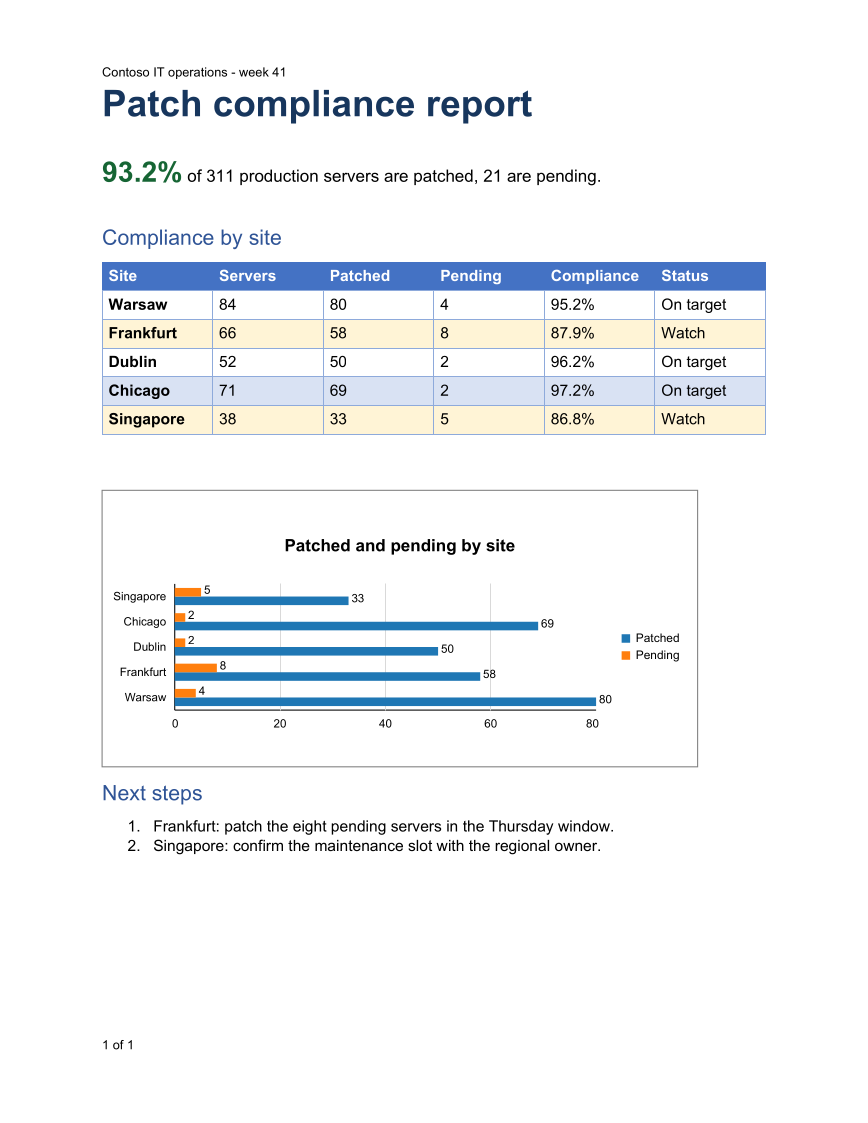
The script builds a title, summary and detailed table, with consistent colors, cell padding and spacing. The DOCX remains editable for review notes.
Export the distribution copy
Export-OfficeDocumentPdf converts the saved Word file with the first-party converter. Check the PDF before distribution, especially after adding more rows or changing fonts.
The PowerShell source
Follow the code below to see how the input becomes the report. Change the data and output folder for your own review.
Use PSWriteOffice in your reporting session:
Import-Module PSWriteOffice<#
.SYNOPSIS
Builds the patch compliance report shown on the PSWriteOffice product page.
.DESCRIPTION
Creates a Word report from PowerShell objects with PSWriteOffice, then exports it to PDF.
The site build runs this file with the module version its command catalog was generated from,
so the downloadable DOCX and PDF come from the code shown beside them.
.EXAMPLE
pwsh -NoProfile -File .\PatchComplianceReport.ps1 -OutputDirectory .\out
#>
[CmdletBinding()]
param(
[Parameter(Mandatory)][string] $OutputDirectory,
[string] $ModuleVersion
)
$ErrorActionPreference = 'Stop'
if ($ModuleVersion) { Import-Module PSWriteOffice -RequiredVersion $ModuleVersion } else { Import-Module PSWriteOffice }
New-Item -ItemType Directory -Path $OutputDirectory -Force | Out-Null
$docxPath = Join-Path $OutputDirectory 'PatchComplianceReport.docx'
$pdfPath = Join-Path $OutputDirectory 'PatchComplianceReport.pdf'
#region Excerpt:pswriteoffice-patch-report
# Sample inventory; replace it with your own query. Any objects with properties work.
$sites = @(
[pscustomobject]@{ Site = 'Warsaw'; Servers = 84; Patched = 80; Pending = 4; Status = 'On target' }
[pscustomobject]@{ Site = 'Frankfurt'; Servers = 66; Patched = 58; Pending = 8; Status = 'Watch' }
[pscustomobject]@{ Site = 'Dublin'; Servers = 52; Patched = 50; Pending = 2; Status = 'On target' }
[pscustomobject]@{ Site = 'Chicago'; Servers = 71; Patched = 69; Pending = 2; Status = 'On target' }
[pscustomobject]@{ Site = 'Singapore'; Servers = 38; Patched = 33; Pending = 5; Status = 'Watch' }
)
$servers = ($sites | Measure-Object Servers -Sum).Sum
$patched = ($sites | Measure-Object Patched -Sum).Sum
$rows = $sites | Select-Object Site, Servers, Patched, Pending,
@{ Name = 'Compliance'; Expression = { "$([math]::Round(100 * $_.Patched / $_.Servers, 1))%" } }, Status
New-OfficeWord -Path $docxPath {
WordHeader -Type Default { WordParagraph -Text 'Contoso IT operations - week 41' }
WordFooter -Type Default { WordPageNumber -IncludeTotalPages }
WordParagraph {
WordParagraphStyle -SpacingAfterPoints 14 -KeepWithNext $true
WordText 'Patch compliance report' -Bold -FontSize 26 -Color '17365D'
}
WordParagraph {
WordText "$([math]::Round(100 * $patched / $servers, 1))%" -Bold -FontSize 20 -Color '166534'
WordText " of $servers production servers are patched, $($servers - $patched) are pending." -FontSize 12
}
WordParagraph {
WordParagraphStyle -Style Heading1 -SpacingBeforePoints 16 -SpacingAfterPoints 8 -KeepWithNext $true
WordText 'Compliance by site' -Bold -FontSize 15 -Color '17365D'
}
$table = WordTable -InputObject $rows -Style GridTable4Accent1 -Layout AutoFitToWindow -PassThru {
WordTableCondition -FilterScript { $_.Status -eq 'Watch' } -BackgroundColor '#fff4d6'
}
$table | Get-OfficeWordTableCell | ForEach-Object {
$_.MarginTopCentimeters = 0.12
$_.MarginBottomCentimeters = 0.12
$_.MarginLeftCentimeters = 0.16
$_.MarginRightCentimeters = 0.16
}
WordParagraph {
WordParagraphStyle -SpacingBeforePoints 14 -SpacingAfterPoints 12
WordChart -Type Bar -InputObject $rows -CategoryProperty Site -SeriesProperty Patched, Pending `
-Title 'Patched and pending by site' -Legend -FitToPageWidth -WidthFraction 1 -HeightPixels 260
}
WordParagraph {
WordParagraphStyle -Style Heading1 -SpacingBeforePoints 10 -SpacingAfterPoints 8 -KeepWithNext $true
WordText 'Next steps' -Bold -FontSize 15 -Color '17365D'
}
WordList -Style Numbered {
WordListItem -Text 'Frankfurt: patch the eight pending servers in the Thursday window.'
WordListItem -Text 'Singapore: confirm the maintenance slot with the regional owner.'
}
}
Export-OfficeDocumentPdf -InputPath $docxPath -Path $pdfPath
#endregion
Get-Item -LiteralPath $docxPath, $pdfPath | Select-Object Name, Length
API used in this example
Use your own data
Group the inventory by service or business owner, replace the example branding, and add exception owners and review dates. Generate from a reviewed data snapshot so every recipient sees the same report.
Set OutputDirectory to the folder for your report. For CSV examples, set InputPath to your reviewed data and AsOfDate to the review date. The code calculates the workbook and written review from the same snapshot.
Install the module once with Install-Module PSWriteOffice -Scope CurrentUser if needed. The example uses the installed module in PowerShell 7 or Windows PowerShell 5.1.
The PSWriteOffice guide explains package setup and related document APIs.
Documents and scope
What the preview shows
The downloadable DOCX and PDF come from the PowerShell script shown beside them, run against the PSWriteOffice version the command catalog documents. The preview is an independent Poppler render of that PDF.
What to keep in mind
The inventory in the script is sample data. The report uses the PSWriteOffice Word cmdlets and its built-in table style; the PDF is the first-party OfficeIMO conversion of the DOCX, so pagination can differ from Microsoft Word.