RTF · C# walkthrough
Service desk handover reference
Give support colleagues a compact reference they can edit in an RTF-capable application.
- Start with
- Handover fields and communication guidance
- Generate
- RTF + PDF
How it works
Choose essential fields
Keep request, state, next action and next update together.
Show useful wording
Provide a specific example for each field.
Close the loop
Explain acknowledgment and the next update in plain language.
The C# source
The example below shows the document API and layout used for this report. Follow the RTF guide for package setup in your own project.
using OfficeIMO.Rtf;

namespace OfficeIMO.Examples.Showcase.Workflows {
    /// <summary>Creates an editable RTF desk reference for clear, privacy-conscious service handovers.</summary>
    internal static class DeskReference {
        internal static void Create(string folder) {
            var document = RtfDocument.Create();
            document.Info.Title = "Service desk handover reference";
            document.Info.Author = "OfficeIMO";
            int navy = document.AddColor(23, 54, 93), pale = document.AddColor(234, 241, 251);
            Heading("Service desk handover", 24);
            document.AddParagraph("QUICK REFERENCE / SYNTHETIC SERVICE WORKFLOW");
            Heading("Before you hand over");
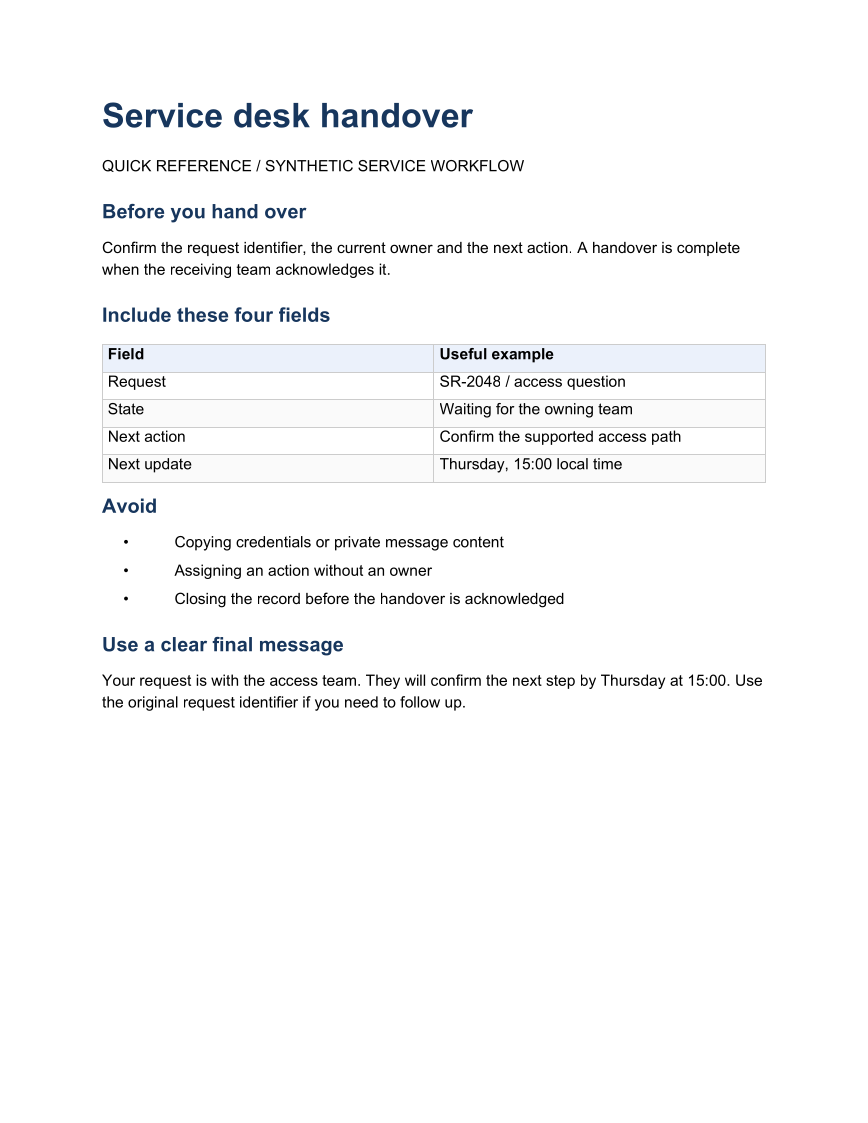
            document.AddParagraph("Confirm the request identifier, the current owner and the next action. A handover is complete when the receiving team acknowledges it.");
            Heading("Include these four fields");
            string[][] values = {
                new[] { "Field", "Useful example" },
                new[] { "Request", "SR-2048 / access question" },
                new[] { "State", "Waiting for the owning team" },
                new[] { "Next action", "Confirm the supported access path" },
                new[] { "Next update", "Thursday, 15:00 local time" }
            };
            var table = document.AddTable(values.Length, 2);
            table.Rows[0].RepeatHeader = true; table.Rows[0].SetBackgroundColor(pale);
            for (int row = 0; row < values.Length; row++)
                for (int column = 0; column < 2; column++) table.Rows[row].Cells[column].AddParagraph(values[row][column]);
            Heading("Avoid");
            foreach (string item in new[] { "Copying credentials or private message content", "Assigning an action without an owner", "Closing the record before the handover is acknowledged" })
                document.AddParagraph(item).SetList(kind: RtfListKind.Bullet).SetIndentation(leftTwips: 540, firstLineTwips: -240);
            Heading("Use a clear final message");
            document.AddParagraph("Your request is with the access team. They will confirm the next step by Thursday at 15:00. Use the original request identifier if you need to follow up.");
            File.WriteAllText(Path.Combine(folder, "example.rtf"), document.ToRtf());
            void Heading(string text, double size = 14) {
                var paragraph = document.AddParagraph(text); paragraph.SpaceBeforeTwips = 220; paragraph.SpaceAfterTwips = 140;
                foreach (var run in paragraph.Runs) { run.FontSize = size; run.Bold = true; run.ForegroundColorIndex = navy; }
            }
        }
    }
}
API used in this example
Use this in your project
Adapt the fields and response promise to the service and keep personal data out of public examples.
The RTF guide explains package setup and related document APIs.
Documents and scope
What the preview shows
The C# source generates the downloadable file. The runner reopens the editable document, validates Open XML where applicable and exports a PDF. Page previews come from the generated output.
What to keep in mind
Adapt the fields and response promise to the service and keep personal data out of public examples.