Visio · C# walkthrough
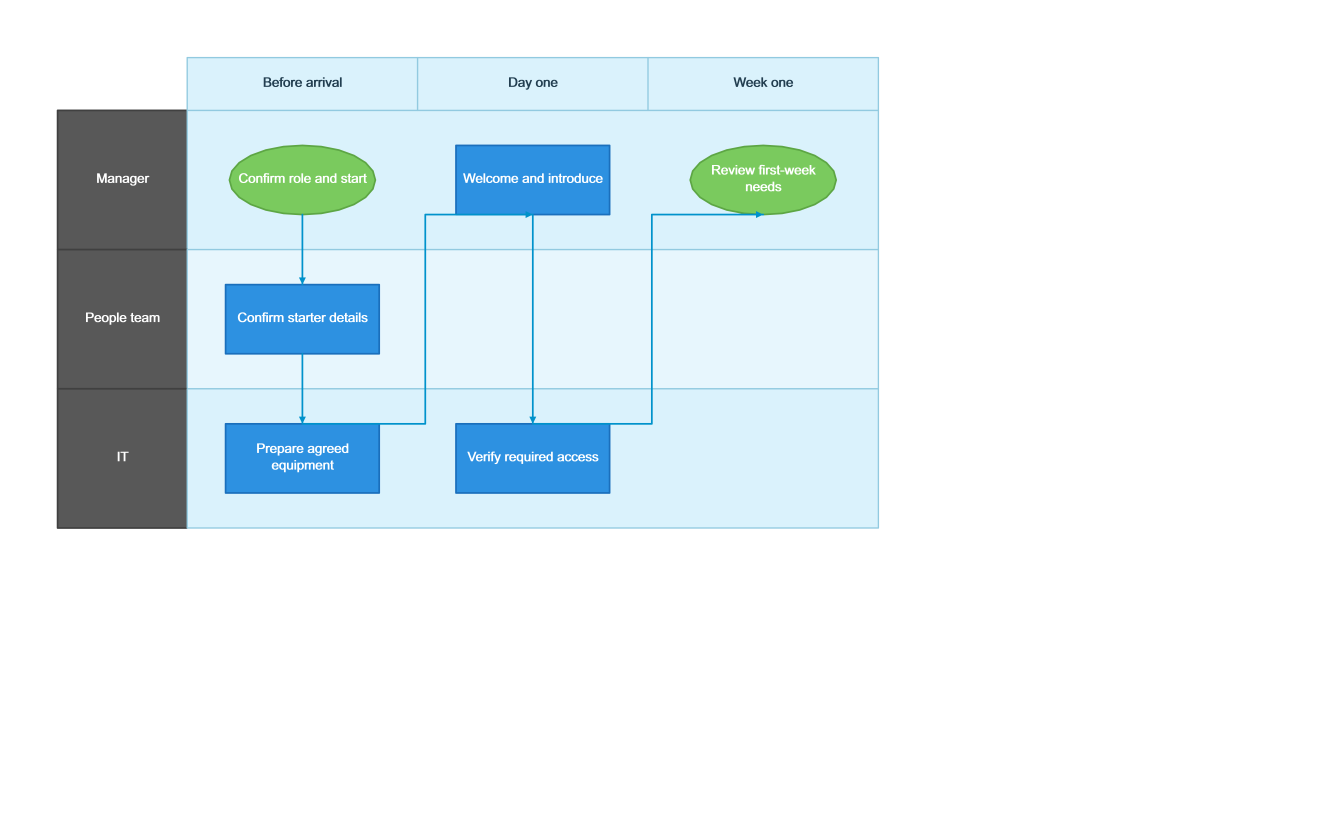
New-starter handover journey
Make cross-team ownership visible before a new colleague arrives.
- Start with
- Starter milestones and team handovers
- Generate
- VSDX
How it works
Define responsibility
Use a lane per team and a phase per period.
Connect handovers
Show when work crosses from one owner to another.
End with a review
Confirm first-week needs instead of ending at equipment delivery.
The C# source
The example below shows the document API and layout used for this report. Follow the Visio guide for package setup in your own project.
using OfficeIMO.Visio;
using OfficeIMO.Visio.Diagrams;

namespace OfficeIMO.Examples.Showcase.Workflows {
    /// <summary>Maps a new-starter handover across the manager, people team and IT without automating account changes.</summary>
    internal static class OnboardingJourney {
        internal static void Create(string folder) {
            var document = VisioDocument.Create(Path.Combine(folder, "example.vsdx"))
                .SwimlaneDiagram("New starter journey", swim => swim
                    .Theme(VisioStyleTheme.Modern())
                    .Lane("manager", "Manager").Lane("people", "People team").Lane("it", "IT")
                    .Phase("prepare", "Before arrival").Phase("arrival", "Day one").Phase("review", "Week one")
                    .Start("plan", "Confirm role and start", "manager", "prepare")
                    .Step("details", "Confirm starter details", "people", "prepare")
                    .Step("equipment", "Prepare agreed equipment", "it", "prepare")
                    .Step("welcome", "Welcome and introduce", "manager", "arrival")
                    .Step("access", "Verify required access", "it", "arrival")
                    .End("review", "Review first-week needs", "manager", "review")
                    .Handoff("plan", "details").Handoff("details", "equipment")
                    .Handoff("equipment", "welcome").Handoff("welcome", "access")
                    .Handoff("access", "review"));
            document.Save();
        }
    }
}
API used in this example
Use this in your project
Use approved onboarding steps; the example neither provisions accounts nor changes access.
The Visio guide explains package setup and related document APIs.
Documents and scope
What the preview shows
The C# source generates the downloadable file. The runner validates the diagram and exports native PNG and SVG previews.
What to keep in mind
Use approved onboarding steps; the example neither provisions accounts nor changes access.