Word · C# walkthrough
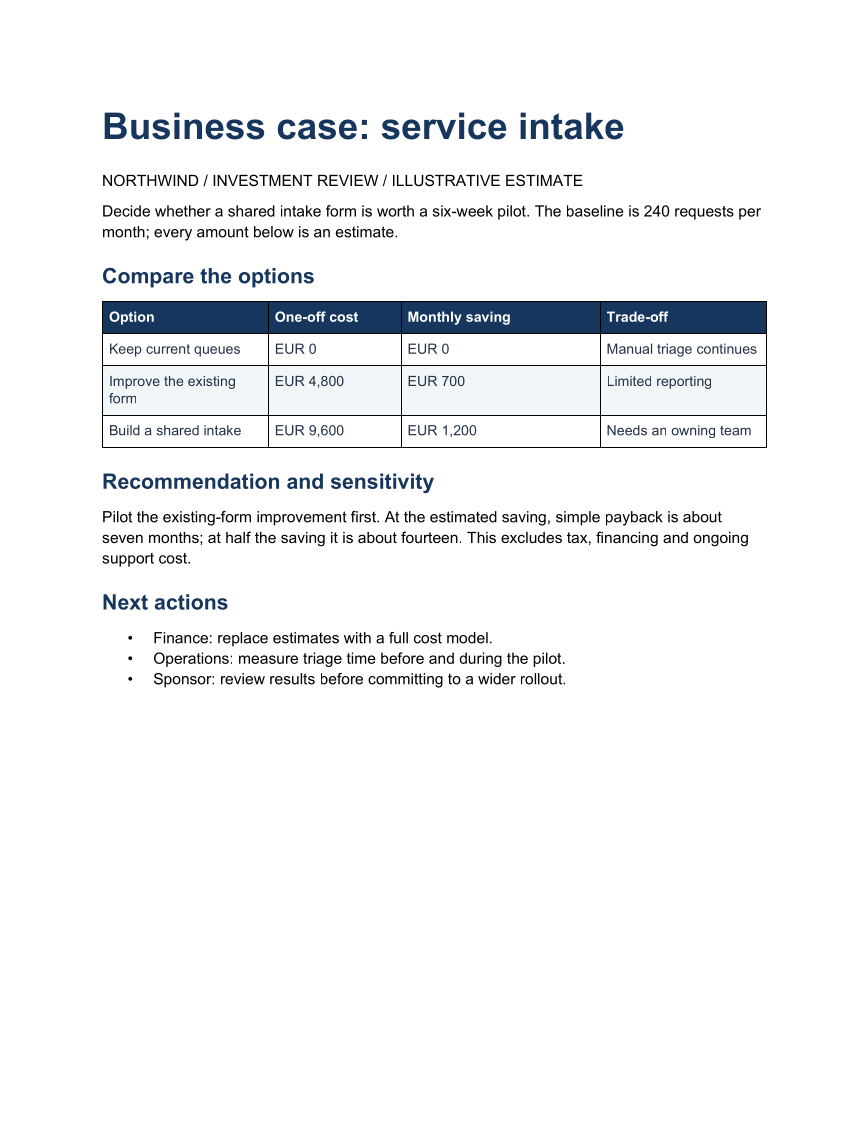
Business case with cost options
Keep an investment decision tied to its assumptions and a reversible first step.
Opens the generated download in a local browser tool. The C# example below creates the document.
- Start with
- Options, estimated cost and expected saving
- Generate
- DOCX + PDF
How it works
Compare alternatives
Write the cost, expected saving and trade-off for each option in a padded table.
Show uncertainty
Explain how lower savings change the payback estimate.
Name the next checks
Assign financial validation, measurement and approval actions.
The C# source
The example below shows the document API and layout used for this report. Follow the Word guide for package setup in your own project.
using OfficeIMO.Word;

namespace OfficeIMO.Examples.Showcase.Workflows {
    /// <summary>Creates an editable business case: service intake with a decision, supporting table and named next actions.</summary>
    internal static class BusinessCase {
        internal static void Create(string folder) {
            using var document = WordDocument.Create(Path.Combine(folder, "example.docx"));
            document.Settings.FontFamily = "Carlito";
            document.Settings.FontSize = 11;
            document.BuiltinDocumentProperties.Title = "Business case: service intake";
            document.AddParagraph("Business case: service intake").Style = WordParagraphStyles.Heading1;
            document.AddParagraph("NORTHWIND / INVESTMENT REVIEW / ILLUSTRATIVE ESTIMATE");
            document.AddParagraph("Decide whether a shared intake form is worth a six-week pilot. The baseline is 240 requests per month; every amount below is an estimate.");
            document.AddParagraph("Compare the options").Style = WordParagraphStyles.Heading2;
            string[][] rows = {
                new[] { "Option", "One-off cost", "Monthly saving", "Trade-off" },
                new[] { "Keep current queues", "EUR 0", "EUR 0", "Manual triage continues" },
                new[] { "Improve the existing form", "EUR 4,800", "EUR 700", "Limited reporting" },
                new[] { "Build a shared intake", "EUR 9,600", "EUR 1,200", "Needs an owning team" }
            };
            var table = document.AddTable(rows.Length, 4, WordTableStyle.TableGrid);
            table.SetWidthPercentage(100);
            table.SetColumnWidthsPercentage(25, 20, 30, 25);
            for (int row = 0; row < rows.Length; row++) {
                for (int column = 0; column < 4; column++) {
                    var cell = table.Rows[row].Cells[column];
                    cell.MarginTopCentimeters = 0.14;
                    cell.MarginBottomCentimeters = 0.14;
                    cell.MarginLeftCentimeters = 0.16;
                    cell.MarginRightCentimeters = 0.16;
                    cell.ShadingFillColorHex = row == 0 ? "17365D" : row % 2 == 0 ? "F1F5F9" : "FFFFFF";
                    var paragraph = cell.Paragraphs[0];
                    paragraph.Text = rows[row][column];
                    paragraph.Bold = row == 0;
                    paragraph.ColorHex = row == 0 ? "FFFFFF" : "243247";
                    paragraph.FontFamily = "Carlito";
                    paragraph.FontSize = 10;
                    paragraph.LineSpacingAfterPoints = 2;
                }
            }
            document.AddParagraph("Recommendation and sensitivity").Style = WordParagraphStyles.Heading2;
            document.AddParagraph("Pilot the existing-form improvement first. At the estimated saving, simple payback is about seven months; at half the saving it is about fourteen. This excludes tax, financing and ongoing support cost.");
            document.AddParagraph("Next actions").Style = WordParagraphStyles.Heading2;
            var actions = document.AddList(WordListStyle.Bulleted);
            actions.AddItem("Finance: replace estimates with a full cost model.");
            actions.AddItem("Operations: measure triage time before and during the pilot.");
            actions.AddItem("Sponsor: review results before committing to a wider rollout.");
            foreach (var paragraph in document.Paragraphs) {
                paragraph.FontFamily = "Carlito";
                bool title = paragraph.Style == WordParagraphStyles.Heading1;
                bool heading = paragraph.Style == WordParagraphStyles.Heading2;
                paragraph.FontSize = title ? 26 : heading ? 15 : 11;
                paragraph.LineSpacingBeforePoints = heading ? 14 : 0;
                paragraph.LineSpacingAfterPoints = title ? 14 : heading ? 8 : 7;
                if (title || heading) {
                    paragraph.ColorHex = "17365D";
                    paragraph.Bold = true;
                    paragraph.KeepWithNext = true;
                }
            }
            document.Save();
        }
    }
}
API used in this example
Use this in your project
Replace sample amounts with an approved cost model; include ongoing support, tax and financing when relevant.
The Word guide explains package setup and related document APIs.
Documents and scope
What the preview shows
The C# source generates the downloadable file. The runner reopens the editable document, validates Open XML where applicable and exports a PDF. Page previews come from the generated output.
What to keep in mind
Replace sample amounts with an approved cost model; include ongoing support, tax and financing when relevant.