Word · C# walkthrough
An editable decision record
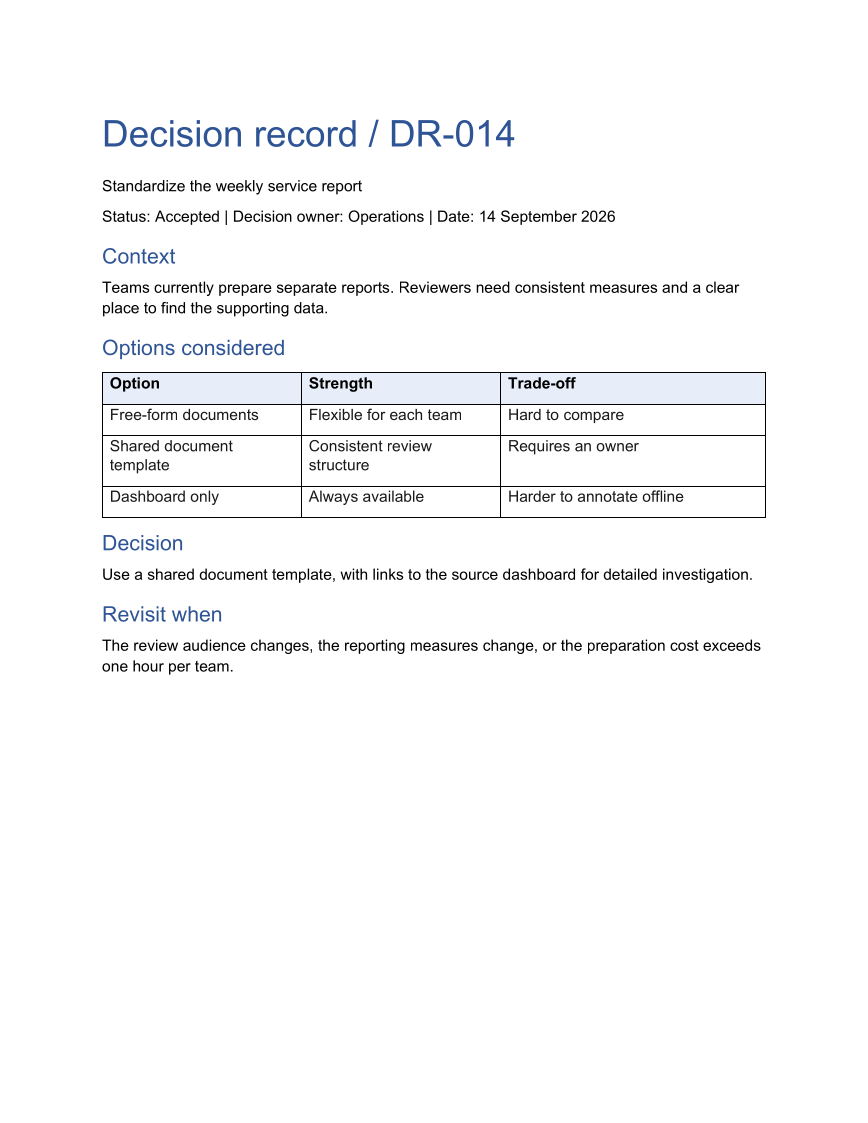
Preserve why a team chose an approach, not just the final choice. The record puts the alternatives beside their strengths and costs, then states the condition that should trigger another review.
Opens the generated download in a local browser tool. The C# example below creates the document.
- Start with
- Decision context and evaluated options
- Generate
- DOCX + PDF
How it works
Identify the decision
Start with an identifier, owner, status, and date so the record can be referenced from other documents.
Compare alternatives explicitly
Build a three-column table for the option, its strength, and its trade-off.
Record the consequence
State the selected approach and the conditions for revisiting it in separate sections.
The C# source
The example below shows the document API and layout used for this report. Follow the Word guide for package setup in your own project.
using System.IO;
using OfficeIMO.Word;

namespace OfficeIMO.Examples.Showcase.Workflows;

/// <summary>Captures a decision, the alternatives considered, and the conditions for revisiting it.</summary>
internal static class WordDecisionRecord {
    internal static void Create(string folder) {
        using WordDocument document = WordDocument.Create(Path.Combine(folder, "example.docx"));
        document.Settings.FontSize = global::OfficeIMO.OfficeLength.Points(11);
        document.AddParagraph("Decision record / DR-014").Style = WordParagraphStyles.Heading1;
        document.AddParagraph("Standardize the weekly service report");
        document.AddParagraph("Status: Accepted | Decision owner: Operations | Date: 14 September 2026");
        document.AddParagraph("Context").Style = WordParagraphStyles.Heading2;
        document.AddParagraph("Teams currently prepare separate reports. Reviewers need consistent measures and a clear place to find the supporting data.");

        document.AddParagraph("Options considered").Style = WordParagraphStyles.Heading2;
        string[,] options = {
            { "Option", "Strength", "Trade-off" },
            { "Free-form documents", "Flexible for each team", "Hard to compare" },
            { "Shared document template", "Consistent review structure", "Requires an owner" },
            { "Dashboard only", "Always available", "Harder to annotate offline" }
        };
        WordTable table = document.AddTable(4, 3, WordTableStyle.TableGrid);
        for (int row = 0; row < 4; row++) {
            for (int column = 0; column < 3; column++) {
                table.Rows[row].Cells[column].Paragraphs[0].Text = options[row, column];
                table.Rows[row].Cells[column].Paragraphs[0].Bold = row == 0;
                if (row == 0) table.Rows[row].Cells[column].ShadingFillColor = OfficeColor.Parse("E8EEF8");
            }
        }
        document.AddParagraph("Decision").Style = WordParagraphStyles.Heading2;
        document.AddParagraph("Use a shared document template, with links to the source dashboard for detailed investigation.");
        document.AddParagraph("Revisit when").Style = WordParagraphStyles.Heading2;
        document.AddParagraph("The review audience changes, the reporting measures change, or the preparation cost exceeds one hour per team.");
        foreach (WordParagraph paragraph in document.Paragraphs) {
            paragraph.FontSize = global::OfficeIMO.OfficeLength.Points(11);
            paragraph.LineSpacingAfter = global::OfficeIMO.OfficeLength.Points(7D);
            if (paragraph.Style == WordParagraphStyles.Heading1) {
                paragraph.FontSize = global::OfficeIMO.OfficeLength.Points(26);
                paragraph.Bold = true;
                paragraph.LineSpacingAfter = global::OfficeIMO.OfficeLength.Points(12D);
            } else if (paragraph.Style == WordParagraphStyles.Heading2) {
                paragraph.FontSize = global::OfficeIMO.OfficeLength.Points(15);
                paragraph.Bold = true;
                paragraph.LineSpacingBefore = global::OfficeIMO.OfficeLength.Points(12D);
                paragraph.LineSpacingAfter = global::OfficeIMO.OfficeLength.Points(6D);
            }
        }
        foreach (WordTable styledTable in document.Tables) {
            styledTable.SetWidthPercentage(100);
            styledTable.SetColumnWidthsPercentage(30, 30, 40);
            foreach (var row in styledTable.Rows) {
                foreach (var cell in row.Cells) {
                    cell.MarginTop = global::OfficeIMO.OfficeLength.Centimeters(0.1D);
                    cell.MarginBottom = global::OfficeIMO.OfficeLength.Centimeters(0.1D);
                    foreach (var paragraph in cell.Paragraphs) {
                        paragraph.FontSize = global::OfficeIMO.OfficeLength.Points(11);
                        paragraph.LineSpacingAfter = global::OfficeIMO.OfficeLength.Points(3D);
                    }
                }
            }
        }
        WorkflowFooter.Add(document, "Decision record / DR-014");
        document.Save();
    }
}
API used in this example
Use this in your project
Use an options array from your own evaluation. Keep the decision statement short and link supporting evidence from the surrounding document system.
The Word guide explains package setup and related document APIs.
Documents and scope
What the preview shows
The linked C# example generates this file. The runner reopens and validates the DOCX, exports a PDF, and the preview renders that PDF.
What to keep in mind
The example records a decision in a document. It does not calculate option scores or collect electronic approvals.