Word · C# walkthrough
Meeting minutes and actions
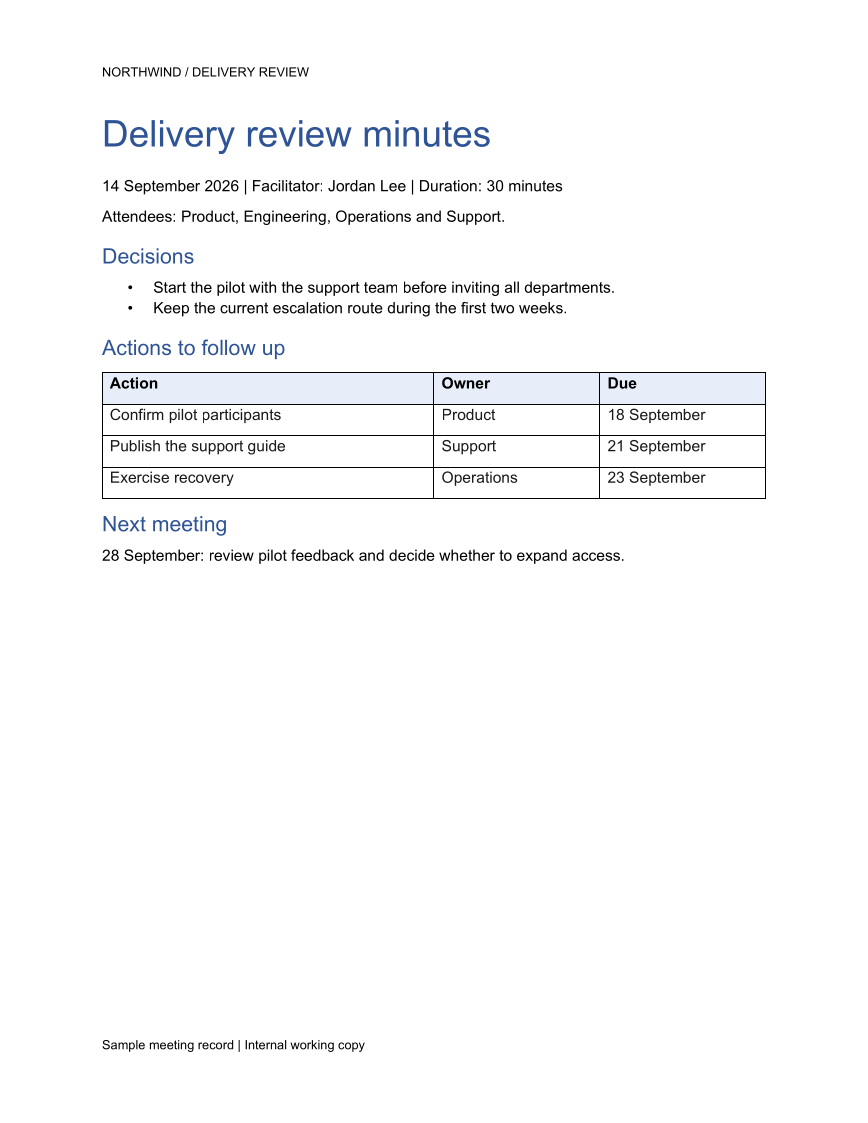
Publish a meeting record that makes the follow-up clear. The example separates decisions from actions, gives each action an owner and due date, and adds a running header and footer.
Opens the generated download in a local browser tool. The C# example below creates the document.
- Start with
- Meeting details, decisions, and action items
- Generate
- DOCX + PDF
How it works
Set up the running furniture
Create headers and footers before adding the meeting content. Put the team name in the header and the working-copy label in the footer.
Capture decisions separately
Use a bulleted list for agreed decisions so readers can distinguish them from work that is still pending.
Assign the follow-up
Write the actions, owners, and due dates into a table, then finish with the purpose of the next meeting.
The C# source
The example below shows the document API and layout used for this report. Follow the Word guide for package setup in your own project.
using System.IO;
using OfficeIMO.Word;

namespace OfficeIMO.Examples.Showcase.Workflows;

/// <summary>Turns meeting decisions and actions into an editable record with a running header.</summary>
internal static class MeetingMinutes {
    internal static void Create(string folder) {
        using WordDocument document = WordDocument.Create(Path.Combine(folder, "example.docx"));
        document.Settings.FontSize = global::OfficeIMO.OfficeLength.Points(11);
        document.PageSetup.Header.AddParagraph("NORTHWIND / DELIVERY REVIEW");
        document.AddParagraph("Delivery review minutes").Style = WordParagraphStyles.Heading1;
        document.AddParagraph("14 September 2026 | Facilitator: Jordan Lee | Duration: 30 minutes");
        document.AddParagraph("Attendees: Product, Engineering, Operations and Support.");

        document.AddParagraph("Decisions").Style = WordParagraphStyles.Heading2;
        WordList decisions = document.AddList(WordListStyle.Bulleted);
        decisions.AddItem("Start the pilot with the support team before inviting all departments.");
        decisions.AddItem("Keep the current escalation route during the first two weeks.");
        document.AddParagraph("Actions to follow up").Style = WordParagraphStyles.Heading2;
        string[,] values = {
            { "Action", "Owner", "Due" },
            { "Confirm pilot participants", "Product", "18 September" },
            { "Publish the support guide", "Support", "21 September" },
            { "Exercise recovery", "Operations", "23 September" }
        };
        WordTable actions = document.AddTable(4, 3, WordTableStyle.TableGrid);
        for (int row = 0; row < 4; row++) {
            for (int column = 0; column < 3; column++) {
                actions.Rows[row].Cells[column].Paragraphs[0].Text = values[row, column];
                actions.Rows[row].Cells[column].Paragraphs[0].Bold = row == 0;
                if (row == 0) actions.Rows[row].Cells[column].ShadingFillColor = OfficeColor.Parse("E8EEF8");
            }
        }
        document.AddParagraph("Next meeting").Style = WordParagraphStyles.Heading2;
        document.AddParagraph("28 September: review pilot feedback and decide whether to expand access.");
        foreach (WordParagraph paragraph in document.Paragraphs) {
            paragraph.FontSize = global::OfficeIMO.OfficeLength.Points(11);
            paragraph.LineSpacingAfter = global::OfficeIMO.OfficeLength.Points(7D);
            if (paragraph.Style == WordParagraphStyles.Heading1) {
                paragraph.FontSize = global::OfficeIMO.OfficeLength.Points(26);
                paragraph.Bold = true;
                paragraph.LineSpacingAfter = global::OfficeIMO.OfficeLength.Points(12D);
            } else if (paragraph.Style == WordParagraphStyles.Heading2) {
                paragraph.FontSize = global::OfficeIMO.OfficeLength.Points(15);
                paragraph.Bold = true;
                paragraph.LineSpacingBefore = global::OfficeIMO.OfficeLength.Points(12D);
                paragraph.LineSpacingAfter = global::OfficeIMO.OfficeLength.Points(6D);
            }
        }
        foreach (WordTable styledTable in document.Tables) {
            styledTable.SetWidthPercentage(100);
            styledTable.SetColumnWidthsPercentage(50, 25, 25);
            foreach (var row in styledTable.Rows) {
                foreach (var cell in row.Cells) {
                    cell.MarginTop = global::OfficeIMO.OfficeLength.Centimeters(0.1D);
                    cell.MarginBottom = global::OfficeIMO.OfficeLength.Centimeters(0.1D);
                    foreach (var paragraph in cell.Paragraphs) {
                        paragraph.FontSize = global::OfficeIMO.OfficeLength.Points(11);
                        paragraph.LineSpacingAfter = global::OfficeIMO.OfficeLength.Points(3D);
                    }
                }
            }
        }
        WorkflowFooter.Add(document, "Delivery review minutes");
        document.Save();
    }
}
API used in this example
Use this in your project
Feed the action table from your meeting notes or task system. Preserve the difference between a decision already made and an action somebody still needs to complete.
The Word guide explains package setup and related document APIs.
Documents and scope
What the preview shows
The linked C# example generates this file. The runner reopens and validates the DOCX, exports a PDF, and the preview renders that PDF.
What to keep in mind
The sample is an editable meeting record. It does not create calendar events, send reminders, or synchronize action status.