Word · C# walkthrough
Portrait report with a landscape matrix
Give the main recommendation a normal reading page while reserving a wider page for evidence that would be cramped in portrait.
Opens the generated download in a local browser tool. The C# example below creates the document.
- Start with
- Evaluation narrative and a five-column evidence matrix
- Generate
- DOCX + PDF
How it works
Write the narrative first
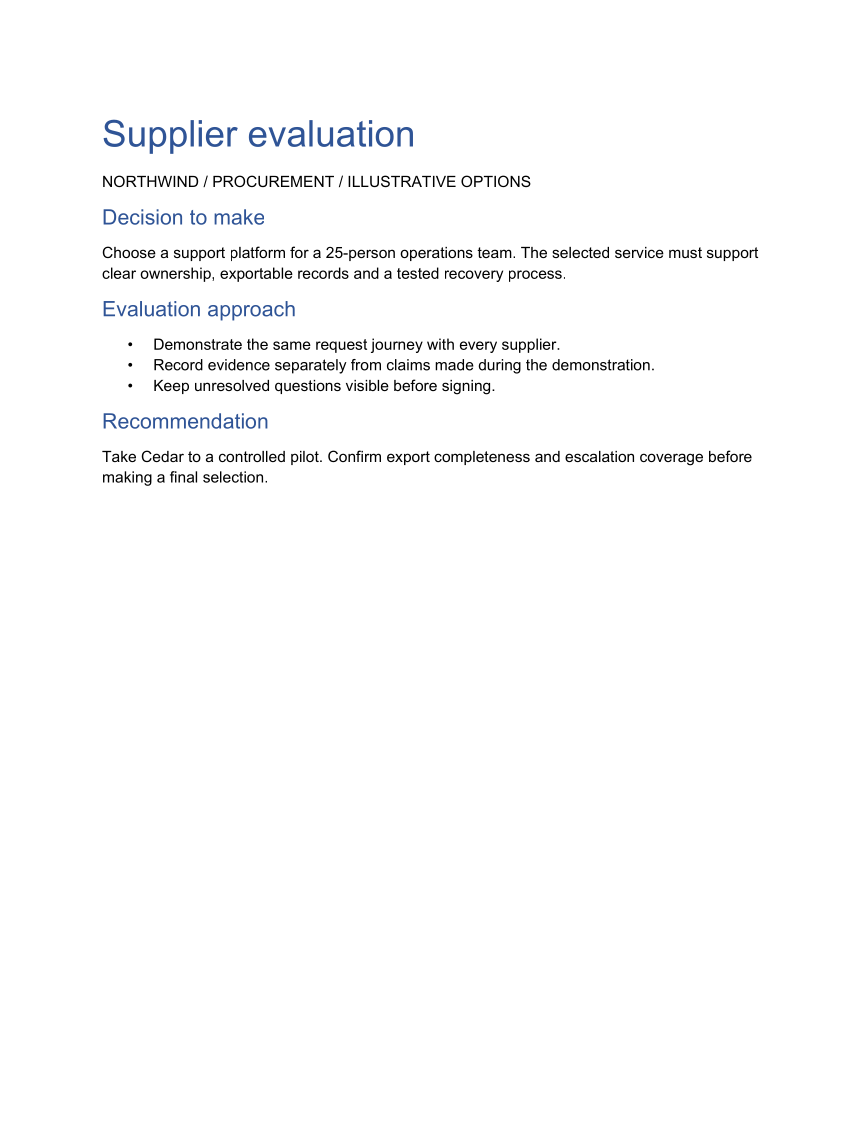
Use heading styles and a short list for the decision, evaluation approach and recommendation.
Start a landscape section
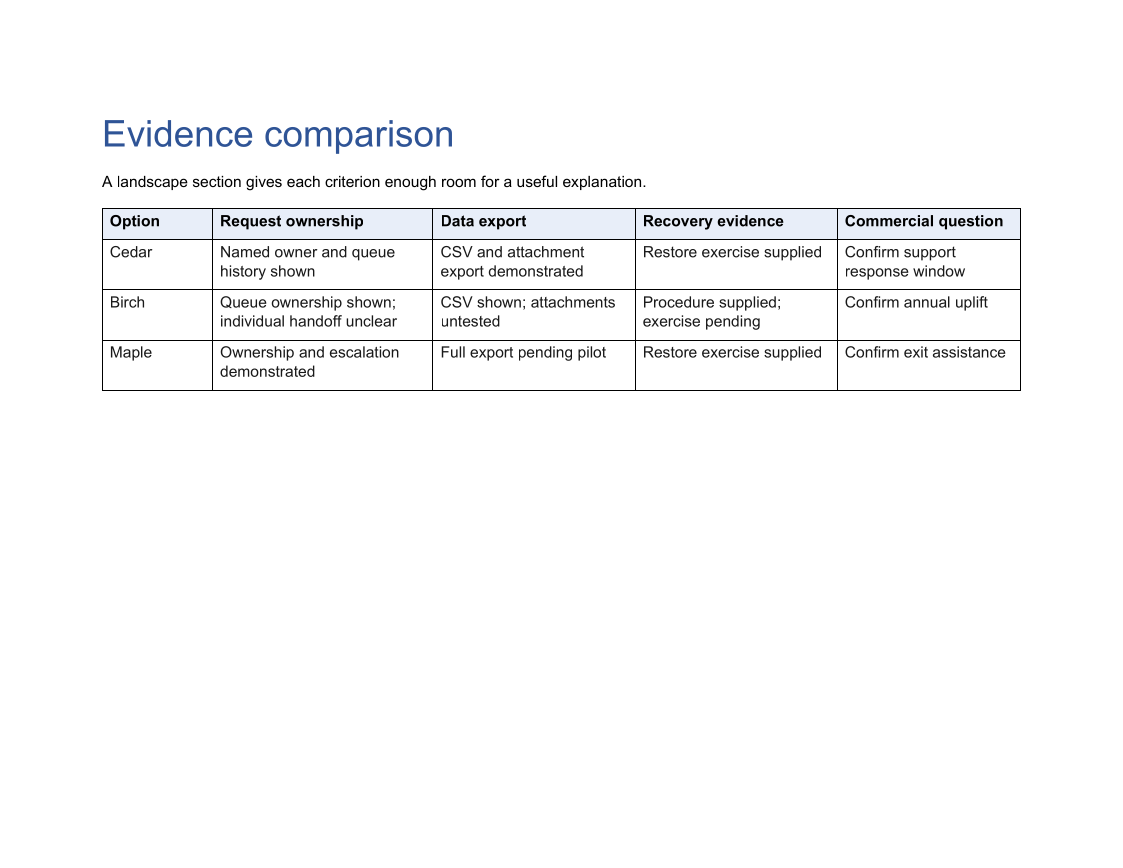
Add a section and set its PageOrientation to Landscape before building the comparison matrix.
Size the evidence columns
Use percentage widths to reserve room for longer observations, emphasize the header and add cell padding.
The rest of the document
The C# source
The example below shows the document API and layout used for this report. Follow the Word guide for package setup in your own project.
using OfficeIMO.Drawing;
using OfficeIMO.Word;

namespace OfficeIMO.Examples.Showcase.Workflows;

/// <summary>Keeps the narrative portrait and places a wide decision matrix in its own landscape section.</summary>
internal static class MixedOrientationReport {
    internal static void Create(string folder) {
        using WordDocument document = WordDocument.Create(Path.Combine(folder, "example.docx"));
        document.Settings.FontSize = global::OfficeIMO.OfficeLength.Points(11);
        document.AddParagraph("Supplier evaluation").Style = WordParagraphStyles.Heading1;
        document.AddParagraph("NORTHWIND / PROCUREMENT / ILLUSTRATIVE OPTIONS");
        document.AddParagraph("Decision to make").Style = WordParagraphStyles.Heading2;
        document.AddParagraph("Choose a support platform for a 25-person operations team. The selected service must support clear ownership, exportable records and a tested recovery process.");
        document.AddParagraph("Evaluation approach").Style = WordParagraphStyles.Heading2;
        var list = document.AddList(WordListStyle.Bulleted);
        list.AddItem("Demonstrate the same request journey with every supplier.");
        list.AddItem("Record evidence separately from claims made during the demonstration.");
        list.AddItem("Keep unresolved questions visible before signing.");
        document.AddParagraph("Recommendation").Style = WordParagraphStyles.Heading2;
        document.AddParagraph("Take Cedar to a controlled pilot. Confirm export completeness and escalation coverage before making a final selection.");
        var section = document.AddSection();
        section.PageSetup.Orientation = OfficePageOrientation.Landscape;
        document.AddParagraph("Evidence comparison").Style = WordParagraphStyles.Heading1;
        document.AddParagraph("A landscape section gives each criterion enough room for a useful explanation.");
        string[,] rows = {
            { "Option", "Request ownership", "Data export", "Recovery evidence", "Commercial question" },
            { "Cedar", "Named owner and queue history shown", "CSV and attachment export demonstrated", "Restore exercise supplied", "Confirm support response window" },
            { "Birch", "Queue ownership shown; individual handoff unclear", "CSV shown; attachments untested", "Procedure supplied; exercise pending", "Confirm annual uplift" },
            { "Maple", "Ownership and escalation demonstrated", "Full export pending pilot", "Restore exercise supplied", "Confirm exit assistance" }
        };
        var table = document.AddTable(4, 5, WordTableStyle.TableGrid);
        table.SetWidthPercentage(100);
        table.SetColumnWidthsPercentage(12, 24, 22, 22, 20);
        for (int row = 0; row < 4; row++) for (int column = 0; column < 5; column++) {
            var cell = table.Rows[row].Cells[column];
            cell.Paragraphs[0].Text = rows[row, column];
            cell.Paragraphs[0].Bold = row == 0;
            cell.MarginTop = cell.MarginBottom = global::OfficeIMO.OfficeLength.Centimeters(0.15D);
            if (row == 0) cell.ShadingFillColor = OfficeColor.Parse("E8EEF8");
        }
        foreach (var paragraph in document.Paragraphs) {
            paragraph.FontSize = global::OfficeIMO.OfficeLength.Points(paragraph.Style == WordParagraphStyles.Heading1 ? 26 : paragraph.Style == WordParagraphStyles.Heading2 ? 15 : 11);
            paragraph.LineSpacingAfter = global::OfficeIMO.OfficeLength.Points(9D);
        }
        WorkflowFooter.Add(document, "Supplier evaluation");
        document.Save();
    }
}
API used in this example
Use this in your project
Replace the fictional options with your criteria. Keep narrative and matrix sections separate so each can use suitable margins and orientation.
The Word guide explains package setup and related document APIs.
Documents and scope
What the preview shows
The linked C# example generates this file. The runner reopens and validates the DOCX, exports a PDF, and renders every PDF page for review.
What to keep in mind
The source and PDF demonstrate mixed page orientation. The sample comparison is illustrative and is not an endorsement of a supplier.