Word · C# walkthrough
Employee onboarding checklist
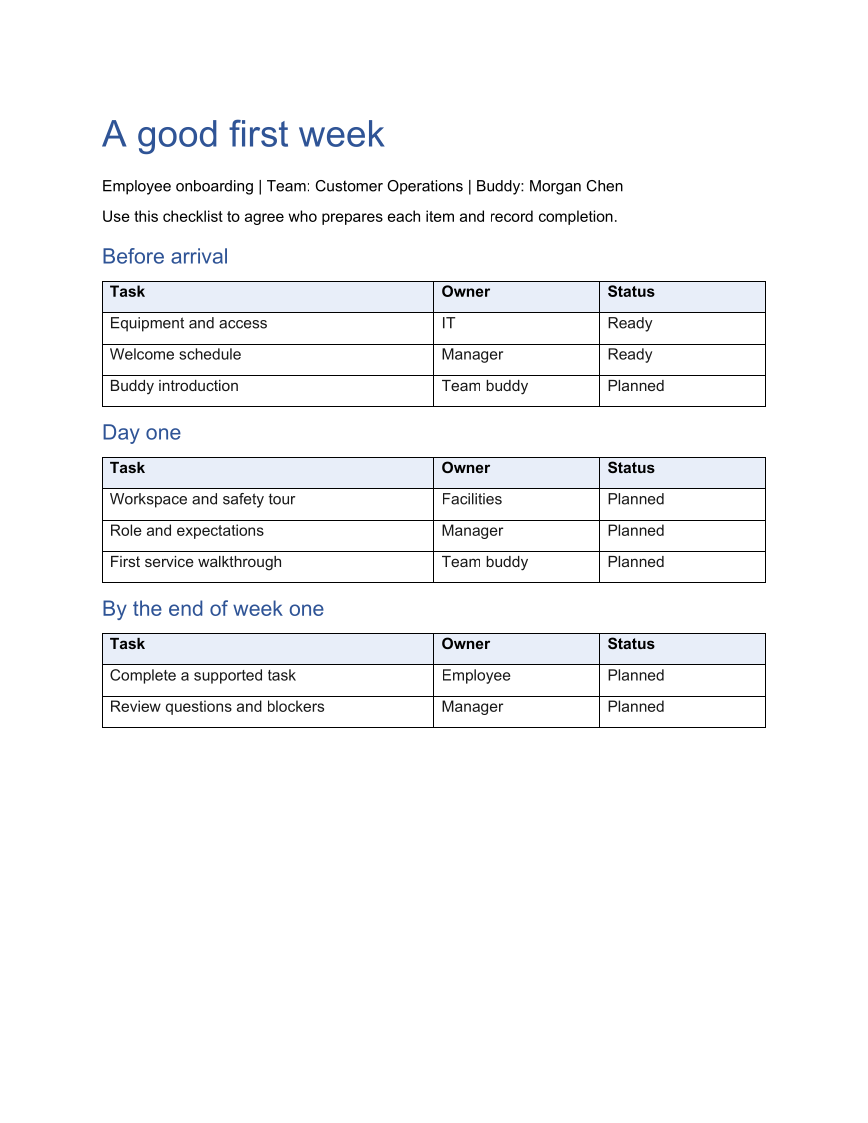
Give a manager, buddy, and new employee the same first-week plan. Grouped tables keep preparation, day-one work, and the first review easy to scan without mixing their owners.
Opens the generated download in a local browser tool. The C# example below creates the document.
- Start with
- Onboarding stages and assigned tasks
- Generate
- DOCX + PDF
How it works
Group tasks by stage
Represent each stage as a title and an array of task, owner, and status tuples.
Render the same table structure
A local function creates the stage heading and fills its table. The task data changes while the document structure stays consistent.
Leave an editable working record
Save the DOCX so the receiving team can update statuses, and use the generated PDF for a printable overview.
The C# source
The example below shows the document API and layout used for this report. Follow the Word guide for package setup in your own project.
using System.IO;
using OfficeIMO.Word;

namespace OfficeIMO.Examples.Showcase.Workflows;

/// <summary>Builds a printable onboarding checklist with tasks grouped by the employee journey.</summary>
internal static class OnboardingChecklist {
    internal static void Create(string folder) {
        using WordDocument document = WordDocument.Create(Path.Combine(folder, "example.docx"));
        document.Settings.FontSize = global::OfficeIMO.OfficeLength.Points(11);
        document.AddParagraph("A good first week").Style = WordParagraphStyles.Heading1;
        document.AddParagraph("Employee onboarding | Team: Customer Operations | Buddy: Morgan Chen");
        document.AddParagraph("Use this checklist to agree who prepares each item and record completion.");

        AddStage("Before arrival", new[] {
            ("Equipment and access", "IT", "Ready"),
            ("Welcome schedule", "Manager", "Ready"),
            ("Buddy introduction", "Team buddy", "Planned")
        });
        AddStage("Day one", new[] {
            ("Workspace and safety tour", "Facilities", "Planned"),
            ("Role and expectations", "Manager", "Planned"),
            ("First service walkthrough", "Team buddy", "Planned")
        });
        AddStage("By the end of week one", new[] {
            ("Complete a supported task", "Employee", "Planned"),
            ("Review questions and blockers", "Manager", "Planned")
        });
        foreach (WordParagraph paragraph in document.Paragraphs) {
            paragraph.FontSize = global::OfficeIMO.OfficeLength.Points(11);
            paragraph.LineSpacingAfter = global::OfficeIMO.OfficeLength.Points(7D);
            if (paragraph.Style == WordParagraphStyles.Heading1) {
                paragraph.FontSize = global::OfficeIMO.OfficeLength.Points(26);
                paragraph.Bold = true;
                paragraph.LineSpacingAfter = global::OfficeIMO.OfficeLength.Points(12D);
            } else if (paragraph.Style == WordParagraphStyles.Heading2) {
                paragraph.FontSize = global::OfficeIMO.OfficeLength.Points(15);
                paragraph.Bold = true;
                paragraph.LineSpacingBefore = global::OfficeIMO.OfficeLength.Points(12D);
                paragraph.LineSpacingAfter = global::OfficeIMO.OfficeLength.Points(6D);
            }
        }
        foreach (WordTable styledTable in document.Tables) {
            styledTable.SetWidthPercentage(100);
            styledTable.SetColumnWidthsPercentage(50, 25, 25);
            foreach (var row in styledTable.Rows) {
                foreach (var cell in row.Cells) {
                    cell.MarginTop = global::OfficeIMO.OfficeLength.Centimeters(0.1D);
                    cell.MarginBottom = global::OfficeIMO.OfficeLength.Centimeters(0.1D);
                    foreach (var paragraph in cell.Paragraphs) {
                        paragraph.FontSize = global::OfficeIMO.OfficeLength.Points(11);
                        paragraph.LineSpacingAfter = global::OfficeIMO.OfficeLength.Points(3D);
                    }
                }
            }
        }
        WorkflowFooter.Add(document, "A good first week");
        document.Save();

        void AddStage(string title, (string Task, string Owner, string Status)[] tasks) {
            document.AddParagraph(title).Style = WordParagraphStyles.Heading2;
            WordTable table = document.AddTable(tasks.Length + 1, 3, WordTableStyle.TableGrid);
            string[] headers = { "Task", "Owner", "Status" };
            for (int column = 0; column < 3; column++) {
                table.Rows[0].Cells[column].Paragraphs[0].Text = headers[column];
                table.Rows[0].Cells[column].Paragraphs[0].Bold = true;
                table.Rows[0].Cells[column].ShadingFillColor = OfficeColor.Parse("E8EEF8");
            }
            for (int row = 0; row < tasks.Length; row++) {
                table.Rows[row + 1].Cells[0].Paragraphs[0].Text = tasks[row].Task;
                table.Rows[row + 1].Cells[1].Paragraphs[0].Text = tasks[row].Owner;
                table.Rows[row + 1].Cells[2].Paragraphs[0].Text = tasks[row].Status;
            }
        }
    }
}
API used in this example
Use this in your project
Use the same structure for equipment handovers, event preparation, or a service launch. Add stages only when they help readers understand when the work should happen.
The Word guide explains package setup and related document APIs.
Documents and scope
What the preview shows
The linked C# example generates this file. The runner reopens and validates the DOCX, exports a PDF, and the preview renders that PDF.
What to keep in mind
Status values are ordinary editable table text. This sample does not implement interactive checkbox controls or an approval workflow.