Word · C# walkthrough
A concise policy brief
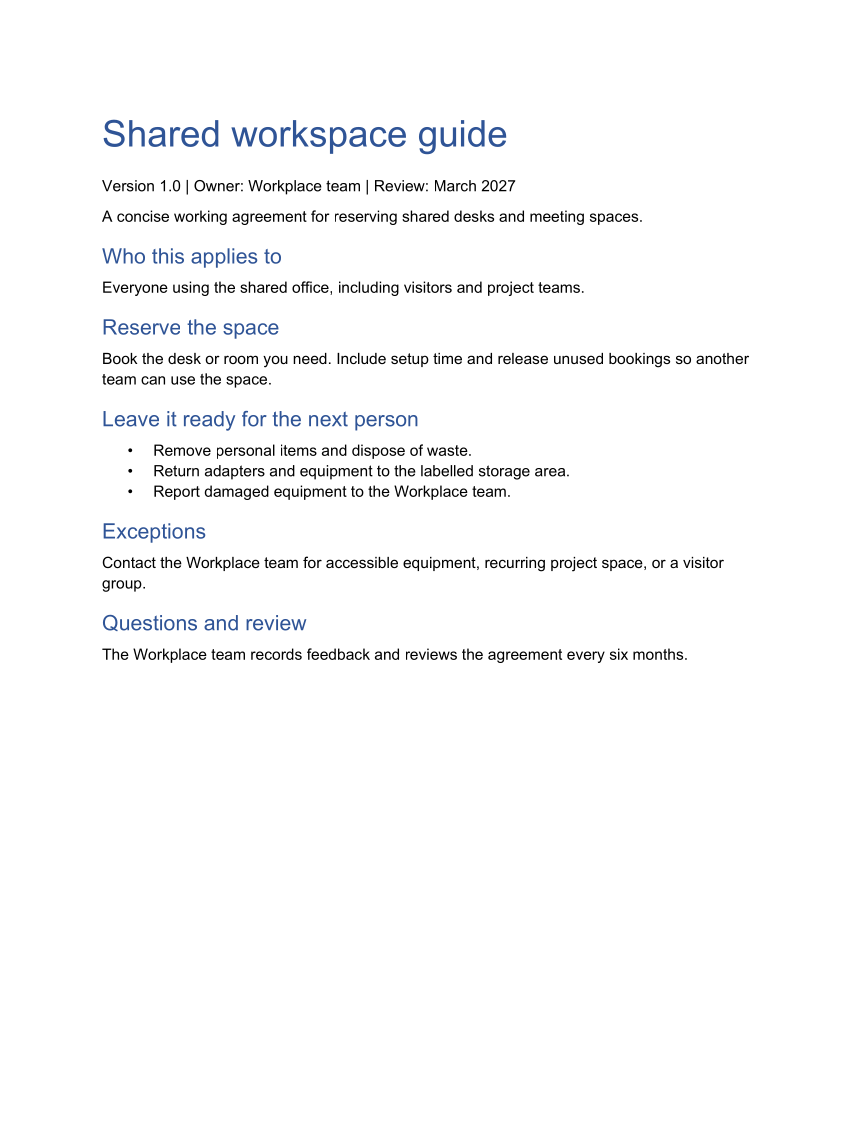
Turn a short working agreement into a consistent document. The example names the owner and review date, explains who the agreement applies to, and keeps the instructions close to their exceptions.
Opens the generated download in a local browser tool. The C# example below creates the document.
- Start with
- Working agreements and review ownership
- Generate
- DOCX + PDF
How it works
Set searchable metadata
Populate the built-in title and subject so the file carries context beyond its filename.
Use a small heading hierarchy
Build sections through a local function that adds a heading and paragraph. Word's native heading styles keep the document editable.
Make the actions scannable
Use a bullet list for the steps somebody should follow, then describe the exception and review paths.
The C# source
The example below shows the document API and layout used for this report. Follow the Word guide for package setup in your own project.
using System.IO;
using OfficeIMO.Word;

namespace OfficeIMO.Examples.Showcase.Workflows;

/// <summary>Creates a short policy brief with reusable heading structure and bullet lists.</summary>
internal static class PolicyBrief {
    internal static void Create(string folder) {
        using WordDocument document = WordDocument.Create(Path.Combine(folder, "example.docx"));
        document.Settings.FontSize = global::OfficeIMO.OfficeLength.Points(11);
        document.Properties.Title = "Shared workspace guide";
        document.Properties.Subject = "Working agreements";
        document.AddParagraph("Shared workspace guide").Style = WordParagraphStyles.Heading1;
        document.AddParagraph("Version 1.0 | Owner: Workplace team | Review: March 2027");
        document.AddParagraph("A concise working agreement for reserving shared desks and meeting spaces.");

        Section("Who this applies to", "Everyone using the shared office, including visitors and project teams.");
        Section("Reserve the space", "Book the desk or room you need. Include setup time and release unused bookings so another team can use the space.");
        document.AddParagraph("Rules at a glance").Style = WordParagraphStyles.Heading2;
        string[][] rules = {
            new[] { "Space", "Book ahead", "Release by" },
            new[] { "Desk", "Same day", "10:00 if unused" },
            new[] { "Meeting room", "Up to 4 weeks", "15 minutes before the start" },
            new[] { "Project room", "Up to 3 months", "Weekly with the Workplace team" }
        };
        WordTable table = document.AddTable(rules.Length, 3, WordTableStyle.TableGrid);
        table.SetWidthPercentage(100);
        for (int row = 0; row < rules.Length; row++) {
            for (int column = 0; column < 3; column++) {
                WordTableCell cell = table.Rows[row].Cells[column];
                cell.Paragraphs[0].Text = rules[row][column];
                if (row == 0) {
                    cell.ShadingFillColor = OfficeColor.Parse("2F5597");
                    cell.Paragraphs[0].Bold = true;
                    cell.Paragraphs[0].SetColor(OfficeColor.Parse("FFFFFF"));
                }
            }
        }

        WordParagraph reminder = document.AddParagraph("Release a booking as soon as plans change. Unused space is returned to the pool automatically after the release time.");
        reminder.LineSpacingBefore = global::OfficeIMO.OfficeLength.Points(10D);
        reminder.ShadingFillColor = OfficeColor.Parse("EAF1FB");
        reminder.Borders.LeftStyle = WordBorderStyle.Single;
        reminder.Borders.LeftColor = OfficeColor.Parse("2F5597");
        reminder.Borders.LeftSize = OfficeLength.Points(3);
        document.AddParagraph("Leave it ready for the next person").Style = WordParagraphStyles.Heading2;
        WordList actions = document.AddList(WordListStyle.Bulleted);
        actions.AddItem("Remove personal items and dispose of waste.");
        actions.AddItem("Return adapters and equipment to the labelled storage area.");
        actions.AddItem("Report damaged equipment to the Workplace team.");

        Section("Exceptions", "Contact the Workplace team for accessible equipment, recurring project space, or a visitor group.");
        Section("Questions and review", "The Workplace team records feedback and reviews the agreement every six months.");
        foreach (WordParagraph paragraph in document.Paragraphs) {
            paragraph.FontSize = global::OfficeIMO.OfficeLength.Points(11);
            paragraph.LineSpacingAfter = global::OfficeIMO.OfficeLength.Points(7D);
            if (paragraph.Style == WordParagraphStyles.Heading1) {
                paragraph.FontSize = global::OfficeIMO.OfficeLength.Points(26);
                paragraph.Bold = true;
                paragraph.LineSpacingAfter = global::OfficeIMO.OfficeLength.Points(12D);
            } else if (paragraph.Style == WordParagraphStyles.Heading2) {
                paragraph.FontSize = global::OfficeIMO.OfficeLength.Points(15);
                paragraph.Bold = true;
                paragraph.LineSpacingBefore = global::OfficeIMO.OfficeLength.Points(12D);
                paragraph.LineSpacingAfter = global::OfficeIMO.OfficeLength.Points(6D);
            }
        }
        WorkflowFooter.Add(document, "Shared workspace guide");
        document.Save();

        void Section(string heading, string body) {
            document.AddParagraph(heading).Style = WordParagraphStyles.Heading2;
            document.AddParagraph(body);
        }
    }
}
API used in this example
Use this in your project
Replace the shared-workspace content with an agreement owned by your team. Keep the owner and review date visible, and use the metadata fields to support your document inventory.
The Word guide explains package setup and related document APIs.
Documents and scope
What the preview shows
The linked C# example generates this file. The runner reopens and validates the DOCX, exports a PDF, and the preview renders that PDF.
What to keep in mind
This is a formatting and authoring example with fictional workplace content. It does not supply an organization's approved policy or enforce compliance.