Word · C# walkthrough
Post-incident review timeline
Explain a service interruption without losing the evidence or blaming individuals.
Opens the generated download in a local browser tool. The C# example below creates the document.
- Start with
- Incident events and corrective actions
- Generate
- DOCX + PDF
How it works
Order the evidence
Record times, events, source records and user effects.
Explain conditions
Separate detection and recovery facts from causal assumptions.
Track corrective work
Give each action an owner and a verification step.
The C# source
The example below shows the document API and layout used for this report. Follow the Word guide for package setup in your own project.
using OfficeIMO.Word;

namespace OfficeIMO.Examples.Showcase.Workflows {
    /// <summary>Creates an editable post-incident review with a decision, supporting table and named next actions.</summary>
    internal static class PostIncidentReview {
        internal static void Create(string folder) {
            using var document = WordDocument.Create(Path.Combine(folder, "example.docx"));
            document.Settings.FontFamily = "Carlito";
            document.Settings.FontSize = 11;
            document.BuiltinDocumentProperties.Title = "Post-incident review";
            document.AddParagraph("Post-incident review").Style = WordParagraphStyles.Heading1;
            document.AddParagraph("NORTHWIND / INCIDENT INC-042 / SYNTHETIC SCENARIO");
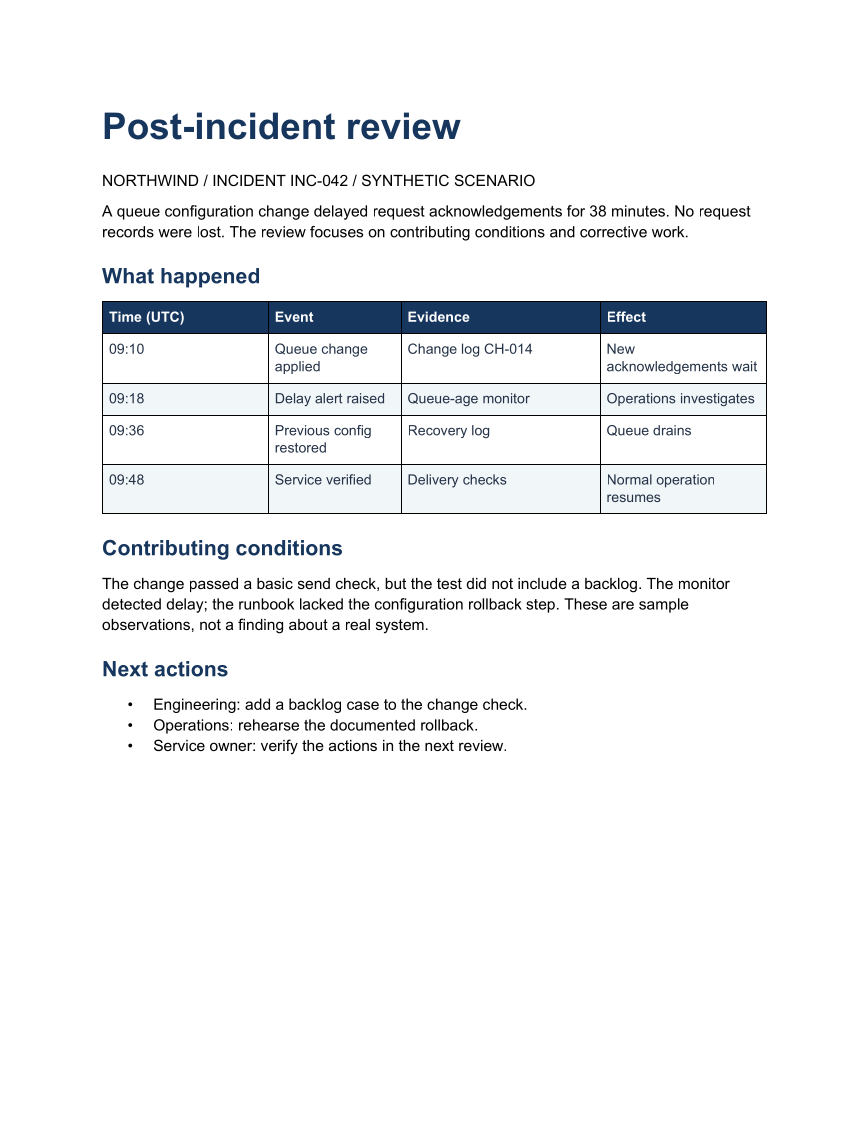
            document.AddParagraph("A queue configuration change delayed request acknowledgements for 38 minutes. No request records were lost. The review focuses on contributing conditions and corrective work.");
            document.AddParagraph("What happened").Style = WordParagraphStyles.Heading2;
            string[][] rows = {
                new[] { "Time (UTC)", "Event", "Evidence", "Effect" },
                new[] { "09:10", "Queue change applied", "Change log CH-014", "New acknowledgements wait" },
                new[] { "09:18", "Delay alert raised", "Queue-age monitor", "Operations investigates" },
                new[] { "09:36", "Previous config restored", "Recovery log", "Queue drains" },
                new[] { "09:48", "Service verified", "Delivery checks", "Normal operation resumes" }
            };
            var table = document.AddTable(rows.Length, 4, WordTableStyle.TableGrid);
            table.SetWidthPercentage(100);
            table.SetColumnWidthsPercentage(25, 20, 30, 25);
            for (int row = 0; row < rows.Length; row++) {
                for (int column = 0; column < 4; column++) {
                    var cell = table.Rows[row].Cells[column];
                    cell.MarginTopCentimeters = 0.14;
                    cell.MarginBottomCentimeters = 0.14;
                    cell.MarginLeftCentimeters = 0.16;
                    cell.MarginRightCentimeters = 0.16;
                    cell.ShadingFillColorHex = row == 0 ? "17365D" : row % 2 == 0 ? "F1F5F9" : "FFFFFF";
                    var paragraph = cell.Paragraphs[0];
                    paragraph.Text = rows[row][column];
                    paragraph.Bold = row == 0;
                    paragraph.ColorHex = row == 0 ? "FFFFFF" : "243247";
                    paragraph.FontFamily = "Carlito";
                    paragraph.FontSize = 10;
                    paragraph.LineSpacingAfterPoints = 2;
                }
            }
            document.AddParagraph("Contributing conditions").Style = WordParagraphStyles.Heading2;
            document.AddParagraph("The change passed a basic send check, but the test did not include a backlog. The monitor detected delay; the runbook lacked the configuration rollback step. These are sample observations, not a finding about a real system.");
            document.AddParagraph("Next actions").Style = WordParagraphStyles.Heading2;
            var actions = document.AddList(WordListStyle.Bulleted);
            actions.AddItem("Engineering: add a backlog case to the change check.");
            actions.AddItem("Operations: rehearse the documented rollback.");
            actions.AddItem("Service owner: verify the actions in the next review.");
            foreach (var paragraph in document.Paragraphs) {
                paragraph.FontFamily = "Carlito";
                bool title = paragraph.Style == WordParagraphStyles.Heading1;
                bool heading = paragraph.Style == WordParagraphStyles.Heading2;
                paragraph.FontSize = title ? 26 : heading ? 15 : 11;
                paragraph.LineSpacingBeforePoints = heading ? 14 : 0;
                paragraph.LineSpacingAfterPoints = title ? 14 : heading ? 8 : 7;
                if (title || heading) {
                    paragraph.ColorHex = "17365D";
                    paragraph.Bold = true;
                    paragraph.KeepWithNext = true;
                }
            }
            document.Save();
        }
    }
}
API used in this example
Use this in your project
Replace the fictional timeline with verified events and distinguish observations from unconfirmed causes.
The Word guide explains package setup and related document APIs.
Documents and scope
What the preview shows
The C# source generates the downloadable file. The runner reopens the editable document, validates Open XML where applicable and exports a PDF. Page previews come from the generated output.
What to keep in mind
Replace the fictional timeline with verified events and distinguish observations from unconfirmed causes.