Word · C# walkthrough
Managed service renewal proposal
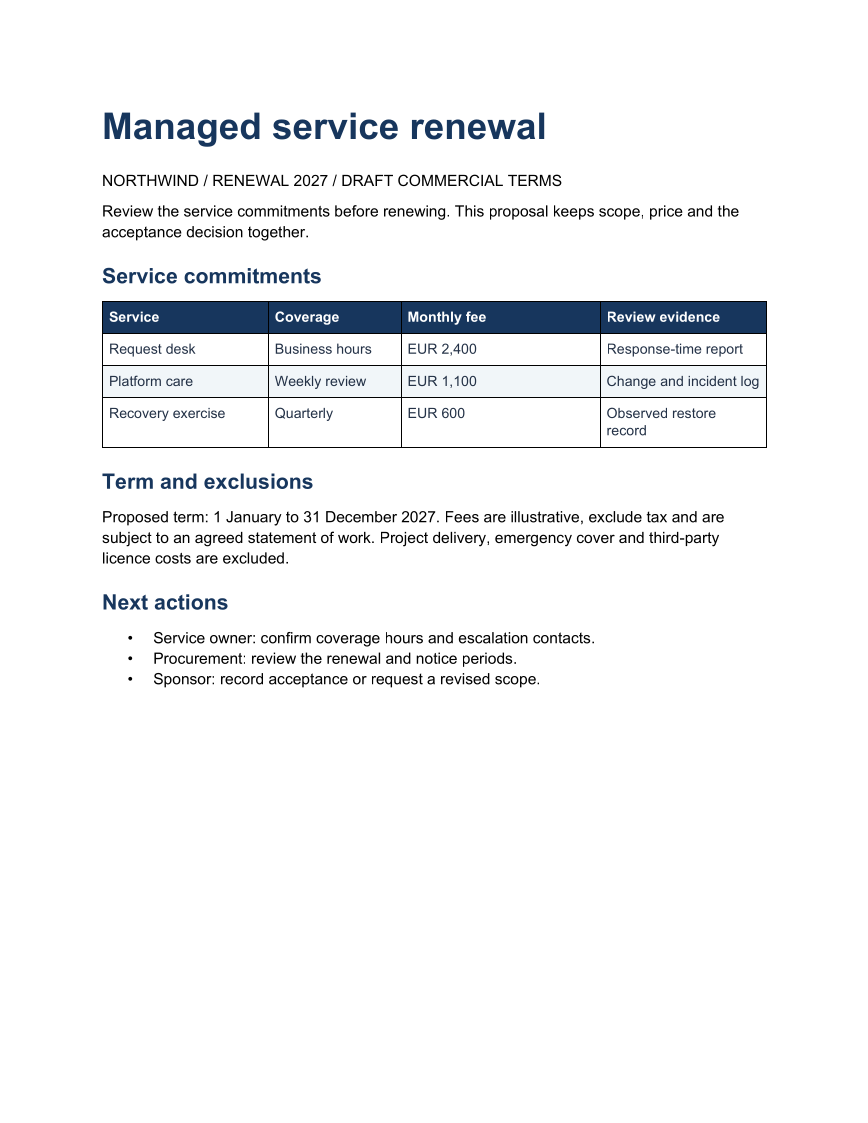
Give procurement and the service owner one editable scope record for a renewal.
Opens the generated download in a local browser tool. The C# example below creates the document.
- Start with
- Service commitments and proposed commercial terms
- Generate
- DOCX + PDF
How it works
Separate commitments
Keep coverage, fee and verification evidence in separate columns.
State boundaries
Record the term and excluded work beneath the table.
Route acceptance
Name who checks coverage, terms and approval.
The C# source
The example below shows the document API and layout used for this report. Follow the Word guide for package setup in your own project.
using OfficeIMO.Word;

namespace OfficeIMO.Examples.Showcase.Workflows {
    /// <summary>Creates an editable managed service renewal with a decision, supporting table and named next actions.</summary>
    internal static class RenewalProposal {
        internal static void Create(string folder) {
            using var document = WordDocument.Create(Path.Combine(folder, "example.docx"));
            document.Settings.FontFamily = "Carlito";
            document.Settings.FontSize = 11;
            document.BuiltinDocumentProperties.Title = "Managed service renewal";
            document.AddParagraph("Managed service renewal").Style = WordParagraphStyles.Heading1;
            document.AddParagraph("NORTHWIND / RENEWAL 2027 / DRAFT COMMERCIAL TERMS");
            document.AddParagraph("Review the service commitments before renewing. This proposal keeps scope, price and the acceptance decision together.");
            document.AddParagraph("Service commitments").Style = WordParagraphStyles.Heading2;
            string[][] rows = {
                new[] { "Service", "Coverage", "Monthly fee", "Review evidence" },
                new[] { "Request desk", "Business hours", "EUR 2,400", "Response-time report" },
                new[] { "Platform care", "Weekly review", "EUR 1,100", "Change and incident log" },
                new[] { "Recovery exercise", "Quarterly", "EUR 600", "Observed restore record" }
            };
            var table = document.AddTable(rows.Length, 4, WordTableStyle.TableGrid);
            table.SetWidthPercentage(100);
            table.SetColumnWidthsPercentage(25, 20, 30, 25);
            for (int row = 0; row < rows.Length; row++) {
                for (int column = 0; column < 4; column++) {
                    var cell = table.Rows[row].Cells[column];
                    cell.MarginTopCentimeters = 0.14;
                    cell.MarginBottomCentimeters = 0.14;
                    cell.MarginLeftCentimeters = 0.16;
                    cell.MarginRightCentimeters = 0.16;
                    cell.ShadingFillColorHex = row == 0 ? "17365D" : row % 2 == 0 ? "F1F5F9" : "FFFFFF";
                    var paragraph = cell.Paragraphs[0];
                    paragraph.Text = rows[row][column];
                    paragraph.Bold = row == 0;
                    paragraph.ColorHex = row == 0 ? "FFFFFF" : "243247";
                    paragraph.FontFamily = "Carlito";
                    paragraph.FontSize = 10;
                    paragraph.LineSpacingAfterPoints = 2;
                }
            }
            document.AddParagraph("Term and exclusions").Style = WordParagraphStyles.Heading2;
            document.AddParagraph("Proposed term: 1 January to 31 December 2027. Fees are illustrative, exclude tax and are subject to an agreed statement of work. Project delivery, emergency cover and third-party licence costs are excluded.");
            document.AddParagraph("Next actions").Style = WordParagraphStyles.Heading2;
            var actions = document.AddList(WordListStyle.Bulleted);
            actions.AddItem("Service owner: confirm coverage hours and escalation contacts.");
            actions.AddItem("Procurement: review the renewal and notice periods.");
            actions.AddItem("Sponsor: record acceptance or request a revised scope.");
            foreach (var paragraph in document.Paragraphs) {
                paragraph.FontFamily = "Carlito";
                bool title = paragraph.Style == WordParagraphStyles.Heading1;
                bool heading = paragraph.Style == WordParagraphStyles.Heading2;
                paragraph.FontSize = title ? 26 : heading ? 15 : 11;
                paragraph.LineSpacingBeforePoints = heading ? 14 : 0;
                paragraph.LineSpacingAfterPoints = title ? 14 : heading ? 8 : 7;
                if (title || heading) {
                    paragraph.ColorHex = "17365D";
                    paragraph.Bold = true;
                    paragraph.KeepWithNext = true;
                }
            }
            document.Save();
        }
    }
}
API used in this example
Use this in your project
Use agreed commercial terms and obtain the appropriate review before treating the proposal as a commitment.
The Word guide explains package setup and related document APIs.
Documents and scope
What the preview shows
The C# source generates the downloadable file. The runner reopens the editable document, validates Open XML where applicable and exports a PDF. Page previews come from the generated output.
What to keep in mind
Use agreed commercial terms and obtain the appropriate review before treating the proposal as a commitment.