Word · C# walkthrough
Research brief with footnotes
Keep a claim and its supporting note together in a document that colleagues can edit. The sample separates observations, recommendations and research limits.
Opens the generated download in a local browser tool. The C# example below creates the document.
- Start with
- Research observations and source notes
- Generate
- DOCX + PDF
How it works
Write the finding
Add each observation as a paragraph with the count and context needed to interpret it.
Attach the evidence
Call AddFootNote on the claim paragraph. The note becomes part of the DOCX footnote structure, rather than a manually numbered paragraph.
State the decision and limits
Add a recommendation, follow-up actions and a clear explanation of what the small sample cannot establish.
The C# source
The example below shows the document API and layout used for this report. Follow the Word guide for package setup in your own project.
using OfficeIMO.Word;

namespace OfficeIMO.Examples.Showcase.Workflows;

/// <summary>Builds a research brief with editable footnotes that retain the evidence behind each claim.</summary>
internal static class ResearchBrief {
    internal static void Create(string folder) {
        using WordDocument document = WordDocument.Create(Path.Combine(folder, "example.docx"));
        document.Settings.FontSize = global::OfficeIMO.OfficeLength.Points(11);
        document.Properties.Title = "Customer research brief";
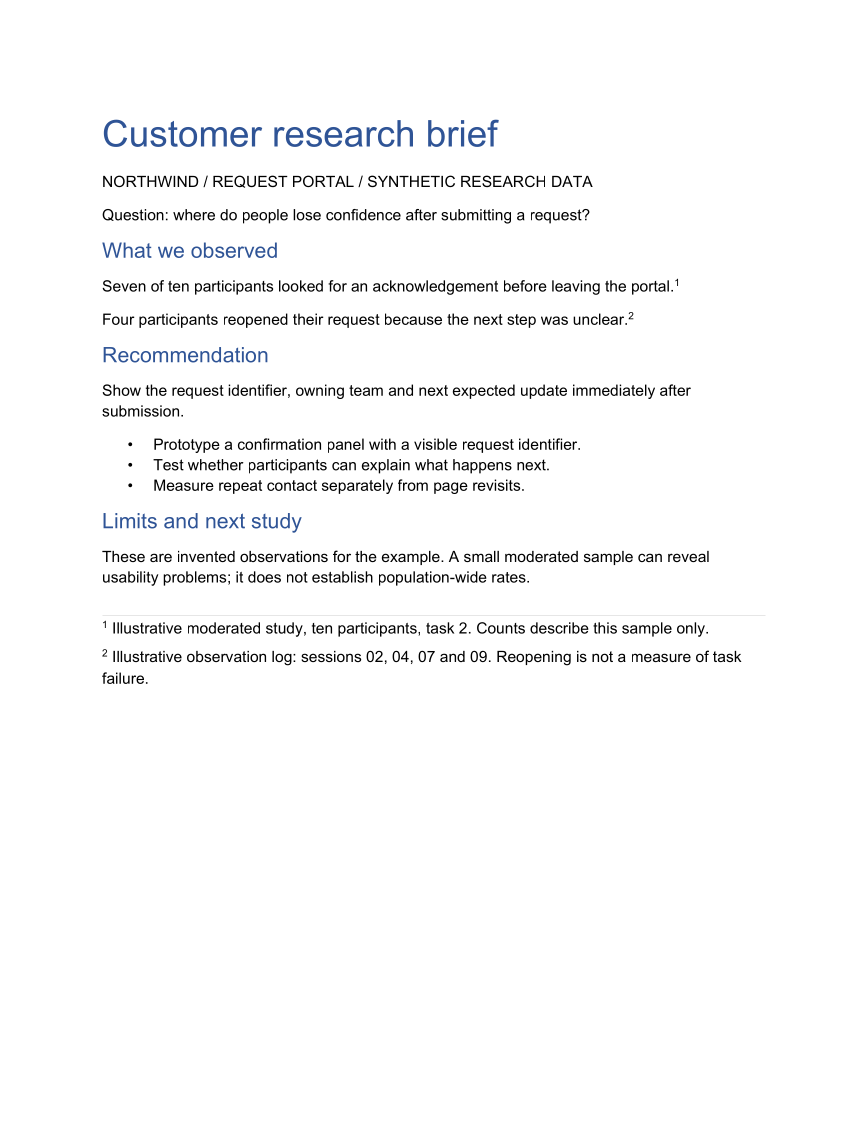
        document.AddParagraph("Customer research brief").Style = WordParagraphStyles.Heading1;
        document.AddParagraph("NORTHWIND / REQUEST PORTAL / SYNTHETIC RESEARCH DATA");
        document.AddParagraph("Question: where do people lose confidence after submitting a request?");
        document.AddParagraph("What we observed").Style = WordParagraphStyles.Heading2;
        document.AddParagraph("Seven of ten participants looked for an acknowledgement before leaving the portal.")
            .AddFootNote("Illustrative moderated study, ten participants, task 2. Counts describe this sample only.");
        document.AddParagraph("Four participants reopened their request because the next step was unclear.")
            .AddFootNote("Illustrative observation log: sessions 02, 04, 07 and 09. Reopening is not a measure of task failure.");
        document.AddParagraph("Recommendation").Style = WordParagraphStyles.Heading2;
        document.AddParagraph("Show the request identifier, owning team and next expected update immediately after submission.");
        WordList actions = document.AddList(WordListStyle.Bulleted);
        actions.AddItem("Prototype a confirmation panel with a visible request identifier.");
        actions.AddItem("Test whether participants can explain what happens next.");
        actions.AddItem("Measure repeat contact separately from page revisits.");
        document.AddParagraph("Limits and next study").Style = WordParagraphStyles.Heading2;
        document.AddParagraph("These are invented observations for the example. A small moderated sample can reveal usability problems; it does not establish population-wide rates.");
        foreach (var paragraph in document.Paragraphs) {
            paragraph.FontSize = global::OfficeIMO.OfficeLength.Points(paragraph.Style == WordParagraphStyles.Heading1 ? 26 : paragraph.Style == WordParagraphStyles.Heading2 ? 15 : 11);
            paragraph.LineSpacingAfter = global::OfficeIMO.OfficeLength.Points(9D);
        }
        WorkflowFooter.Add(document, "Customer research brief");
        document.Save();
    }
}
API used in this example
Use this in your project
Replace the invented observations and notes with your own evidence. Keep identifying participant details out of the public document.
The Word guide explains package setup and related document APIs.
Documents and scope
What the preview shows
The linked C# example generates this file. The runner reopens and validates the DOCX, exports a PDF, and renders every PDF page for review.
What to keep in mind
The observations are synthetic. DOCX footnote structure and the generated PDF are checked; behavior in a desktop Word editor is not part of this preview.