Word · C# walkthrough
Reusable service intake template
Reuse one intake layout across many requests. Stable tags connect your application values to document fields without depending on the visible placeholder text.
Opens the generated download in a local browser tool. The C# example below creates the document.
- Start with
- Template field definitions and request values
- Generate
- DOCX + PDF
How it works
Define stable tags
Create content controls for the request identifier, requester, service, need and outcome. Give each control a readable alias and a stable tag.
Save the blank template
Write template.docx before filling values so the reusable document remains available as a separate download.
Populate a request
Reload the template, find each control by tag and replace its text. Save example.docx as the completed request.
The C# source
The example below shows the document API and layout used for this report. Follow the Word guide for package setup in your own project.
using OfficeIMO.Word;

namespace OfficeIMO.Examples.Showcase.Workflows;

/// <summary>Saves a reusable tagged DOCX template, then fills a separate request from structured values.</summary>
internal static class ServiceIntake {
    internal static void Create(string folder) {
        string templatePath = Path.Combine(folder, "template.docx");
        using (WordDocument template = WordDocument.Create(templatePath)) {
            template.Settings.FontSize = global::OfficeIMO.OfficeLength.Points(11);
            template.AddParagraph("Service request").Style = WordParagraphStyles.Heading1;
            template.AddParagraph("NORTHWIND / INTAKE / EDITABLE TEMPLATE");
            AddField("Request identifier", "request-id");
            AddField("Requested by", "requester");
            AddField("Service", "service");
            AddField("Business need", "need");
            AddField("Required outcome", "outcome");
            template.AddParagraph("Triage guidance").Style = WordParagraphStyles.Heading2;
            template.AddParagraph("Confirm the owner, clarify acceptance criteria and agree the next update before scheduling work.");
            foreach (var paragraph in template.Paragraphs) {
                paragraph.FontSize = global::OfficeIMO.OfficeLength.Points(paragraph.Style == WordParagraphStyles.Heading1 ? 26 : paragraph.Style == WordParagraphStyles.Heading2 ? 15 : 11);
                paragraph.LineSpacingAfter = global::OfficeIMO.OfficeLength.Points(8D);
            }
            WorkflowFooter.Add(template, "Service request");
            template.Save();

            void AddField(string label, string tag) {
                template.AddParagraph(label).Bold = true;
                template.AddStructuredDocumentTag("Enter " + label.ToLowerInvariant(), alias: label, tag: tag);
            }
        }
        using WordDocument request = WordDocument.Load(templatePath);
        var values = new Dictionary<string, string> {
            ["request-id"] = "SR-2048",
            ["requester"] = "Maya Ellis / Customer Operations",
            ["service"] = "Request portal",
            ["need"] = "The support team needs a weekly view of requests waiting for customer input.",
            ["outcome"] = "A report shows the owner, age and next action for each waiting request."
        };
        foreach (var value in values) {
            var control = request.GetStructuredDocumentTagByTag(value.Key)
                ?? throw new InvalidOperationException("Missing template field: " + value.Key);
            control.Text = value.Value;
        }
        request.Save(Path.Combine(folder, "example.docx"));
    }
}
API used in this example
Use this in your project
Keep tags stable when colleagues revise the template layout. Validate that every required tag exists before producing a customer document.
The Word guide explains package setup and related document APIs.
Documents and scope
What the preview shows
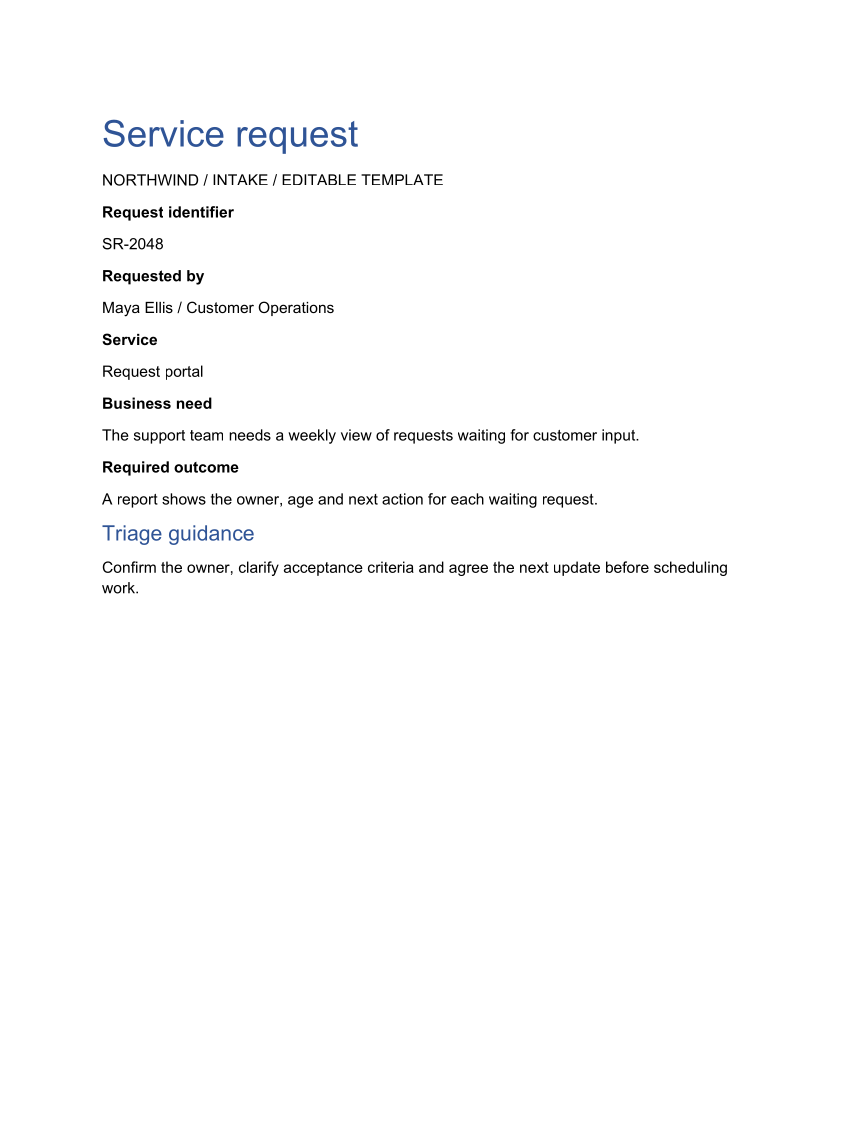
The linked C# example generates this file. The runner reopens and validates the DOCX, exports a PDF, and renders every PDF page for review.
What to keep in mind
The PDF shows the completed request. Download the DOCX files to inspect the editable controls; this example does not add signatures, workflow approval or field locking.