Word · C# walkthrough
Statement of work and acceptance
Make delivery expectations reviewable before implementation begins.
Opens the generated download in a local browser tool. The C# example below creates the document.
- Start with
- Deliverables and acceptance criteria
- Generate
- DOCX + PDF
How it works
Define deliverables
Keep an observable acceptance check beside each output.
Bound the work
State included work and exclusions in plain language.
Record decisions
Agree ownership and changes before the affected work starts.
The C# source
The example below shows the document API and layout used for this report. Follow the Word guide for package setup in your own project.
using OfficeIMO.Word;

namespace OfficeIMO.Examples.Showcase.Workflows {
    /// <summary>Creates an editable statement of work with a decision, supporting table and named next actions.</summary>
    internal static class StatementOfWork {
        internal static void Create(string folder) {
            using var document = WordDocument.Create(Path.Combine(folder, "example.docx"));
            document.Settings.FontFamily = "Carlito";
            document.Settings.FontSize = 11;
            document.BuiltinDocumentProperties.Title = "Statement of work";
            document.AddParagraph("Statement of work").Style = WordParagraphStyles.Heading1;
            document.AddParagraph("NORTHWIND / DOCUMENT AUTOMATION / SOW-018");
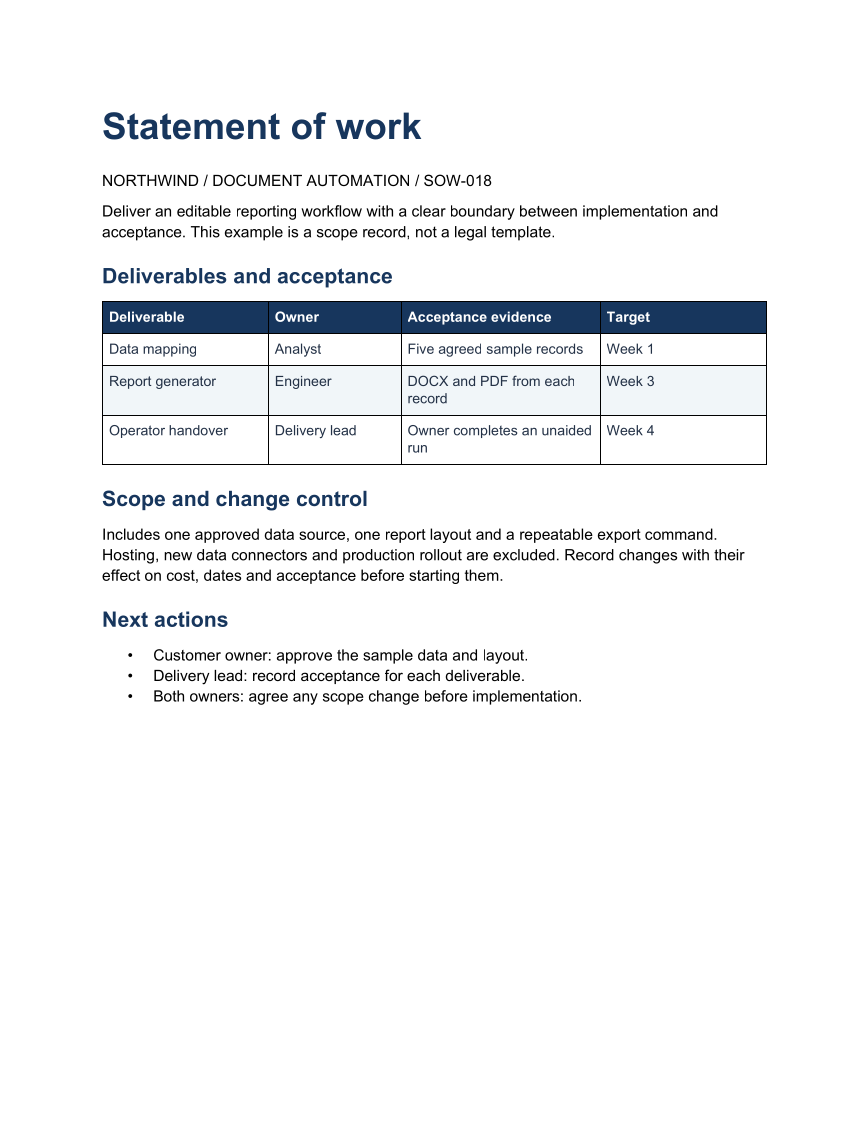
            document.AddParagraph("Deliver an editable reporting workflow with a clear boundary between implementation and acceptance. This example is a scope record, not a legal template.");
            document.AddParagraph("Deliverables and acceptance").Style = WordParagraphStyles.Heading2;
            string[][] rows = {
                new[] { "Deliverable", "Owner", "Acceptance evidence", "Target" },
                new[] { "Data mapping", "Analyst", "Five agreed sample records", "Week 1" },
                new[] { "Report generator", "Engineer", "DOCX and PDF from each record", "Week 3" },
                new[] { "Operator handover", "Delivery lead", "Owner completes an unaided run", "Week 4" }
            };
            var table = document.AddTable(rows.Length, 4, WordTableStyle.TableGrid);
            table.SetWidthPercentage(100);
            table.SetColumnWidthsPercentage(25, 20, 30, 25);
            for (int row = 0; row < rows.Length; row++) {
                for (int column = 0; column < 4; column++) {
                    var cell = table.Rows[row].Cells[column];
                    cell.MarginTopCentimeters = 0.14;
                    cell.MarginBottomCentimeters = 0.14;
                    cell.MarginLeftCentimeters = 0.16;
                    cell.MarginRightCentimeters = 0.16;
                    cell.ShadingFillColorHex = row == 0 ? "17365D" : row % 2 == 0 ? "F1F5F9" : "FFFFFF";
                    var paragraph = cell.Paragraphs[0];
                    paragraph.Text = rows[row][column];
                    paragraph.Bold = row == 0;
                    paragraph.ColorHex = row == 0 ? "FFFFFF" : "243247";
                    paragraph.FontFamily = "Carlito";
                    paragraph.FontSize = 10;
                    paragraph.LineSpacingAfterPoints = 2;
                }
            }
            document.AddParagraph("Scope and change control").Style = WordParagraphStyles.Heading2;
            document.AddParagraph("Includes one approved data source, one report layout and a repeatable export command. Hosting, new data connectors and production rollout are excluded. Record changes with their effect on cost, dates and acceptance before starting them.");
            document.AddParagraph("Next actions").Style = WordParagraphStyles.Heading2;
            var actions = document.AddList(WordListStyle.Bulleted);
            actions.AddItem("Customer owner: approve the sample data and layout.");
            actions.AddItem("Delivery lead: record acceptance for each deliverable.");
            actions.AddItem("Both owners: agree any scope change before implementation.");
            foreach (var paragraph in document.Paragraphs) {
                paragraph.FontFamily = "Carlito";
                bool title = paragraph.Style == WordParagraphStyles.Heading1;
                bool heading = paragraph.Style == WordParagraphStyles.Heading2;
                paragraph.FontSize = title ? 26 : heading ? 15 : 11;
                paragraph.LineSpacingBeforePoints = heading ? 14 : 0;
                paragraph.LineSpacingAfterPoints = title ? 14 : heading ? 8 : 7;
                if (title || heading) {
                    paragraph.ColorHex = "17365D";
                    paragraph.Bold = true;
                    paragraph.KeepWithNext = true;
                }
            }
            document.Save();
        }
    }
}
API used in this example
Use this in your project
Adapt the scope and acceptance criteria to the engagement; the sample is not a legal agreement.
The Word guide explains package setup and related document APIs.
Documents and scope
What the preview shows
The C# source generates the downloadable file. The runner reopens the editable document, validates Open XML where applicable and exports a PDF. Page previews come from the generated output.
What to keep in mind
Adapt the scope and acceptance criteria to the engagement; the sample is not a legal agreement.